PRO PAK’R User Manual Version 1.0 Page -24-
FP International
3 operAting instructions
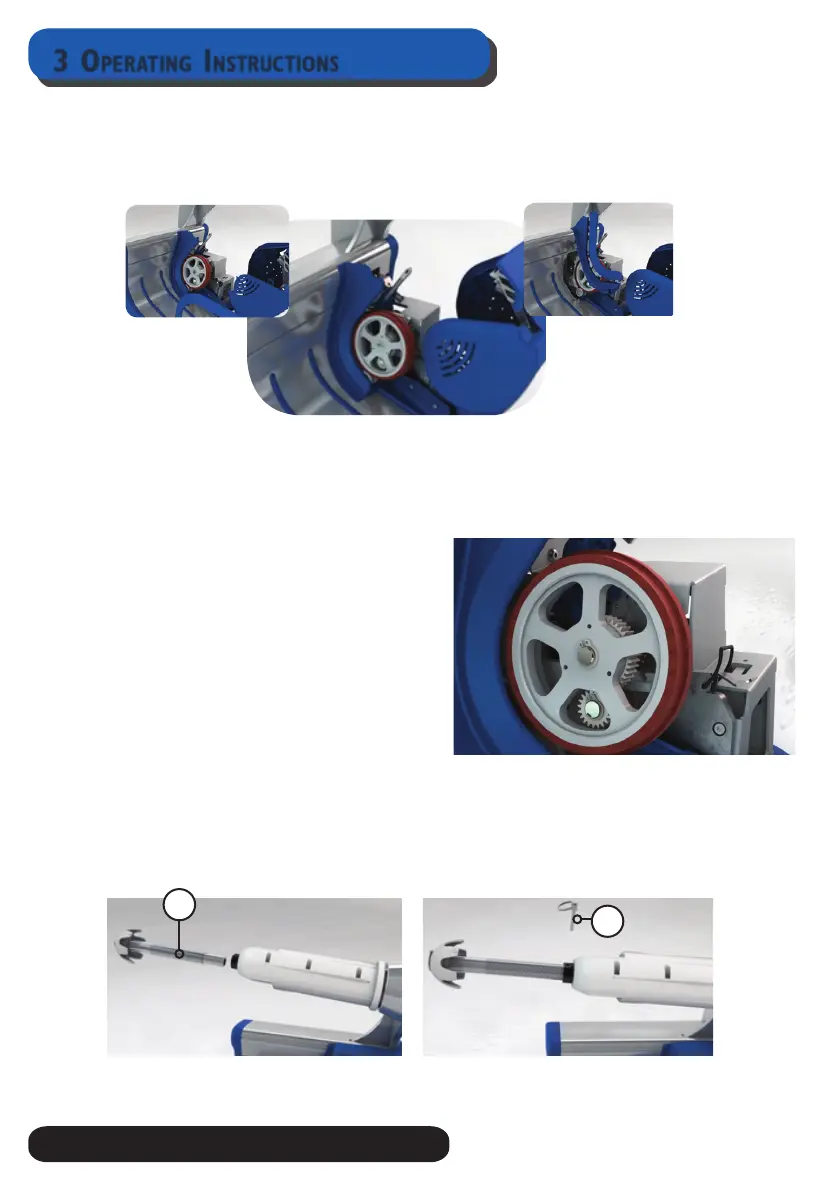
3.7.3 replAcing weAr strips.
The Pro Pak’r has 2 wear strips, these strips transport the lm through the machine. These strip
can be removed when damaged / wear out.
3.7.4 cleAning bAcking wheel
Open Display Cover with Slotted or Phillips Screwdriver. Clean backing wheel with a soggy cloth
3.7.5 replAce bAcking wheel (pAge 15)
Open Display Cover with Slotted or Phillips
Screwdriver.
Remove the wearstrip guide, by pulling the guide
upwards.
Take a retaining plier to remove the circlip.
Remove backing wheel. Be carefull with the key.
remove the spurgear and place it on the new
backingwheel. Place backingwheel back on the
shaft.
3.7.6 extention wide film (optionAl)
If you use the wide rolls on a stand, please provide the machine with the extra extention.
Push the wide rill extention in the mandrel shaft (1). Lock it with the locking pin. (2)
1
2


 To Next Page