105104
Bedienungsanleitung
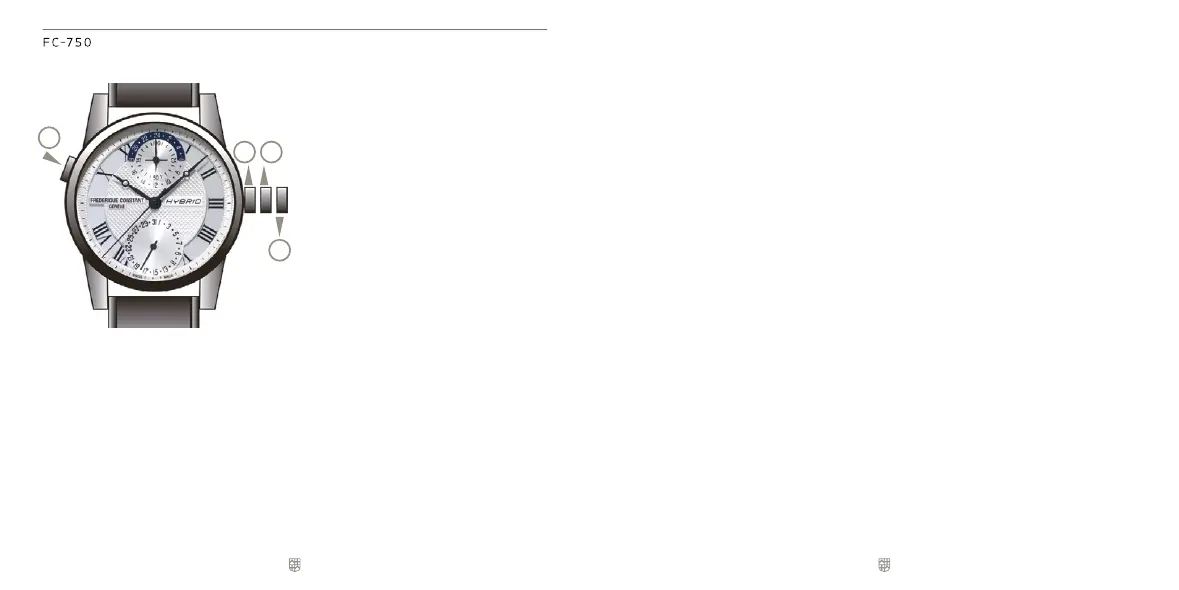
(1) Aufziehen
(2) Einstellen des Datums
(3) Einstellen der Zeit
(4) Nutzen Sie den Drücker um Bluetooth
an der Uhr zu aktivieren und Ihre
Smartwatch Funktionen anzuzeigen.
Modo de empleo
(1) Terminer
(2) Cambio de la fecha
(3) Ajuste de la hora
(4) Utiliza el pulsador para activar el
bluetooth del reloj y visualiza las
funciones preferidas del smartwatch
Modo de utilizaçäo
(1) Corda
(2) Acerto rápido da data
(3) Acerto da hora
(4) Pressione o botão para ativar o
bluetooth no seu relógio e veja suas
funções conectados favoritos.
Modo d’impiego
(1) Carica
(2) Regolazione rapida della data
(3) Regolazione dell’ora
(4) Usa il pulsante dell'orologio per attivare
il bluetooth e per visualizzare le tue
funzione preferite del smartwatch.
取扱說明書
(1) 卷き上げ
(2)日付合わせ
(3)時刻合わせ
(4)プッシュボタンを押してブル
ートゥースを接続し、お気に
入りの機能を表示します。
Operating Instructions
(1) Wind up
(2) Change of the date
(3) Change of time
(4) Use the pusher to activate the bluetooth
of the watch and to display your
favourite smartwatch functions.
Mode d'Emploi
(1) Remonter
(2) Ajustement rapide de la date
(3) Ajustement de l'heure
(4) Presser sur le bouton poussoir pour activer
le bluetooth de votre montre et afficher
vos fonctions connectées favorites.
21
4
3
Инструкция по использованию
(1) Положениедлязаводамеханизма
(2)Установкадаты
(3)Установкатекущеговремени
(4)Используйтекнопкудля
активацииbluetoothвчасах
иотображенияваших
любимыхфункцийчасов
操作說明書
(1) 上鍊
(2)日期調校
(3) 時間調校
(4)使用錶殼左側按鈕以啟動腕錶的藍牙連
接,以及快速顯示自訂的智能腕錶功能。
操作说明书
(1) 上链
(2)日期调校
(3) 时间调校
(4)使用表壳左侧按钮以启动腕表的蓝牙连
接,以及快速显示自订的智能腕表功能。
사용설명
(1) 태엽감기
(2)날짜변경
(3)시각변경
(4)푸셔를사용하여시계의블루투스를활성화
시키며스마트워치의기능중고객이
선호하는기능들을확인할수있습니다.



 To Next Page