43
Installation Manual
4.2 Randomized delay
This function is mandatory in the UK and it must be activated and congured.
When the function is enabled, each charging session starts with a random delay
between 0 s and the selectedvalue. The default value is 600 s. The maximum
allowable value is 1800 s. To activate the function follow the steps below:
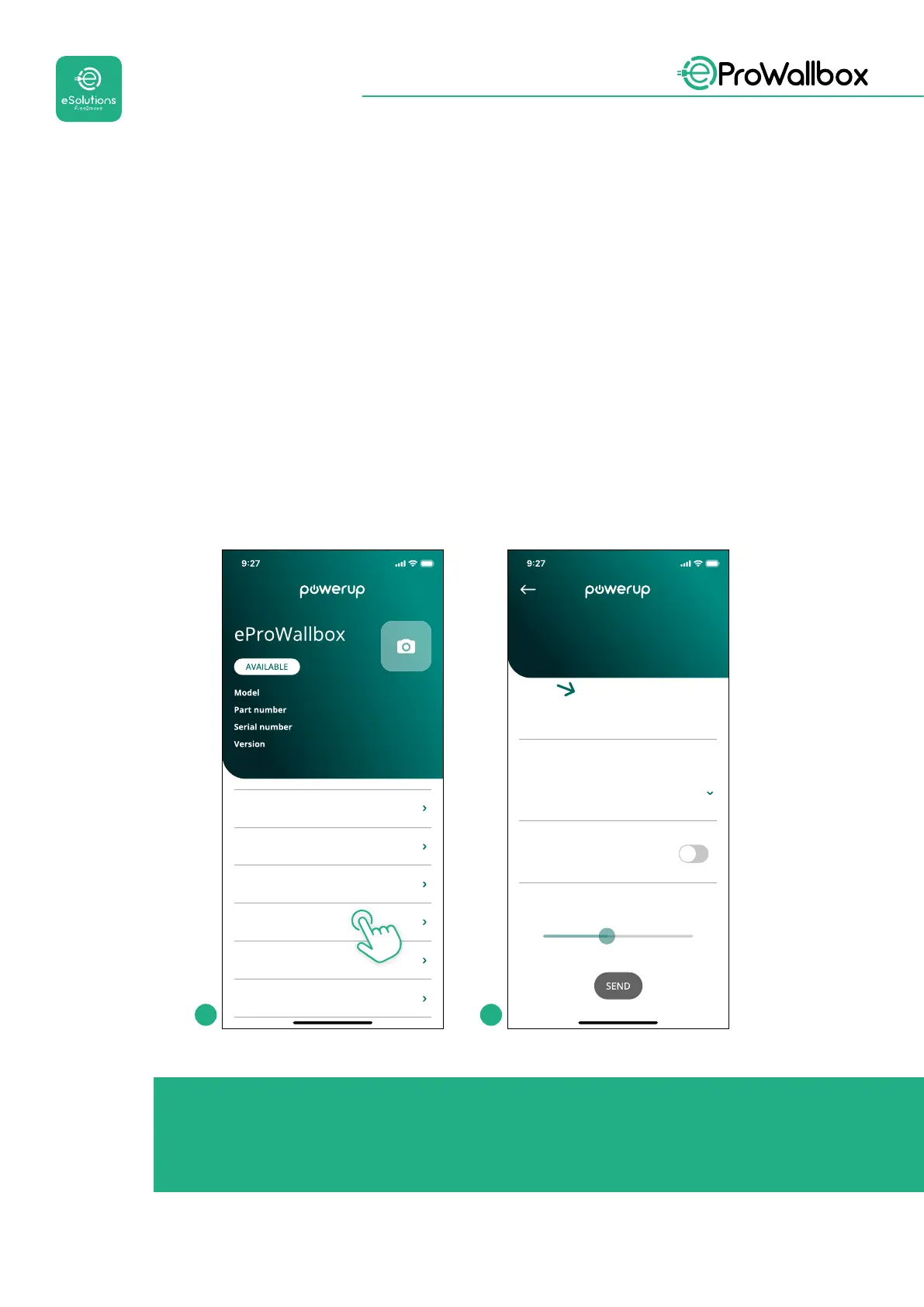
• Select “Country settings” on the homepage
• Enable the Randomized delay using the toggle
• Use the default value of 600 s as per the UK requirements
This function can also be activated and deactivated by the user in the eSolutions
Charging App
eProWallbox
F2ME.EPROXXXXXXXX
0000AB0123456789
2.9.1
DPM PowerMeter
Maximum power
MID counter
Country settings
Operating mode
Wi-Fi settings
Max A 32.00
Max kW 7.40
0
1
2
3
4
5
6
7
8
9
A
B
C
D
E
F
sMaximum dela
Randomized delay
County settings
Load unbalance
OFF
1 2
NOTICE
Once the function is enabled, to make the changes eective, always
restart the wallbox through the dedicated button in the homepage.



 To Next Page