Section 4 Component Teardown
4-8
Light Socket Removal
1. Disconnect the washer from the electrical supply
and remove the top panel.
2. Disconnect the (2) wires from output side of the
transformer.
3. Release the bellows from the front panel.
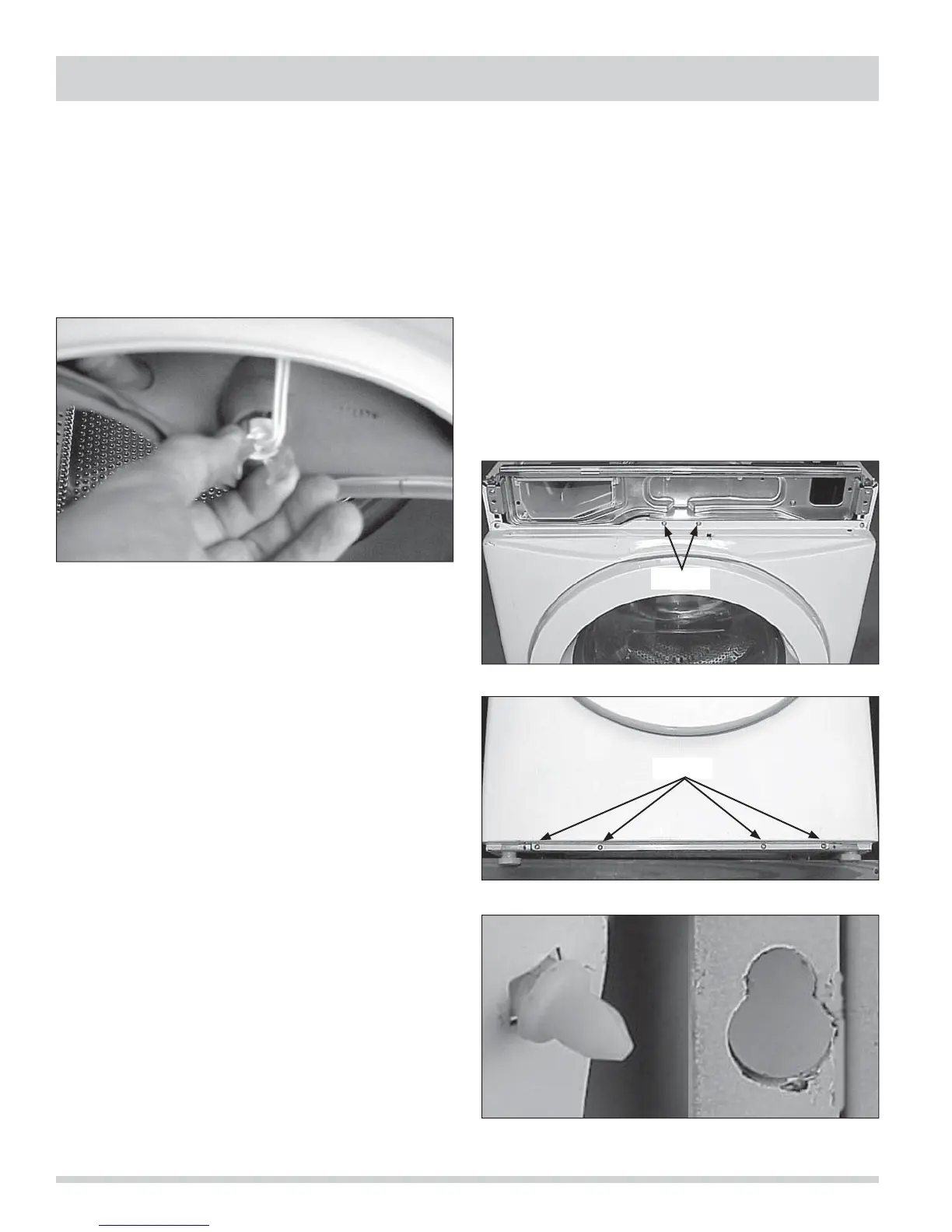
4. Push the light socket holder out of the rear of the
bellows. (See Figure 4-28)
Front Panel Removal
1. Disconnect the washer from the electrical supply
and release the console.
2. Release the bellows from the front panel and remove
the (2) screws holding the door safety switch
assembly to the front panel. (See Figure 4-29)
3. On select models, disconnect the wires from the
light switch.
4. Raise the front of the washer and remove the (4)
screws securing the front panel to the washer base.
(See Figure 4-30)
5. Remove the (4) screws securing top of the panel.
6. Lift up and out on the front panel to disengage it
from the (4) nylon pins, two in the front of each side
panel, and lift the front panel off. (See Figure 4-31)
Figure 4-28.
Figure 4-29.
Figure 4-30.
Figure 4-31.
Screws
Screws




 To Next Page