Section 4 Component Teardown
4-9
Removing the heater control board
1. Disconnect the washer from the electrical supply
and remove the top panel.
2. Unplug the wire harness from the heater control
board.
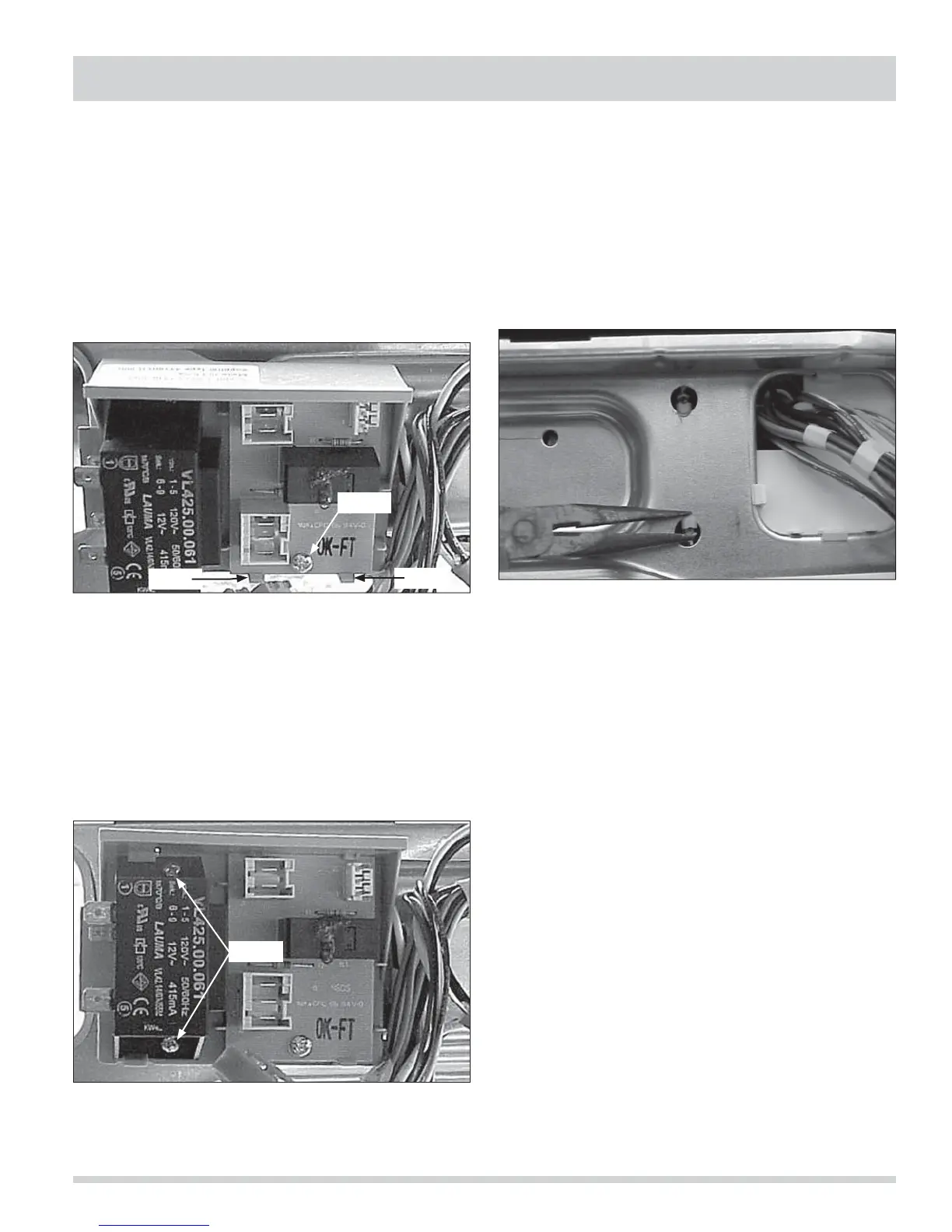
3. Remove the screw holding the heater control board
to its mounting bracket. (See Figure 4-32)
4. Release the (2) tabs at the bottom of the board and
lift the board out. (See Figure 4-33)
Removing the transformer and heater
control board mounting bracket
1. Disconnect the washer from the electrical supply,
remove the top panel and release the console.
2. Remove the light transformer and the heater control
board.
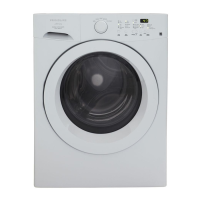
3. Using needle nose pliers, release the mounting
bracket from the control mounting brace.
(See Figure 4-34)
Figure 4-32.
Figure 4-34.
Removing the light transformer
1. Disconnect the washer from the electrical supply
and remove the top panel.
2. Unplug the wires from the transformer.
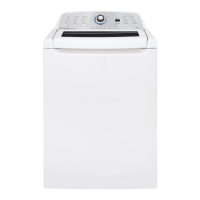
3. Remove the (2) screws holding the transformer to
its mounting bracket and lift the transformer out.
(See Figure 4-33)
Figure 4-33.
Screw
Tab
Tab
Screws




 To Next Page