23
4.4 ADJUSTING INPUT VOLTAGE PARAMETERS
PROCEDURE TO BE PERFORMED BY QUALIFIED PERSONNEL ONLY
The Siemens control will shut itself off if the line voltage is more than 10% different than the voltage set in the control.
You must adjust the parameter to match your line voltage to the machine.
The first step to accurately measure your line voltage. There are two ways to do this.
• Measure the incoming line voltage across all three legs with a voltmeter. Average your readings and write down
the value.
- OR -
• Read the line voltage from the control, follow the following steps:
• MENU SELECT key
• SETUP key
• INFEED PARAMETER key
• Find r25[0] = and write down the voltage value in this parameter.
• Now you have the proper line voltage value to enter in the control.
Follow the steps below:
• Press E-stop
• MENU SELECT key
• SETUP key
• Press ʌ (up arrow hard key next to machine hard key)
• DRIVE SYSTEM key
• SUPPLY key
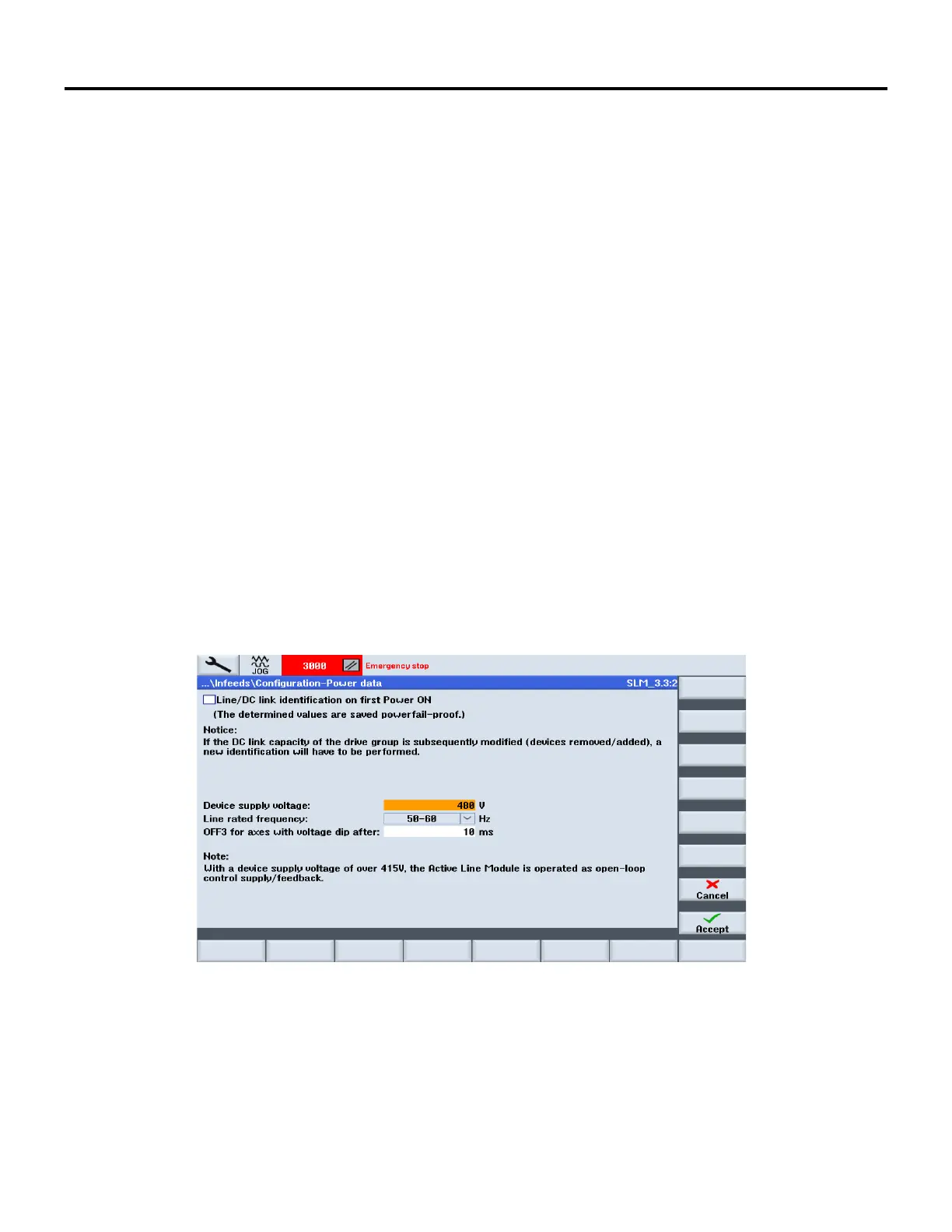
• POWER DATA key See screen below:
• Scroll down to the Device Supply Voltage field like in the screen shot above. Enter the line voltage value
you obtained in the previous steps, press enter
• Press ACCEPT key
• There will be a message that states, “Confirm You Want to Change the Parameter”, Press YES key to
accept the change


 To Next Page