46
s AIM2™ with AIM Program Pending
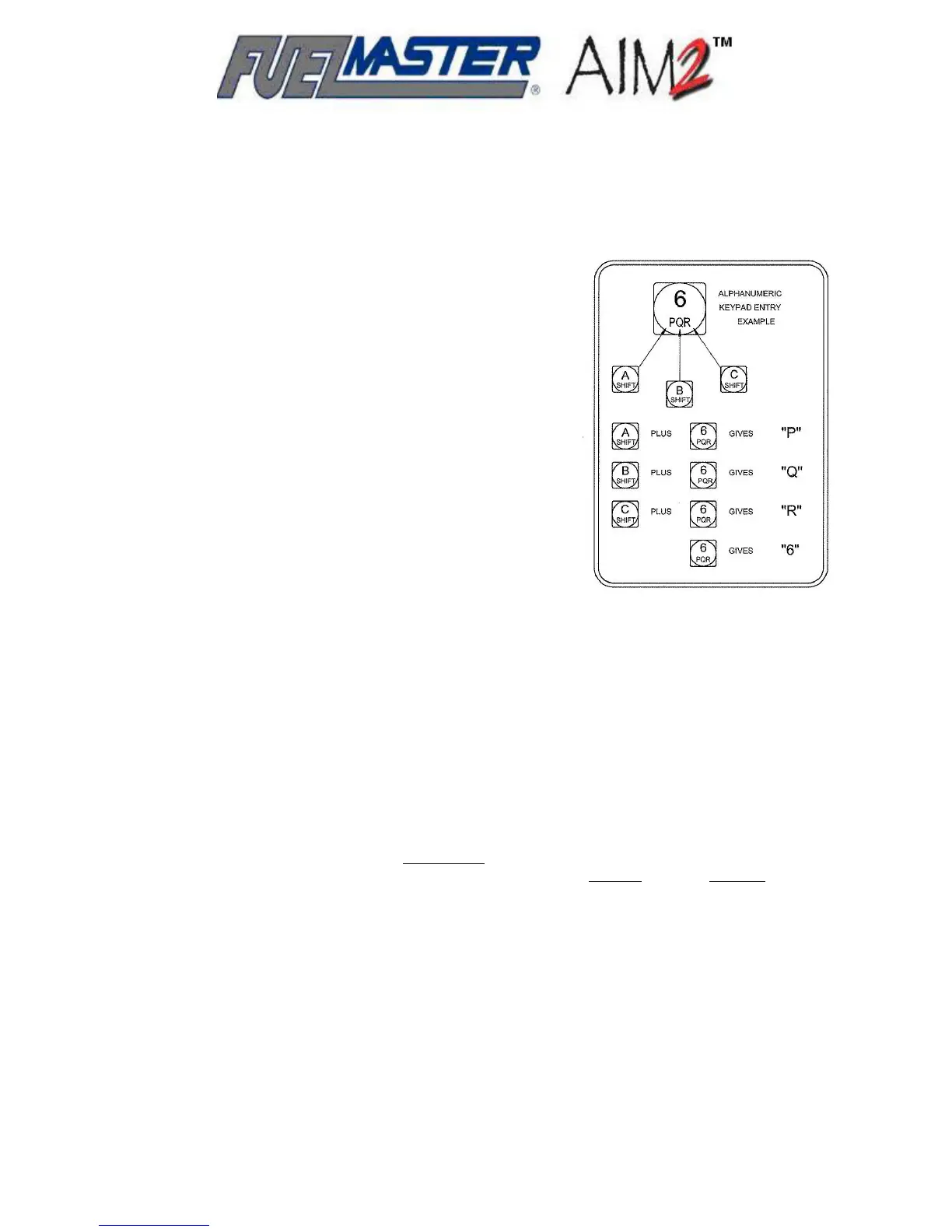
ome prompts may ask to depress a key not found on a 4x4
Program an AIM2™:
1. At the Central Controller, ensure vehicle records in
thorization List
kee /Smartcard. The
* SUPV: 1=SYSTEM, 2=PM, 3=ODOM, 4=AIM *
b. Depress 4=AIM. The following will be displayed:
AIM SUPERVISOR MENU
T, D=EXIT
c. Depress 1=PHT. The following will be displayed:
AIM SUPERVISOR MENU
Curr :__
NOTE
Very Important! The PHT letter entered must m
Programming the AIM2™ Module
Programming AIM2™ modules may only be performed through an FMU-3500 configured as an
AIM2™ Programmer. The AIM2™ Programmer may be a fuel island FMU configured as a
programmer, or a portable programmer configured from an FMU upper cabinet or an FMU
demonstration unit. Additionally, only vehicle records marked a
may be used to program an AIM2™.
S
keypad (keypad with 16 keys). If that is the case, follow the
instructions shown in Figure 11 to shift to attain the desired
key.
the FuelMaster
®
software program are marked for
AIM2™ with AIM Program Pending.
2. From the Central Controller, Send Au
to the AIM2™ Programmer.
3. As required, set PHT in FMU:
a. Insert a Supervisor Pro
®
following will be displayed:
* A=CONFIG, B=ISSUES, C=TANKS, D=EXIT *
Figure 5-1. 4x4
Keypad Shift
Instructions
1=SET PHT, 2=PROGRAM, 3=RESE
ent PHT A: New PHT (A-F)
atch the letter assigned to the Programming Hose Tag
and, if multiple Programmers are within RF range of each other, they must all
be using different PHT’s.
d. Depress the key to set the desired PHT letter (i.e., B) at the cursor, then depress the
AIM SUPERVISOR MENU
Curr ): B
AIM SU MENU
Programming Hose Tag Changed to B
e. Exit the FMU Supervisor menu.
Enter key. The following will be displayed:
ent PHT A: New PHT (A-F
changing to:
PERVISOR



 To Next Page