96
Printing Pictures via USB
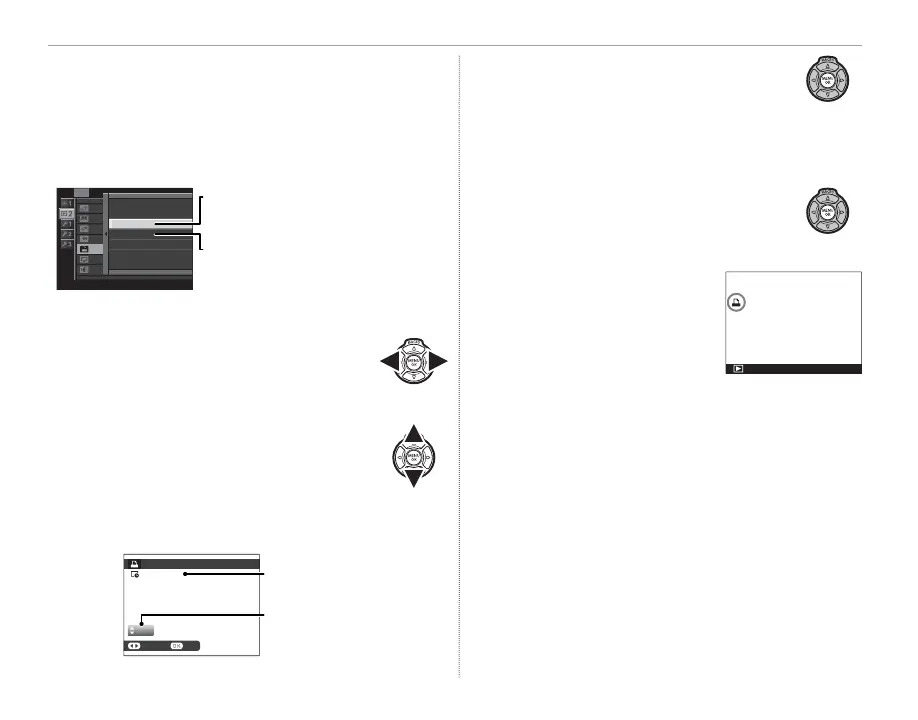
■ WITH DATE s/ WITHOUT DATE
To modify the DPOF print order, select K PRINT
ORDER (DPOF) in the playback menu and press
the selector up or down to highlight WITH
DATE s or WITHOUT DATE.
SLIDE SHOW
PLAYBACK MENU
PHOTOBOOK ASSIST
MARK FOR UPLOAD TO
IMAGE SEARCH
PRINT ORDER
(
DPOF
)
DISP ASPECT
PLAYBACK VOLUME
WITH DATE
s
WITHOUT DATE
RESET ALL
WITH DATE s: Print date of recording
on pictures.
WITHOUT DATE: Print pictures without
date.
Press MENU/OK and follow the steps below.
1
Press the selector left or right to dis-
play a picture you wish to include in
or remove from the print order.
2
Press the selector up or down to
choose the number of copies (up
to 99). To remove a picture from the
order, press the selector down until
the number of copies is 0.
01
PRINT ORDER
(
DPOF
)
SHEETS
SETFRAME
DPOF:
00001
Total number of prints
Number of copies
3
Repeat steps 1–2 to complete the
print order. Press MENU/OK to save
the print order when settings are
complete, or DISP/BACK to exit with-
out changing the print order.
4
The total number of prints is dis-
played in the monitor. Press MENU/
OK to exit.
The pictures in the current
print order are indicated by a
u icon during playback.



 To Next Page