7
First Steps
First Steps
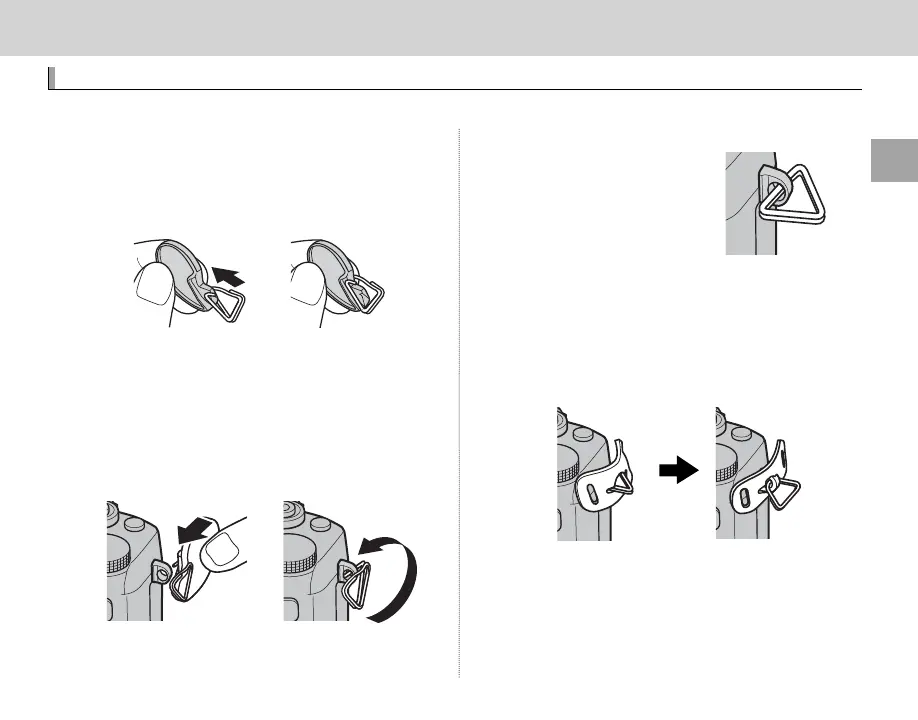
Attaching the Strap
Attach the strap clips to the camera and then attach the strap.
1
Open a strap clip.
Use the clip attaching tool to open a strap clip,
making sure that the tool and clip are in the
orientations shown.
Q Keep the tool in a safe place. You will need it to
open the strap clips when removing the strap.
2
Place the strap clip on an eyelet.
Hook the strap eyelet in the clip opening. Re-
move the tool, using the other hand to keep
the clip in place.
3
Pass the clip through the eyelet.
Rotate the clip fully through
the eyelet until it clicks
closed.
4
Attach a protective cover.
Place a protective cover over the eyelet as
shown, with the black side of the cover toward
the camera. Repeat Steps 1–4 for the second
eyelet.



 To Next Page