32
The Q (Quick Menu) Button
The Q (Quick Menu) Button
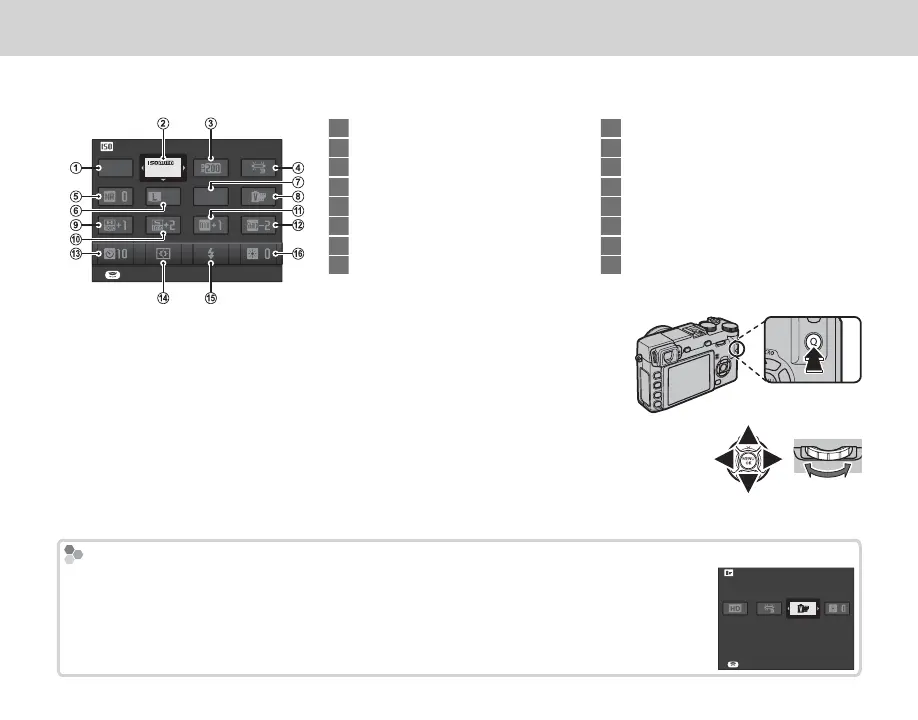
Press Q for quick access to the following items. For more information on the options available, see the
pages listed below.
ISO
SET
3200
BASIC
3:2
FINE
1
u SELECT CUSTOM SETTING ...................... 67
2
N ISO ........................................................... 41
3
U DYNAMIC RANGE ................................... 70
4
D WHITE BALANCE .................................... 39
5
h NOISE REDUCTION ................................. 71
6
O IMAGE SIZE ............................................. 69
7
T IMAGE QUALITY ..................................... 69
8
P FILM SIMULATION ................................. 51
9
r HIGHLIGHT TONE ................................... 70
10
s SHADOW TONE ....................................... 70
11
f COLOR ..................................................... 70
12
q SHARPNESS ............................................ 70
13
B SELF-TIMER ............................................ 49
14
F AF MODE ................................................. 72
15
p FLASH MODE .......................................... 27
16
J EVF/LCD BRIGHTNESS............................ 84
1
Press Q to display the quick menu during shooting.
2
Use the selector to highlight items and rotate the command dial to change.
3
Press Q to exit when settings are complete.
R For quick access to custom settings banks, press and hold the Q button.
Movie Mode
In movie mode, the quick menu contains the following items:
W MOVIE MODE .......................................... 75
P FILM SIMULATION.................................. 51
D WHITE BALANCE .................................... 39
J EVF/LCD BRIGHTNESS............................ 84
FILM SIMULATION
SET



 To Next Page