21
Basic Photography and Playback
Basic Photography and Playback
Basic Photography and Playback
Taking Photographs
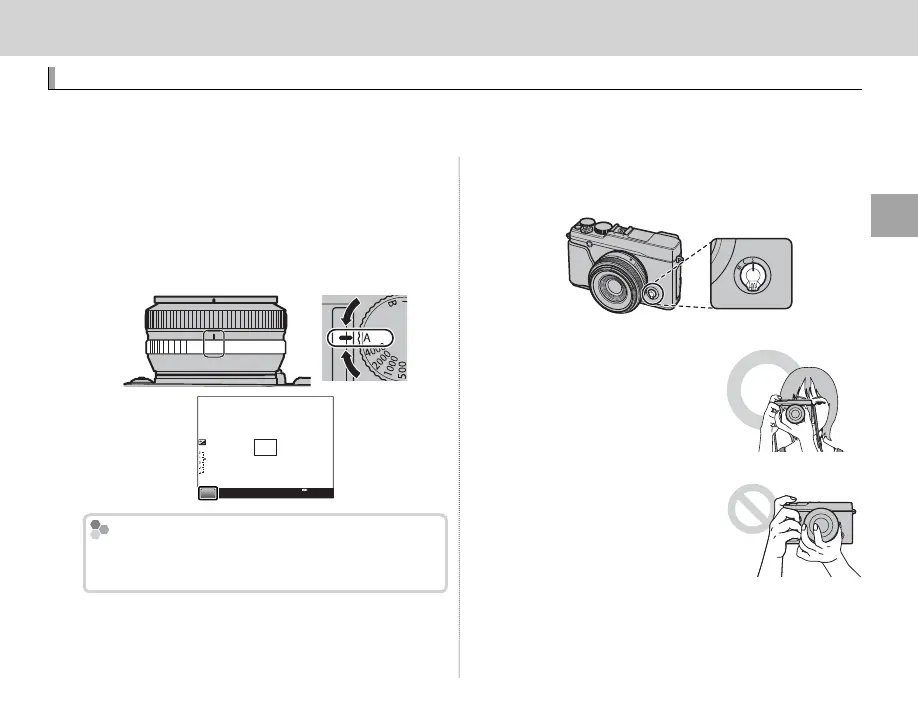
This section describes how to take pictures using program AE (mode P). For information on S, A, and
M modes, see page 33.
1
Select program AE.
Set shutter speed and aperture to A (shutter
speed is set by rotating the shutter speed dial;
for information on adjusting aperture, see the
lens manual). P will appear in the display.
P
2000
F5.6
200
The Q Button
The Q button can be used to view and adjust
camera settings (P 32).
2
Select single AF.
Rotate the focus mode selector to S (P 42).
3
Ready the camera.
Hold the camera steady
with both hands and brace
your elbows against your
sides. Shaking or unsteady
hands can blur your shots.
To prevent pictures that
are out of focus or too dark
(underexposed), keep your
ngers and other objects
away from the lens, ash,
and AF-assist illuminator.



 To Next Page