11
First Steps
Inserting the Battery and a Memory Card
Inserting the Battery and a Memory Card
The camera has no internal memory; instead, pictures are stored on optional SD, SDHC, and SDXC
memory cards (sold separately). After charging the battery, insert the battery and memory card as
described below.
1
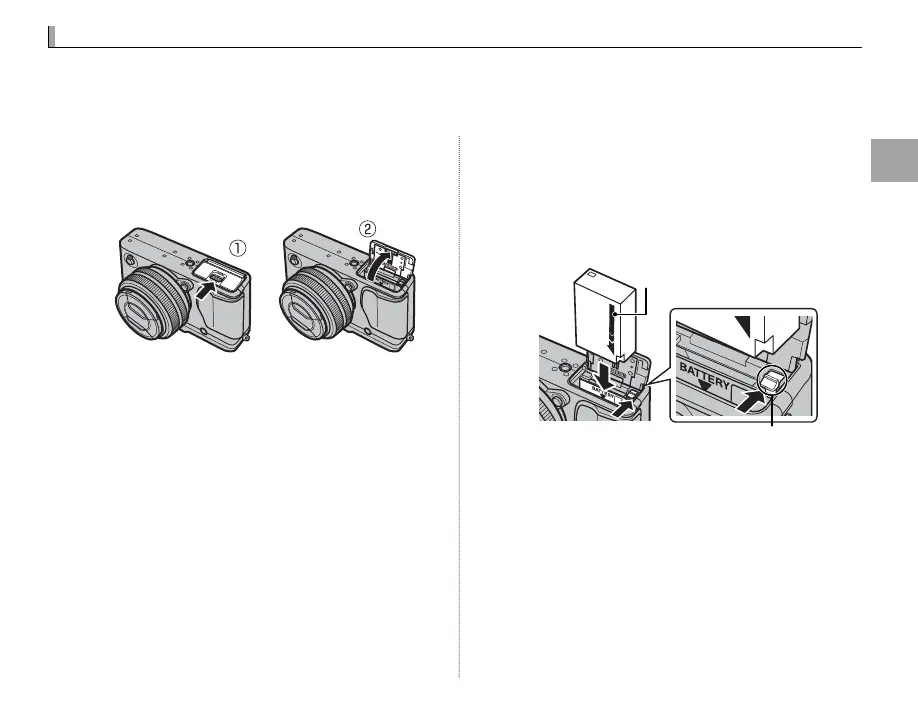
Open the battery-chamber cover.
Slide the battery-chamber latch as shown and
open the battery-chamber cover.
Q Do not open the battery-chamber cover when
the camera is on. Failure to observe this precau-
tion could damage image les or memory cards.
Q Do not use excessive force when handling the
battery-chamber cover.
2
Insert the battery.
Using the battery to keep the battery latch
pressed to one side, insert the battery con-
tacts rst in the direction shown by the arrow.
Con rm that the battery is securely latched.
Battery latch
Arrow
Q Insert the battery in the correct orientation. Do
not use force or attempt to insert the battery up-
side down or backwards. The battery will slide in
easily in the correct orientation.



 To Next Page