4
Parts of the Camera
Silent Mode
In situations in which camera sounds or lights may
be unwelcome, press the DISP/BACK button until the
o icon is displayed (about a second). The camera
speaker, ash, and AF-assist illuminator/self-timer
lamp turn o and ash and volume settings can not
be adjusted (note that silent mode can not be en-
abled or disabled while movie playback is in prog-
ress). Press the DISP/BACK button again to resume
normal operation.
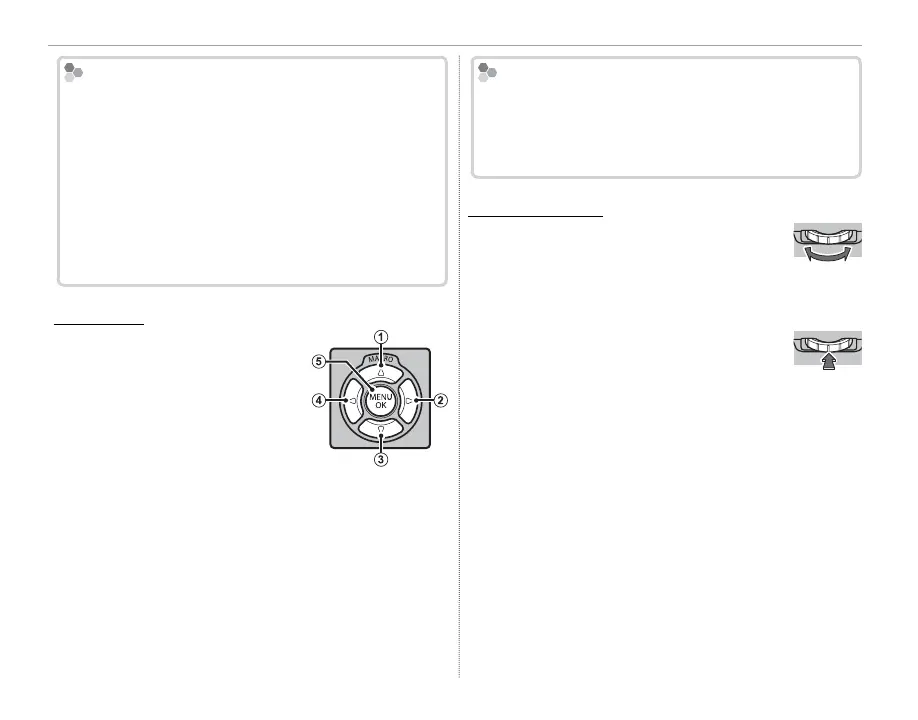
The Selector
Press the selector up (
q
), right
(
w
), down (
e
), or left (
r
) to
highlight items and press MENU/
OK (
t
) to select. Pressing the
selector up (MACRO) during
shooting displays macro op-
tions (P 29).
Control Lock
To avoid accidentally displaying macro options dur-
ing shooting, press MENU/OK until X is displayed. The
control can be unlocked by pressing MENU/OK until X
is no longer displayed.
The Command Dial
The command dial can be used to navi-
gate the menus, to view pictures
(P 23), and to select options in the
quick menu display (P 32).
Press the center of the command dial
to zoom in on the focus area selected
for manual focus (P 43) or the active
focus point during playback (P 24).



 To Next Page