67
More on Photography and Playback
Saving Settings
Save up to 7 sets of custom camera settings for commonly-encountered situations. Saved settings can
be recalled using the u SELECT CUSTOM SETTING option in the shooting menu.
1
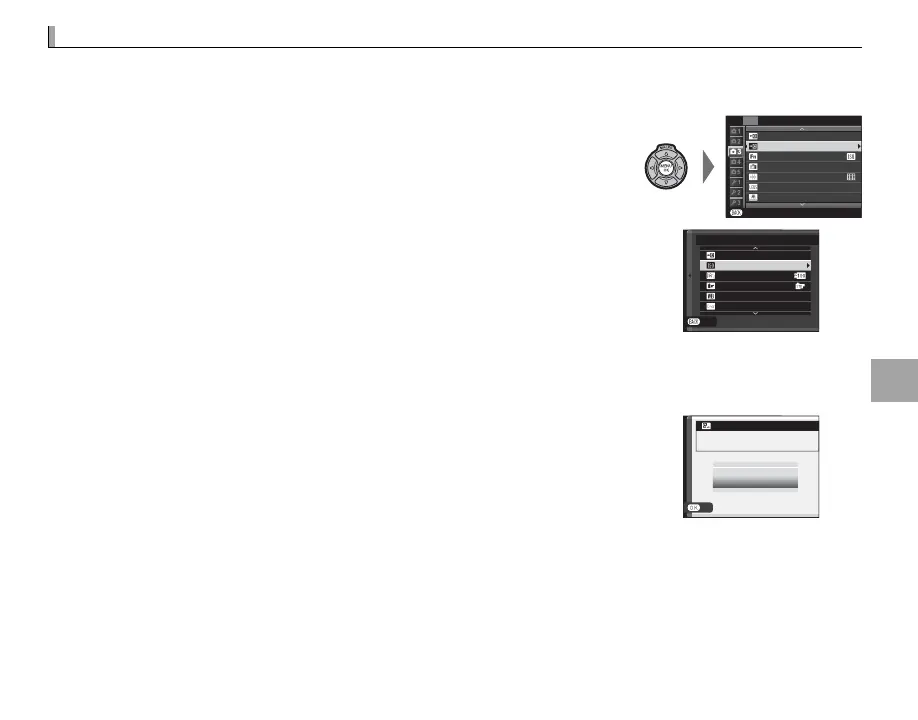
Press MENU/OK in shooting mode to display the shooting menu. Press
the selector up or down to highlight K EDIT/SAVE CUSTOM SET-
TING and press MENU/OK.
P
SELECT CUSTOM SETTING
SHOOTING MENU
EDIT/SAVE CUSTOM SETTING
Fn BUTTON
DISP. CUSTOM SETTING
FRAMING GUIDLINE
SHOOT WITHOUT LENS
EXIT
OFF
35
mm
MOUNT ADAPTOR SETTING
2
Highlight a custom settings bank and press MENU/OK to select. Ad-
just the following as desired and press DISP/BACK when adjustments
are complete: N ISO, U DYNAMIC RANGE, P FILM SIMULATION,
D WHITE BALANCE, f COLOR, q SHARPNESS, r HIGHLIGHT
TONE, s SHADOW TONE, and h NOISE REDUCTION.
EXIT
SAVE CURRENT SETTINGS
ISO
DYNAMIC RANGE
FILM SIMULATION
WHITE BALANCE
COLOR
CUSTOM
1
200
AUTO
0
R To replace the settings in the selected bank with the settings currently selected with the camera, select
K SAVE CURRENT SETTINGS and press MENU/OK.
3
A con rmation dialog will be displayed; highlight OK and press MENU/OK.
OK
CUSTOM
1
SET OK?
CANCEL
OK
SAVE CUSTOM SETTING



 To Next Page