50
Chapter 6
Installing Hardware Options
This chapter provides procedures for installing DIMM cards, the WLAN device, and the internal IDE hard drive.
Installing/Removing a DIMM Module 6
There are two DIMM slots in your Tablet PC. 256 MB, 512 MB, and 1 GB modules are available, so you can install a
combination of up to 2 GB in the system.
Installing a Memory Module 6
To install a DIMM module in the Tablet PC:
1. Ensure that the Tablet PC is off. To do so, carry out the Shut Down command in the Start menu. (Do not attempt to
remove or install a DIMM module when the system is in Suspend mode or running.)
2. Remove the battery pack and store in a safe place.
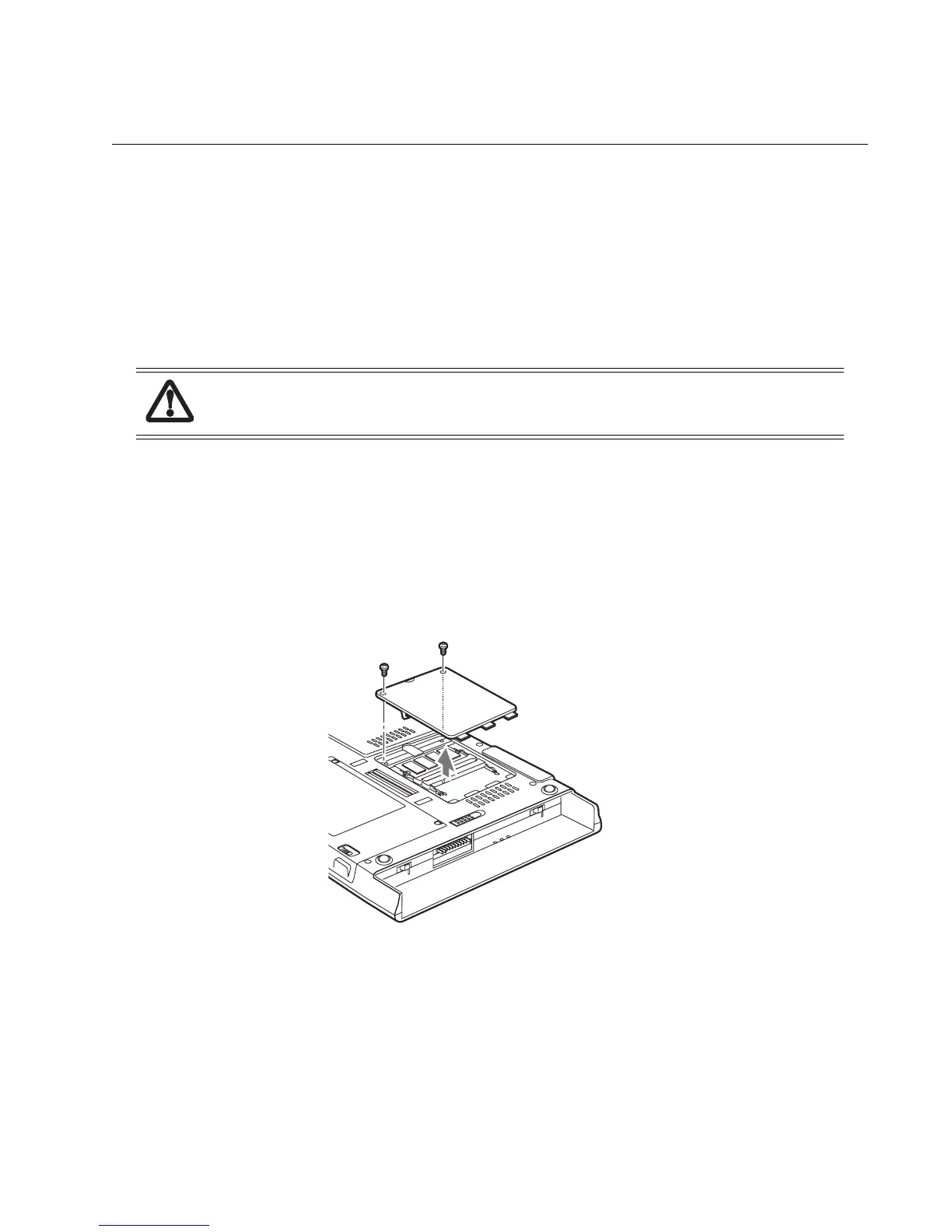
3. Remove the two screws from the cover plate on the back of the Tablet PC and remove the cover plate as shown in Figure
6-1.
Figure 6-1. Accessing the Memory Slot
4. Insert the DIMM module in the socket at an angle and push it down until it locks into place as shown in Figure 6-2.
Note that the DIMM module is keyed to prevent it from being inserted backwards.
DIMM replacement should only be performed at a static-free workstation. Avoid touching connector pins, circuit
boards, or other circuit components on the drive or Tablet PC. Electrostatic discharge caused by doing so can damage
sensitive components.



 To Next Page
 Loading...