En-15
1
1
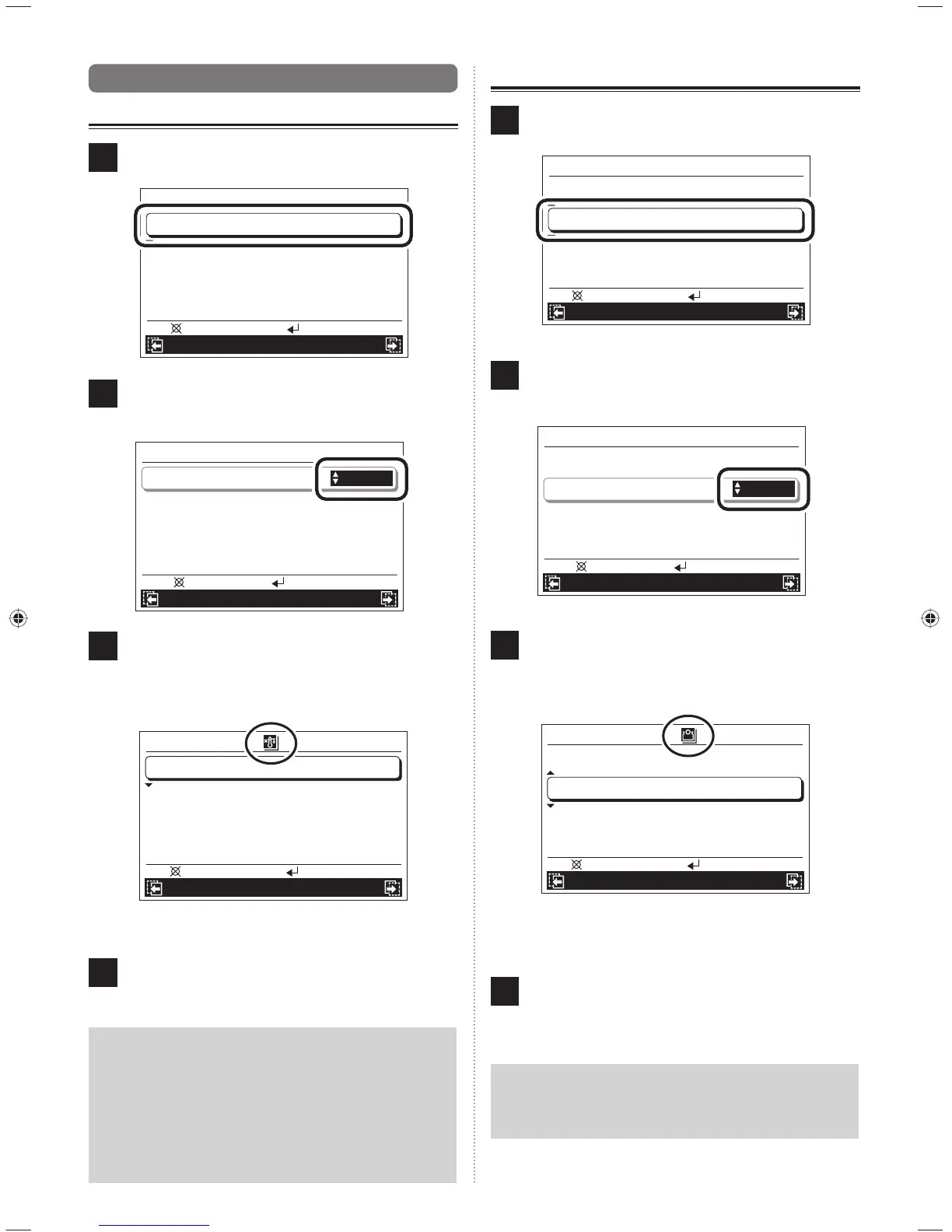
7-3. Function setting
7-3-1. 10 °C heat (All) setting
1
Select “10 °C Heat (All)” with the [Cursor button (Up/
Down)] and press the [Enter button].
Mo 10:00AM
Function
Operation Schedule
O.U. low noise
Schedule select
Economy (All)
Disable
Schedule 1
Disable
10 °C Heat (All) Disable
Back:
Setting:
2
Since the setting items are highlighted, set “Enable” or
“Disable” with the [Cursor button (Up/Down)] and press
the [Enter button].
Mo 10:00AM
Function
Operation Schedule
Cancel: OK:
O.U. low noise
Schedule select
Economy (All)
Disable
Schedule 1
Disable
10 °C Heat (All) Enable
3
Reversed display release. When “Enable” is set, the
indication of function is displayed in the upper part of
the screen, and all indoor units start the 10 °C heat ope-
ration which is stopped by pressing the [On/Off button]
on the Central remote controller.
Mo 10:00AM
Function
Operation Schedule
O.U. low noise
Schedule select
Economy (All)
Disable
Schedule 1
Disable
10 °C Heat (All) Enable
Back:
Setting:
To set other items, select the item with the [Cursor but-
ton (Up/Down)].
4
To complete the setting, the display returns to the
“Monitor” screen when the [Menu button] is pressed.
Notice
• This function is enabled only when stopped by
pressing the [On/Off button] on the Central remote
controller.
• When 10 °C heat (All) operation is stopped, set to
“Disable” and 10 °C heat set to “off” in the operation
setting of each indoor unit. Refer to [6. OPERATION
SETTING].
7-3-2. Economy (All) setting
1
Select “Economy (All)” with the [Cursor button (Up/
Down)] and press the [Enter button].
Mo 10:00AM
Function
Operation Schedule
10 °C Heat (All)
O.U. low noise
Schedule select
Disable
Disable
Schedule 1
Economy (All)
Disable
Back:
Setting:
2
Since the setting items are highlighted, set “Enable” or
“Disable” with the [Cursor button (Up/Down)] and press
the [Enter button].
Mo 10:00AM
Function
Operation Schedule
Cancel: OK:
10 °C Heat (All)
O.U. low noise
Schedule select
Economy (All)
Disable
Disable
Schedule 1
Enable
3
Reversed display release. When “Enable” is set, the
indication of function is displayed in the upper part of
screen, and all indoor units start in Economy operation
mode.
Mo 10:00AM
Function
Operation Schedule
10 °C Heat (All)
O.U. low noise
Schedule select
Disable
Disable
Schedule 1
Economy (All)
Enable
Back:
Setting:
To set other items, select the item with the [Cursor but-
ton (Up/Down)].
4
To complete the setting, the display returns to the
“Monitor” screen when the [Menu button] is pressed.
Notice
When Economy (All) is set to “Enable”, Economy mode
cannot be released by the Operation setting and the
standard remote controller.
9380221012-03_OM_en.indd 159380221012-03_OM_en.indd 15 30/11/2553 15:25:0230/11/2553 15:25:02



 To Next Page
 Loading...