En-27
11
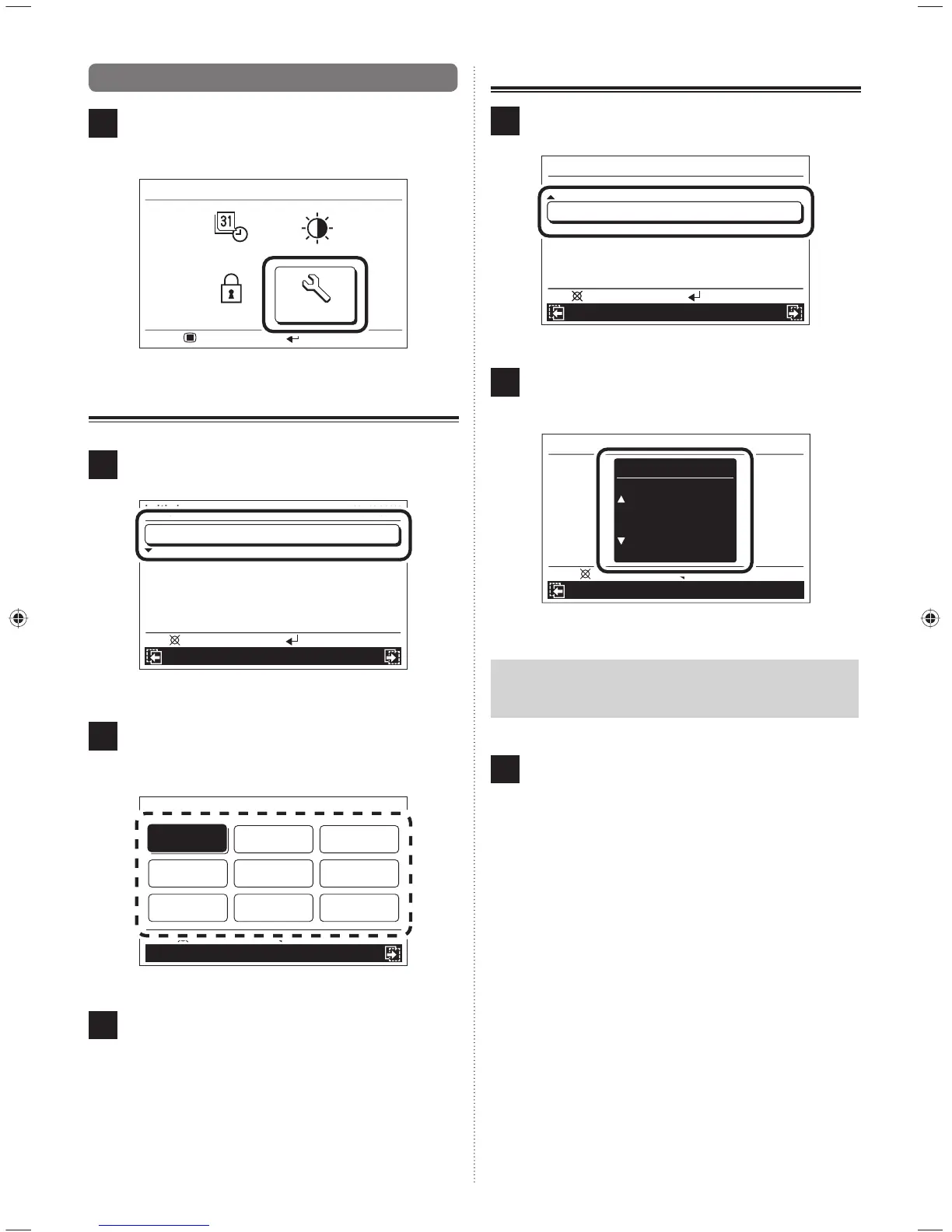
9-6. Initial setting
1
Select “Initial” with the [Cursor button], and press the
[Enter button].
“Initial” screen is displayed.
Submenu
Screen
R.C. prohibit
Initial
Mo 10:00AM
Setting:
Monitor:
Date/Time
9-6-1. Language setting
1
Select “Language” with the [Cursor button (Up/Down)]
and press the [Enter button].
Mo 10:00AM
Initial
R.C. prohibition Date and time
Back:
Setting:
Temp. unit
°C
Language
English
2
Select the relevant language with the [Cursor button]
and press the [Enter button].
The display returns to the “Initial” screen and displays
the selected language.
Mo 10:00AM
Language
Temp. unit
Cancel: OK:
Deutsch Français
ItalianoEspañol
English
Ελληνικά
PortuguêsРусский Türkçe
3
When the [Cancel button] is pressed, the display re-
turns to the “Submenu” screen.
9-6-2. Temperature unit setting
1
Select “Temp. unit” with the [Cursor button (Up/Down)]
and press the [Enter button].
Mo 10:00AM
Initial
R.C. prohibition Date and time
Back:
Setting:
Temp. unit
°C
Language
English
Mo 10:00AM
R.C. prohibition Date and time
Back:
Setting:
Temp. unit
°C
Language
English
2
Set “°C” and “°F” with the [Cursor button (Up/Down)]
and press the [Enter button].
The display returns to the “Initial” screen.
Mo 10:00AM
Temp. unit
Temp. unit
°C
Language
Cancel: OK:
Notice
When “°F” is selected, “Min.heat” is displayed as “10 °C
Heat”.
3
If the [Cancel button] is pressed, the display returns to
the “Submenu” screen.
9380221012-03_OM_en.indd 279380221012-03_OM_en.indd 27 30/11/2553 15:25:0430/11/2553 15:25:04



 To Next Page
 Loading...