En-17
7-3-4. Schedule select
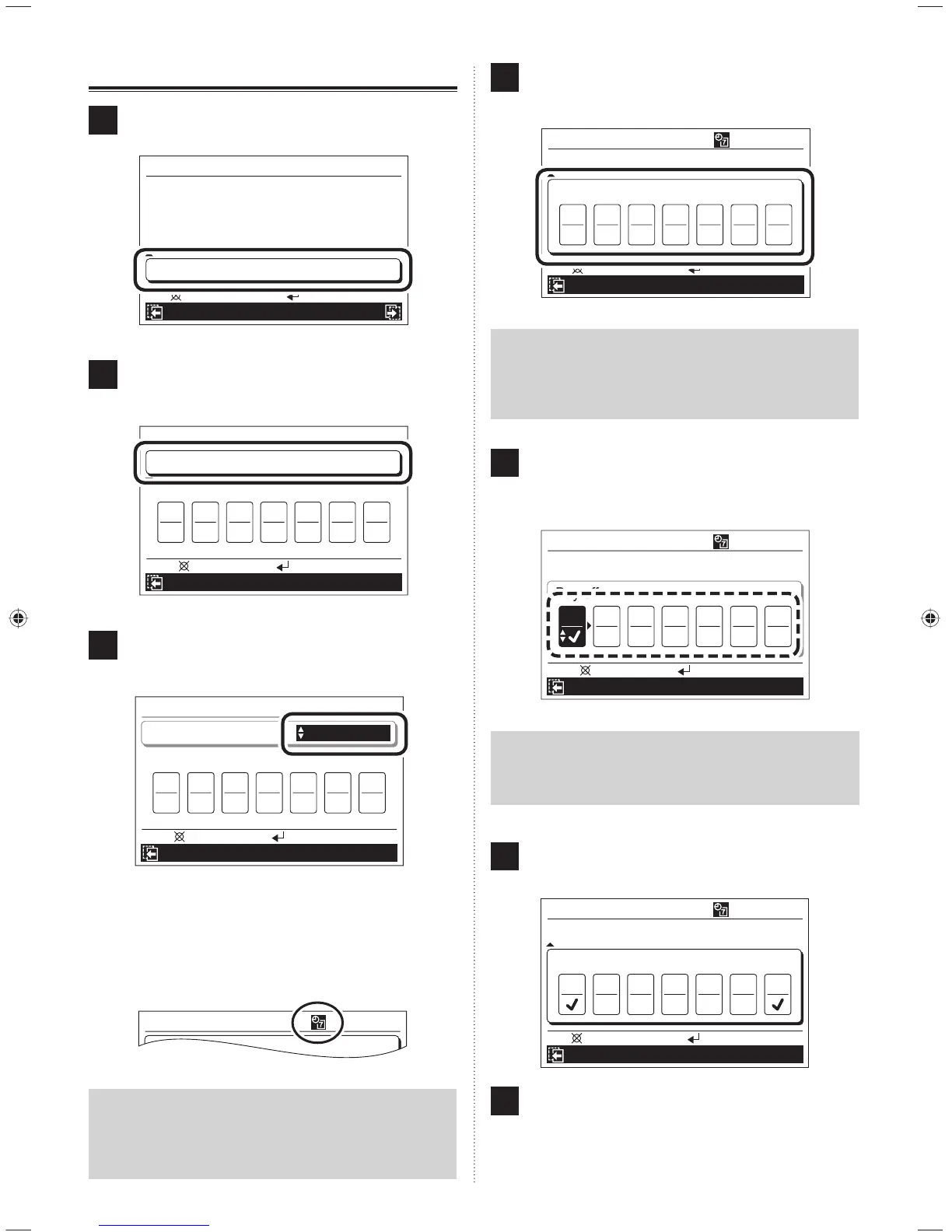
1
Select “Schedule select” with the [Cursor button (Up/
Down)] and press the [Enter button].
Mo 10:00AM
Function
10 °C Heat (All)
O.U. low noise
Disable
Disable
Economy (All) Disable
Operation Schedule
Schedule select Disable
Back:
Setting:
2
Schedule select screen is displayed.
Select “Schedule” with the [Cursor button (Up/Down)]
and press the [Enter button].
Mo 10:00AM
Schedule select
Cancel:
OK:
Day off
Su
O.U. low noise
Mo Tu We Th Fr Sa
Schedule Disable
3
Since the setting item is highlighted, select the applica-
ble schedule name with the [Cursor button (Up/Down)]
and press the [Enter button].
Mo 10:00AM
Schedule select
Cancel:
OK:
Day off
Su
O.U. low noise
Schedule
Mo Tu We Th Fr Sa
Schedule 1
When “Disable” is selected, schedule timer operation is
not performed.
When the [Enter button] is pressed, reversed display
of the setting item is released and the indication of
function is displayed in the upper part of the screen.
Mo 10:00AM
Schedule select
Schedule 1
Notice
If the indication of function is not displayed in the upper
part of the screen, although [Enter button] is pressed after
“Schedule 1” or “Schedule 2” is set, schedule setting is not
effective or not set. Refer to [8. SCHEDULE SETTING].
4
If there are inapplicable days in the schedule timer
operation, select “Day off” with the [Cursor button (Up/
Down)] and press the [Enter button].
Mo 10:00AM
Schedule select
O.U. low noise
Schedule Schedule 1
Day off
Su Mo Tu We Th Fr Sa
Back:
Setting:
Notice
This setting is released after once effected. Use this func-
tion when the schedule operation is not performed such as
on holidays. The schedule operation is enabled only after
set it.
5
As the days of the week are highlighted, select appli-
cable days with the [Cursor button (Left/Right)] and en-
ter the check mark with the [Cursor button (Up/Down)].
Multiple days in a week can be set.
Mo 10:00AM
Schedule select
Cancel:
OK:
Day off
O.U. low noise
Schedule
Mo Tu We Th Fr Sa
Schedule 1
Su
Notice
When schedule on a day of the week is not set in [8.
SCHEDULE SETTING], schedule operation is not per-
formed even if “Day off” is not checked.
6
When the [Enter button] is pressed, the reversed dis-
play is released.
Mo 10:00AM
Schedule select
O.U. low noise
Schedule Schedule 1
Day off
Su Mo Tu We Th Fr Sa
Back:
Setting:
7
To return to the “Function” screen, press the [Cancel
button].
To complete the setting, the display returns to the
“Monitor” screen when the [Menu button] is pressed.
9380221012-03_OM_en.indd 179380221012-03_OM_en.indd 17 30/11/2553 15:25:0330/11/2553 15:25:03



 To Next Page
 Loading...