En-22
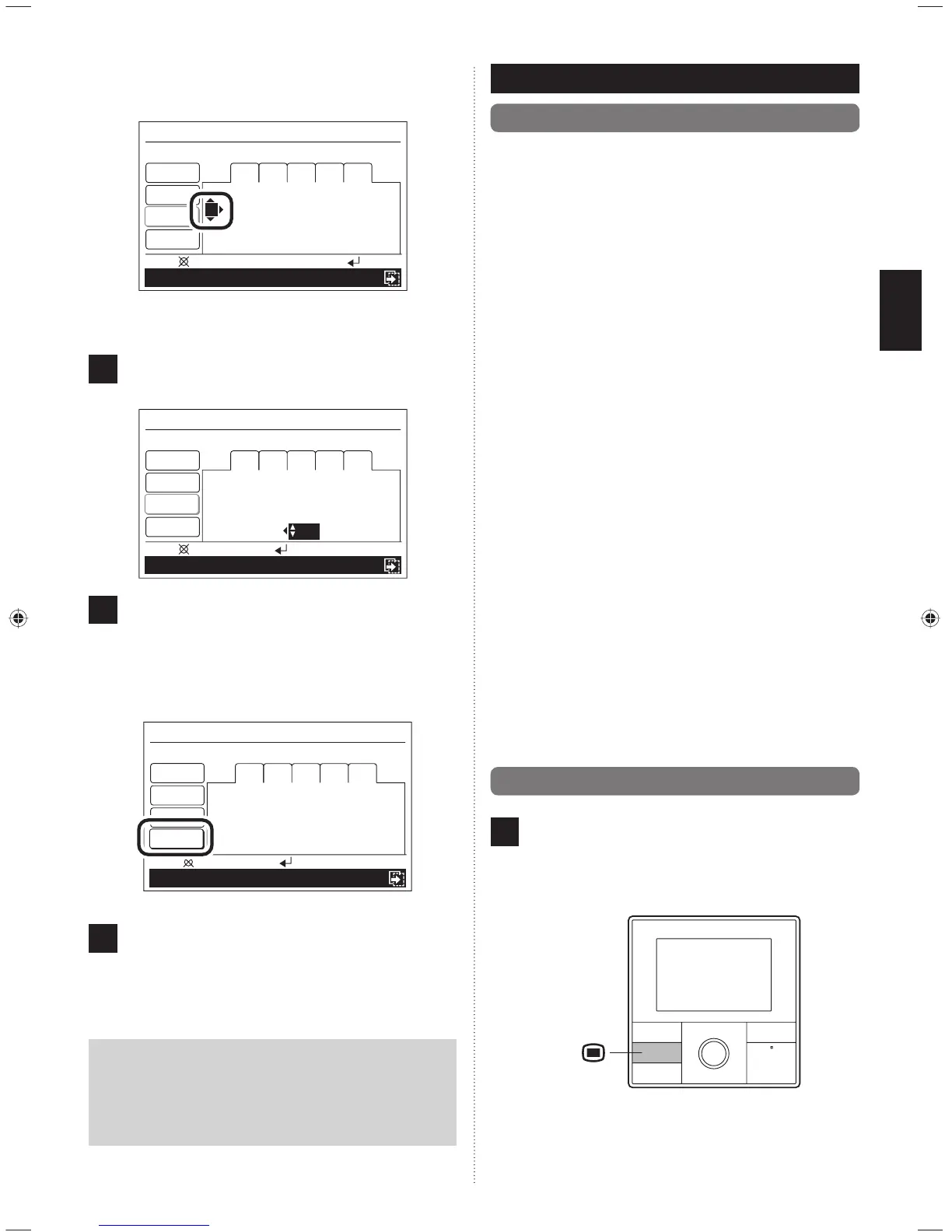
When setting the next time, it moves to “2” when the
[Cursor button (Right)] is pressed.
Mo 10:00AM
Schedule 1
Delete: Push for two seconds
OK
:
Day
Time
End
Room 1
1
6 : 00
AM
On
Cool
28
°C
3 – –
:
– –
AM
– – –
4 – –
:
– –
AM
– – –
Enable
Schedule 2
Mo Tu We Th Fr
2 – –
:
– –
AM
– – –
Set each item with the same procedure as before.
8
When the required settings are completed, press the
[Enter button].
Mo 10:00AM
Schedule 1
Cancel:
OK
:
Day
Time
End
Room 1
1
6 : 00
AM
On
Cool
28
°C
3
5 : 00
PM
On
Cool
28
°C
Enable
Schedule 2
Mo Tu We Th Fr
2
11 : 00
AM
On
Cool
27
°C
4
11 : 00
PM
Off
9
Reversed display of setting items is released.
Other days of the week can be set continuously. (Select
“Day”).
To complete the setting, select “End” with the [Cursor
button (Up/Down)] and press the [Enter button].
Cancel:
OK
:
Mo 10:00AM
Schedule 1
Day
Time
End
Room 1
1
6 : 00
AM
On
Cool
28
°C
3
5 : 00
PM
On
Cool
28
°C
Enable
Schedule 2
Mo Tu We Th Fr
2
11 : 00
AM
On
Cool
27
°C
4
11 : 00
PM
Off
10
If [Enter button] is pressed, the display returns to the
“Schedule (unit select)” screen.
If setting another indoor unit, repeat the procedure from
[8-2-2. Setting of the schedule for each indoor unit].
Notice
When performing a schedule operation, the setting
schedule should be selected.
Select relevant schedule name (“Schedule 1” or “Schedule
2”) in [7-3-4. Schedule select] of [7. FUNCTION SET-
TING].
9. SUBMENU SETTING
1
1
9-1. About the Submenu setting
Settings other than operation can be made. Following can be
set.
Date/Time setting
Date and time can be set.
Refer to [9-3. Date/Time setting].
• Date setting
• Time setting
• Summer time (Daylight saving time) setting
• Change display format setting
Screen setting
Setting of display screen backlight can be set.
Refer to [9-4. Screen setting].
• Automatic off time setting
• Brightness setting
• Contrast setting
R.C. prohibit setting
Prohibition of operation by the standard remote controller of
each indoor unit can be set. Refer to [9-5. R.C. Prohibition
setting].
Initial setting
Language for display and the unit of temperature can be set.
Refer to [9-6. Initial setting].
• Language setting
• Temperature unit setting
11
9-2. Switching to the “Submenu” screen
1
If [Menu button] is pressed while “Monitor” screen is
displayed, it switches to the “Submenu” screen. (If [Menu
button] is pressed while the “Submenu” screen is dis-
played, the display returns to the “Monitor” screen.)
Menu
button
9380221012-03_OM_en.indd 229380221012-03_OM_en.indd 22 30/11/2553 15:25:0330/11/2553 15:25:03



 To Next Page
 Loading...