p.60
Frequently Asked Questions
Supported iPad
®
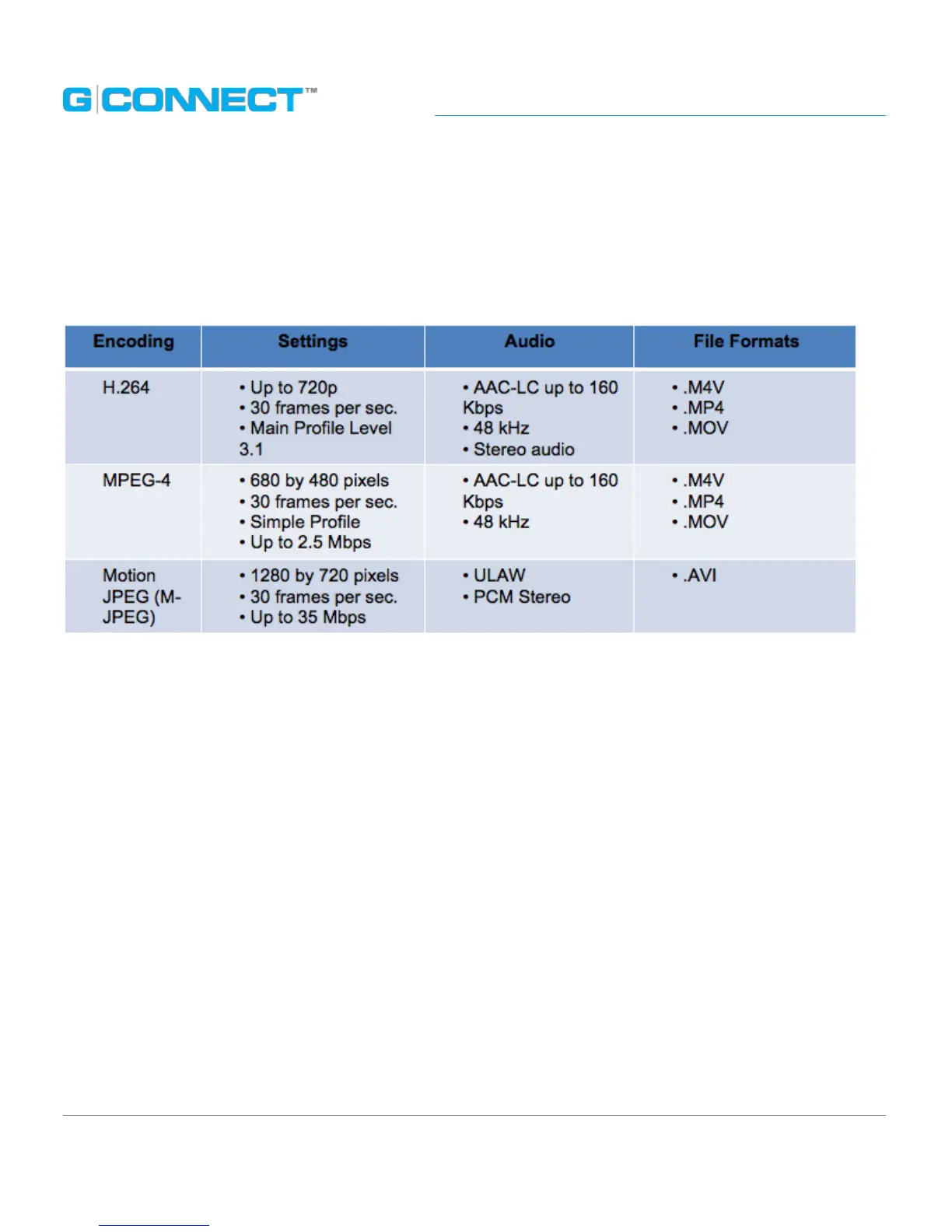
Video Formats
The following table represents supported video playback requirements for the
G-CONNECT iPad App.
Due to the well-documented complexity in video formatting, there may be unique
combinations of encoding, settings and le formats which may not play via the
G-CONNECT iPad App.
Enable Gigabit Ethernet Connection
The G-CONNECT by default has the Wi-Fi
®
enabled with the Ethernet port connection
as 10/100. To enable the Gigabit Ethernet port, you will need to turn o the Wi-Fi on
your device.
To disable the Wi-Fi, you will need to press and hold the Wi-Fi button on the
G-CONNECT for 1-2 seconds. The Wi-Fi indicator will turn o.
To re-enable the Wi-FI, just press the button and the Wi-Fi will turn on and the
indicator will light up.















 To Next Page