Installation
G&D DVIVision · 7
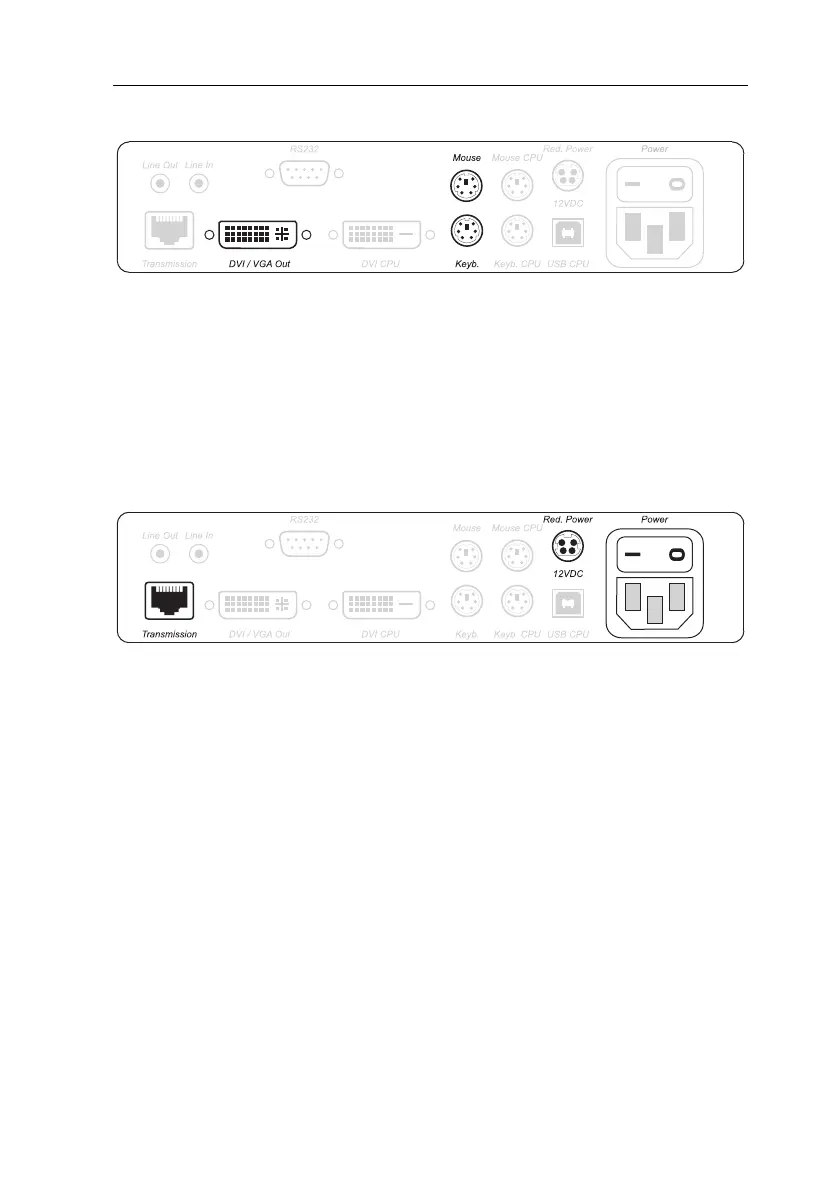
Optional: Connecting the local console
DVI/VGA Out: Connect the monitor of the local console to this interface.
If the monitor only provides an analog VGA input, connect the DVI-I-HD15F adapter
to this interface. Afterwards, connect the monitor’s VGA cable to the adapter.
Keyb.: Connect the keyboard of the local console to this interface.
Mouse: Connect the mouse of the local console to this interface.
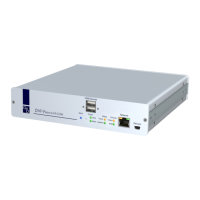
Connections for data transmission and power supply
Transmission: Connect the category 5e (or better) twisted pair cable, which is availa-
ble as accessories, to this interface. Connect the other end of the cable to the respec-
tive interface ofthe user module.
Power: Insert the supplied PowerCable-2 Standard IEC cable.
Red. Power: The Power-Set 12/Type 2 power pack can optionally be connected using
this plug. Through this, a second, redundant power supply of the computer module
is achieved.
Figure 2: Interfaces to connect the local console to the computer module
Figure 3: Interfaces for data transmission and power supply


 To Next Page