Page 19
Keypad Terminal Connections
Some keypads that are compatible with other GardTec control panels may have
additional markings as well as the Gardtec 800 Series legends. These additional
markings are disregarded within this manual.
They may also have three extra terminals marked as follows:-
E/E -VE
E/E +VE
TMP+
The keypad port on the master control panel is situated on the bottom edge of the PCB
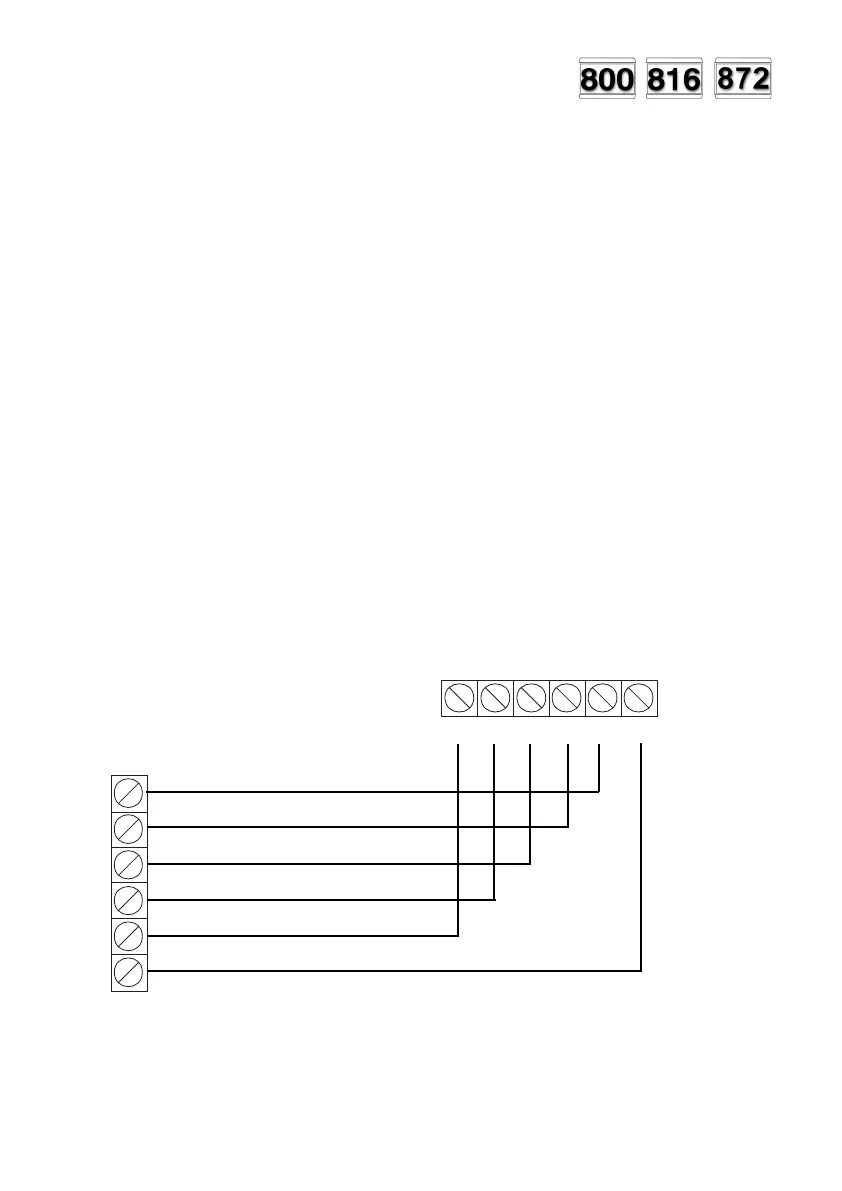
towards the right hand side. Wiring to the RKP(s) is terminal to terminal as shown in
the following illustrations.
Fig 9. Single RKP wiring.
NOTE: RKP terminal positions may differ (dependent on model)
12V 0V CLK DATA DATA SPKR
AB
DATAB DATAA CLK OV 12V SPKR
Control Panel
RKP
PR5892 Rev11 800 Series Eng Ref 15.qxd 16/11/2006 11:20 Page 19



 To Next Page