GPSMAP 60CSx Owner’s Manual 37
MAIN PAGES >
MAIN PAGES
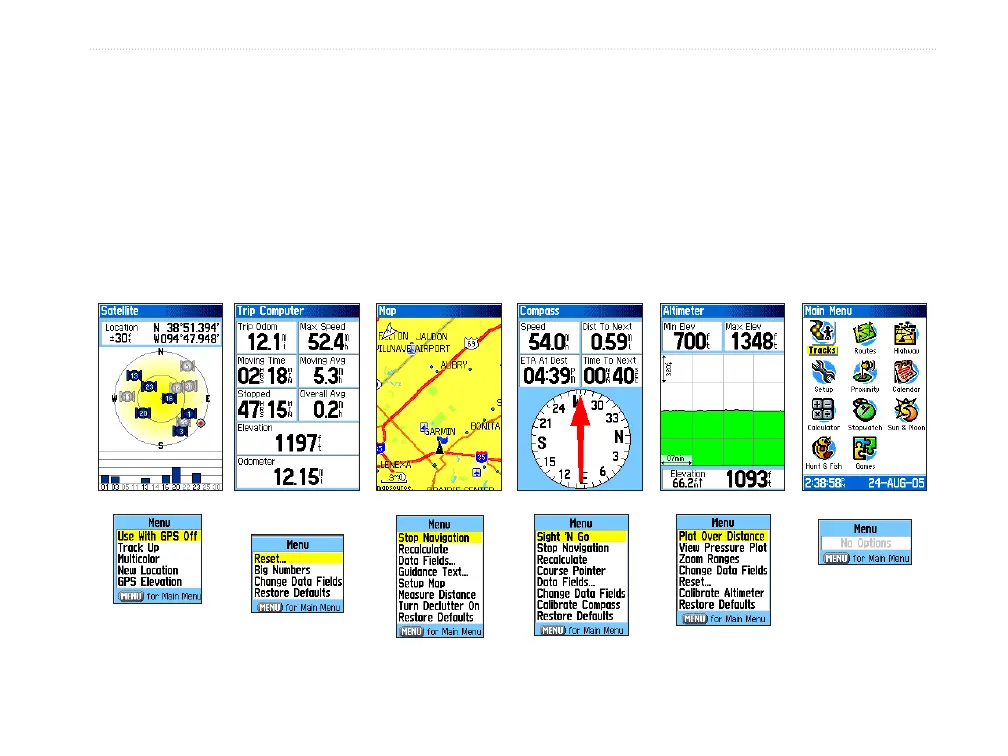
The GPSMAP 60CSx has six main pages: Satellite Page, Trip Computer Page, Map Page, Compass Page,
Altimeter Page, and the Main Menu. You can cycle through these pages by pressing the PAGE key to move
forward or pressing the QUIT key to reverse. Add more pages using the Page Sequence option on the Main
Menu. The Active Route Page appears only when you are actively navigating.
Each page has an Options Menu, which contains the setup options and functions that apply to the page. To view
the Options Menu for a page, press the MENU key.
Satellite Page Trip Computer
Page
Map Page Compass Page Altimeter Page Main Menu
Trip Computer
Page Options
Menu
Satellite Page
Options Menu
Altimeter Page
Options Menu
Compass Page
Options Menu
Map Page
Options Menu















 To Next Page