48 GPSMAP 60CSx Owner’s Manual
MAIN PAGES >
Compass Page
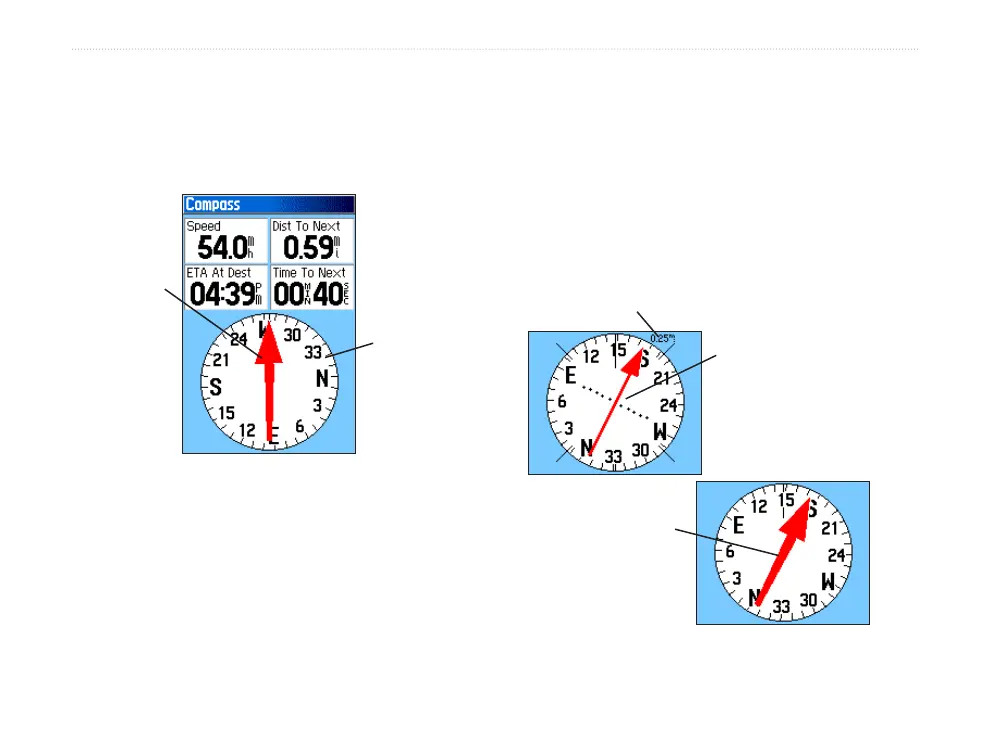
During active navigation, the Compass Page guides
you to your destination with a graphic compass
display and a bearing or course pointer.
When navigating, the Compass Page provides
navigation data and directions. It uses a graphic
compass ring, a bearing or course pointer and digital
data fields to show information such as current speed,
distance to the next point on the route, and estimated
arrival time.
The rotating compass ring indicates the direction you
are heading. The Bearing and Course Pointer indicate
the direction (bearing) to your destination, relative to
your current heading direction. The compass ring and
bearing or course pointer work independently to show
your direction of movement and the direction to your
destination. You can choose the Bearing Pointer or
Course Pointer for guidance.
Compass Page
The Compass
ring moves to
indicate North
orientation.
Bearing
pointer
Course Pointer
Bearing Pointer
Scale
The course pointer
indicates your
course of travel and
the distance you
drift off course.
The bearing
pointer indicates
the direction to
your destination.















 To Next Page