48
7.2 SmartJOB Software Operation
7.2.1 User interface introduction
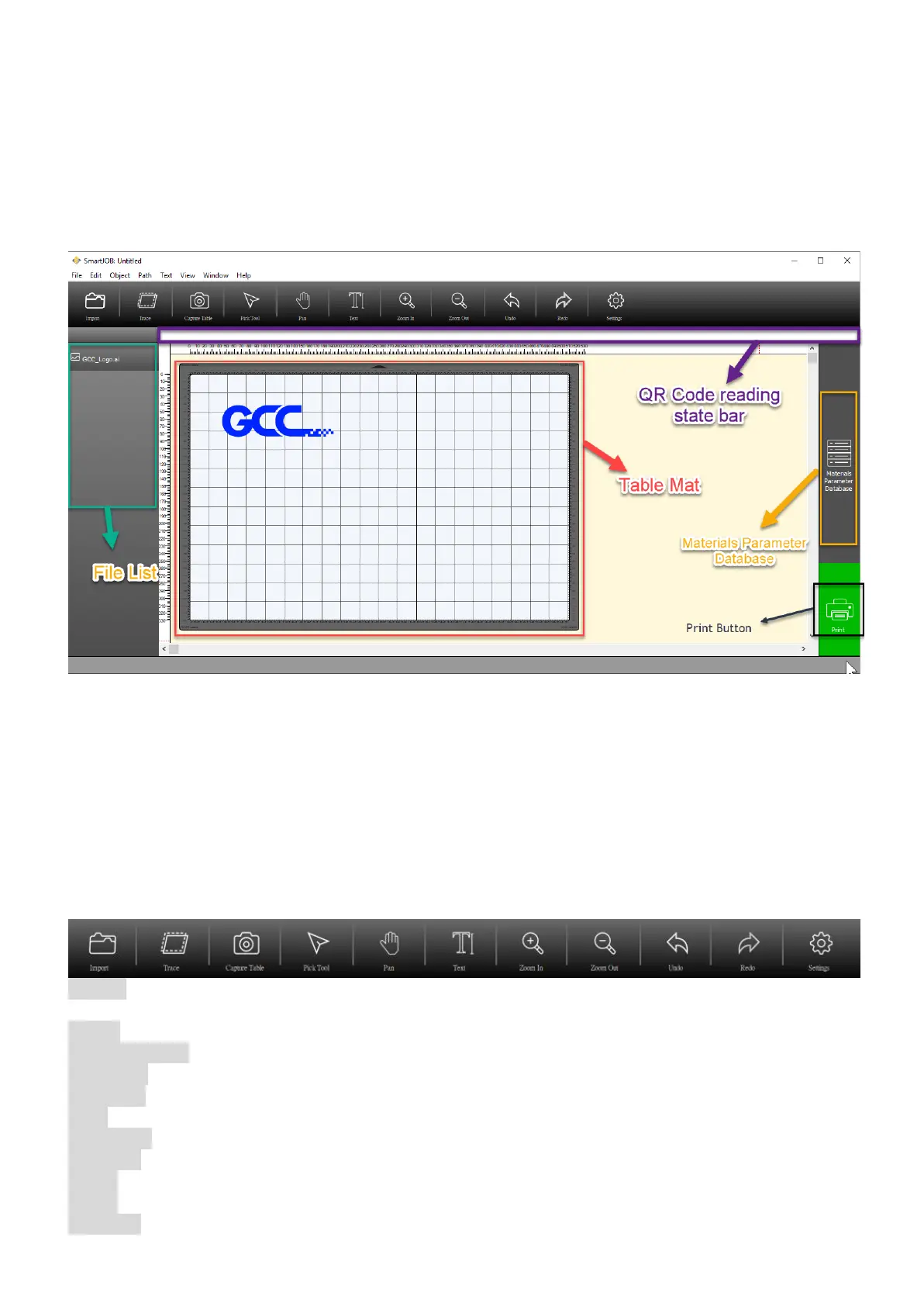
Table Mat: Display the real-time table and object view
QR Code reading state bar: Show the barcode reading state.
File List: Show the file history (Max. 4pcs)
Materials Parameter Datebase: Allow users to choose the processing parameter according to
different materials.
Print Button: Send the file to the machine
7.2.2 Functional Introduction
Import: Allow user to open/import files (available for JPG, BMP, PNG, EPS, PDF, SVG, AI
formats)
Trace: Allow user to trace image and do contour.
Capture Table: Take a table photo (including the object) and read the barcode one the material
Pick Tool: To select, position or transform objects.
Pan Tool: Drag hidden areas of a drawing into view without changing the zoom level.
Text: Allow to add/edit texts to your job.
Zoom out: Decrease the magnification level to view a large portion of the document.
Zoom in: Increase the magnification level to view more detail.
Undo: Cancel the previous action.
Redo: Reapply the last undone action.
Settings: Allow to set Metric/Imperial & connection setting up.



 To Next Page