Maintenance
ReplacingtheDisplayAssembly
1.DisconnectthesystemfromACpower.
2.Removethepapertrayasdescribedin“ReplacingthePaperTrayAssembly”
onpage64.
3.Removethebatteryasdescribedin“ReplacingtheBattery”onpage64.
4.Removethekeyboardbezelasdescribedin“ReplacingtheKeyboard”onpage
67.
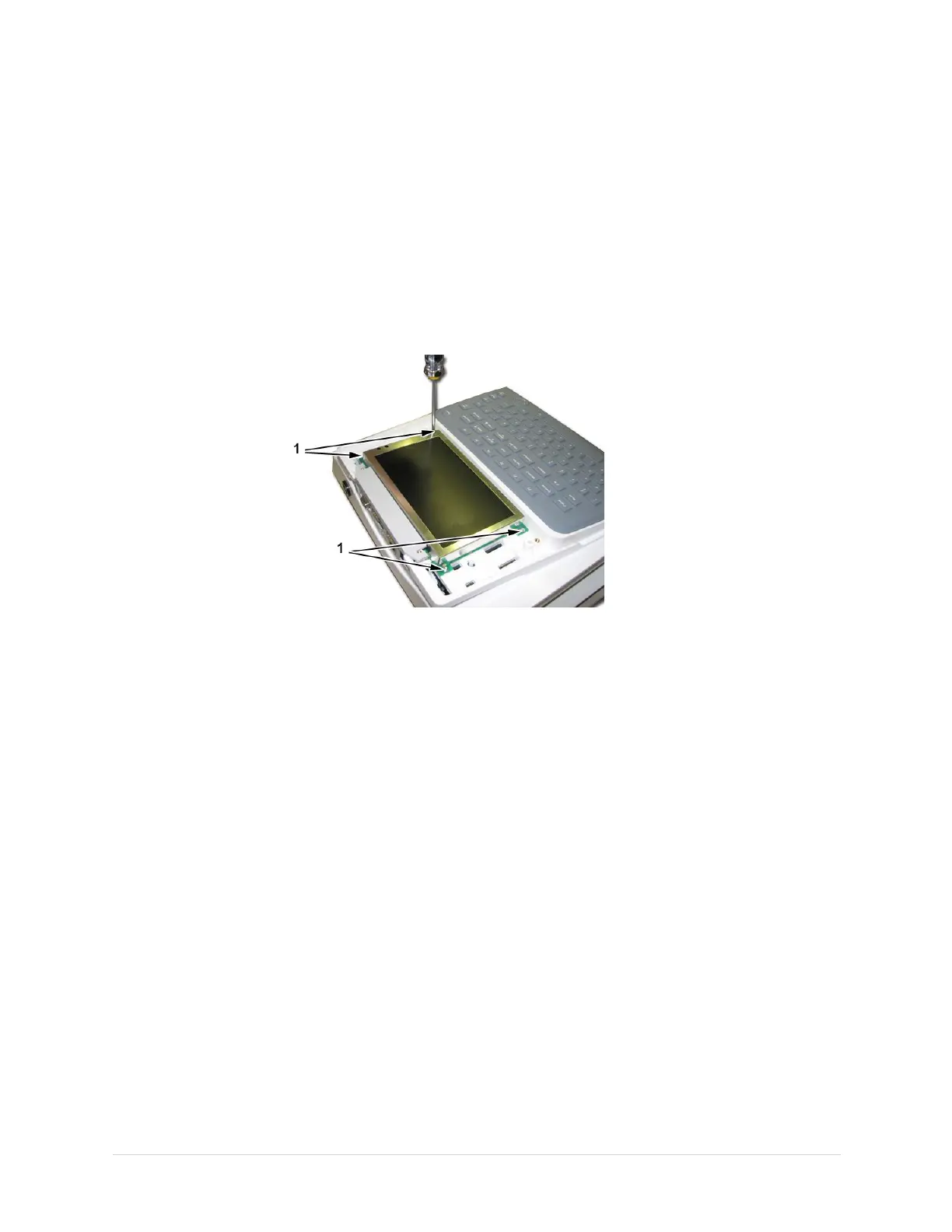
5.Removethefourscrews(1)thatholdthedisplayassemblyinplace.
6.Liftthedisplayoutoftheassembly.
7.Reassemblethedisplaybyreversingthestepsforremoval.
8.Performtheapplicablecheckoutprocedures.
Referto“FunctionalCheckout”onpage99.
ReplacingtheInternalModem(Option)
1.DisconnectthesystemfromACpower.
2.Removethepapertrayasdescribedin“ReplacingthePaperTrayAssembly”
onpage64.
3.Removethebatteryasdescribedin“ReplacingtheBattery”onpage64.
2028451-183EMAC™160071


 To Next Page