moisture.IQ User’s Manual 23
Chapter 1. Installation
1.9.4.1 Standard Delta F Oxygen Cells
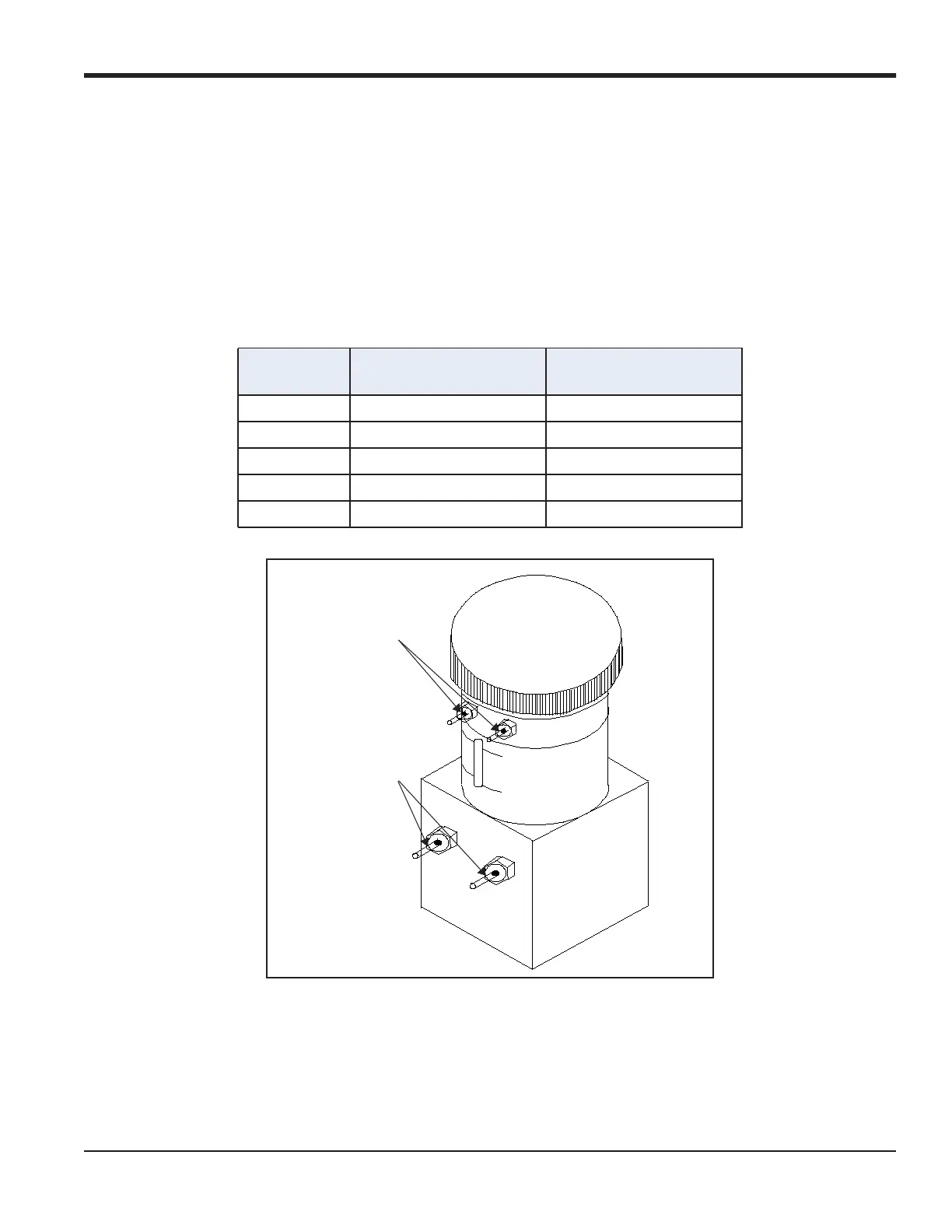
Figure 20 below shows a standard Delta F Oxygen Cell and identifies the sensing and secondary electrodes.
Make oxygen cell connections from the electrodes on the oxygen cell to the OXYGEN terminal block on the
back of the moisture.IQ. Refer to Figure 18 on page 22 and Table 2 below for the required connections.
IMPORTANT: To maintain good contact at each terminal block and to avoid damaging the pins on the connector,
pull the connector straight off (not at an angle), make cable connections while the connector is
away from the unit, and push the connector straight on (not at an angle) when the wiring is
complete.
Figure 20: Standard Delta F Oxygen Cell
Note: The temperature reading of the sensor is used for internal temperature compensation and does not
require any user setup.
Table 2: Standard Delta F Oxygen Cell Connections
Connect:
To Delta F
Oxygen Cell:
To moisture.IQ OXYGEN
Terminal Block
red wire + sensing electrode pin 4 RD
green wire – sensing electrode pin 3 GR
white wire + secondary electrode pin 2 WT
black wire – secondary electrode pin 1 BK
shield Earth Ground Connection ---
Secondary
Electrodes
Sensing
Electrodes


 To Next Page