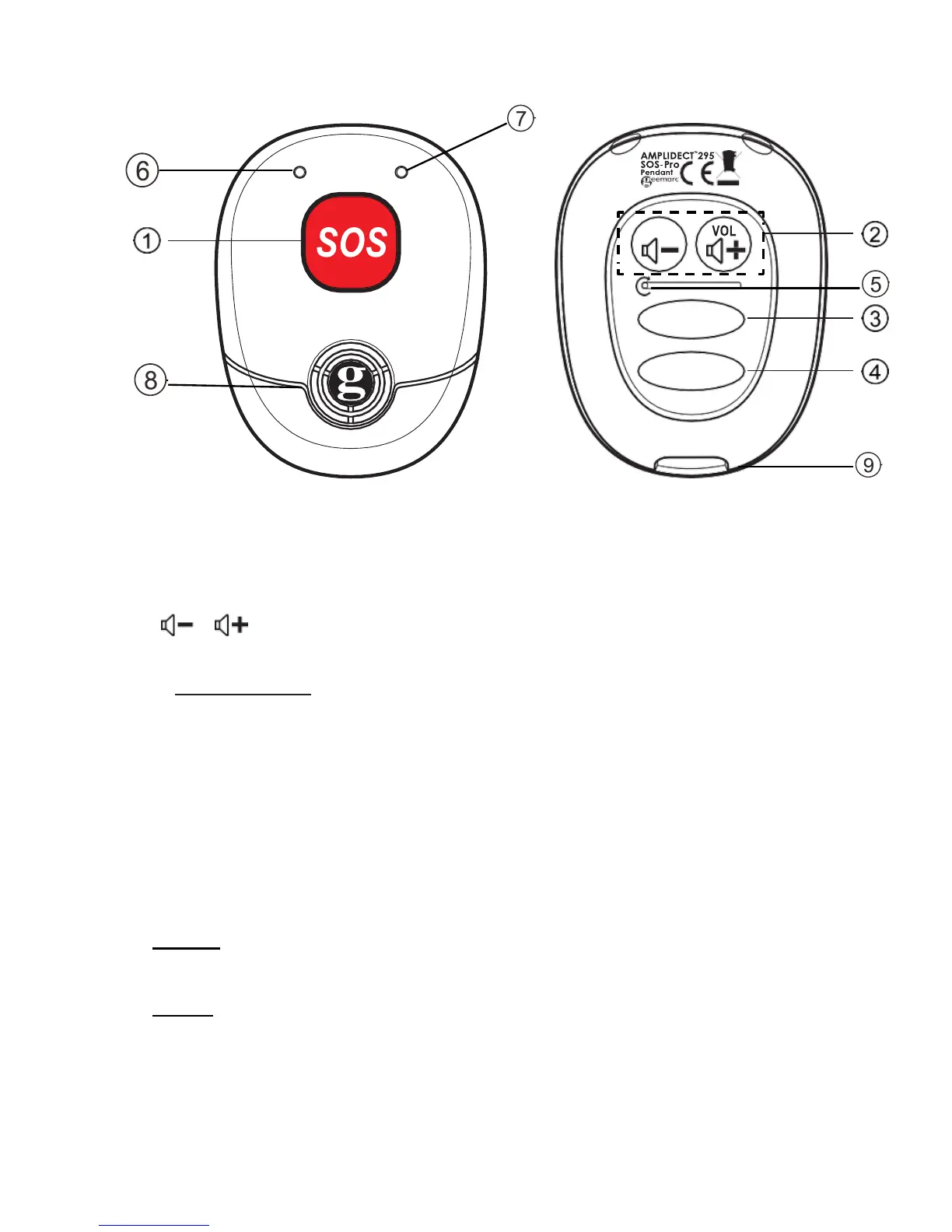
3.3 Overview of the Pendant
1. SOS
In idle mode, press to enter the emergency calling sequence set in your handset.
In call mode: press and hold for 2 seconds to stop the emergency call.
VOL VOL
2.
Press to adjust the ringer volume of the pendant.
Press and hold two keys together to enter registration mode.
3. M1
Press to dial the direct memory number stored in the M1 location in your handset.
4. M2
Press to dial the direct memory number stored in the M2 location in your handset.
5. RESET
6. Microphone
7. Led indicator
(Purple)
- Steady On: Un-register.
- Slow Flash: registered but the base is not available. Searching or out of range.
(Blue)
- Steady On: Seated in the base and fully charged.
- Steady on 3s and emit a long beep: Successfully registered.
- Double flashing: Off hook.
- Double flashing and on for 2s when just off hook: Off hook but the signal is
- weak. Hear 3 rapid beeps in every 10s.
- Short flashing: idle mode and off the charger, the pendant is in Standby mode.



 To Next Page