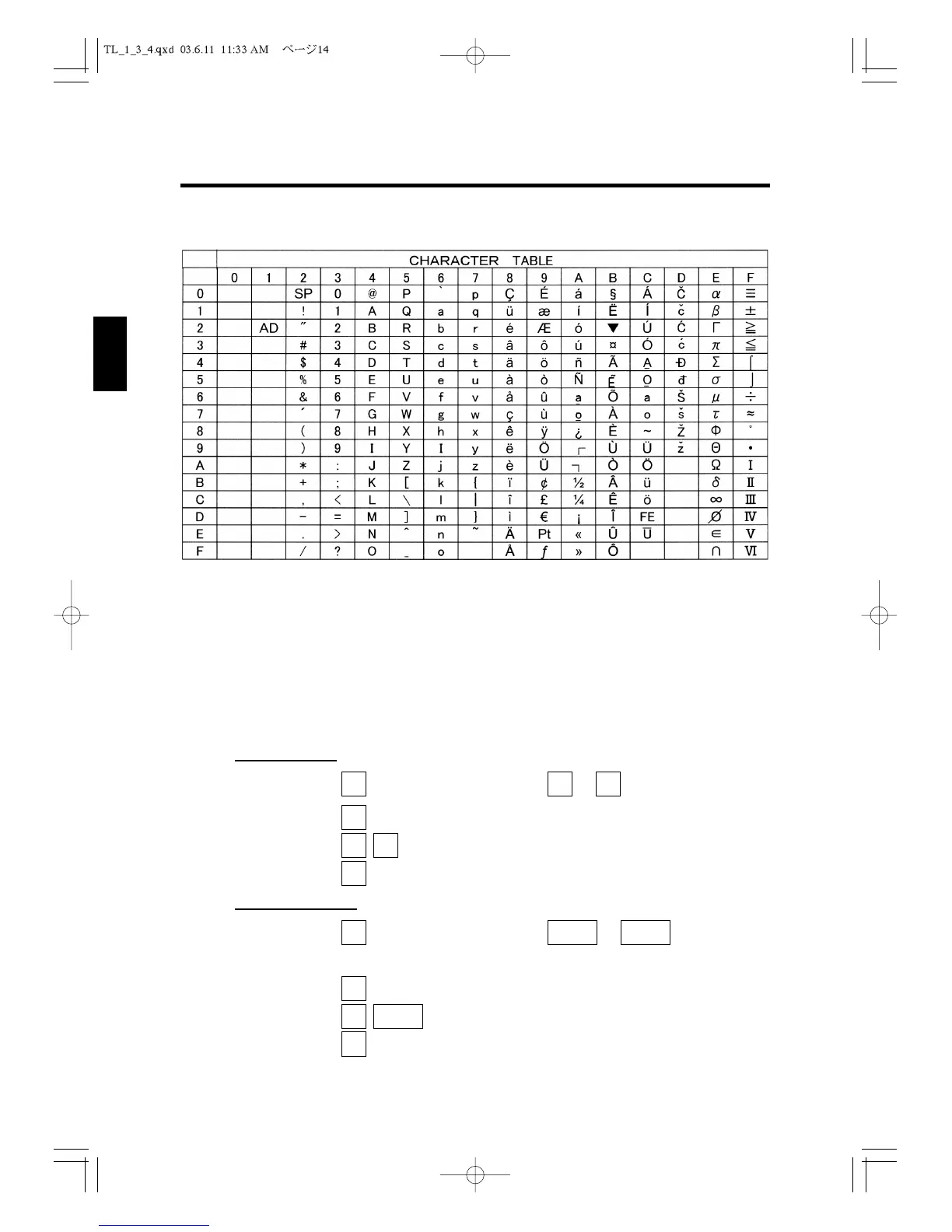
3.2 Character Table
AD (12h) : Double Size Code
SP (20h) : Space Code.
The letters of A to Z can be input directly from the keyboard.
The other characters can be input by ASCII code.
The following keys are used to input by ASCII code :
Control lock key position : P1 or P2
Flat K/B Model
Keys: , numeric keys (0 to 9), and to (A to F)
Example : To enter in ASCII mode
The symbol mark of “*” (2A) is input.
To return to normal entry mode
Raised K/B Model
Keys: , numeric keys (0 to 9), and to
(Department 1 to 6 keys correspond to A to F in ASCII code respectively.)
Example : To enter in ASCII mode
To enter the symbol mark of “+” (2B).
To return to entry mode
CODE
LETTER
2D
E
F
2
CODE
LETTER
6P
Q
R
1A
B
C
CODE
LETTER
CODE
LETTER
COD
E
A
2
CODE
LETTER
COD
E
F
COD
E
A
CODE
LETTER
3. Programming Layout
14
1
2
3
4
5
6
7
8
9
10
11
12



 To Next Page