62 63
SETUP
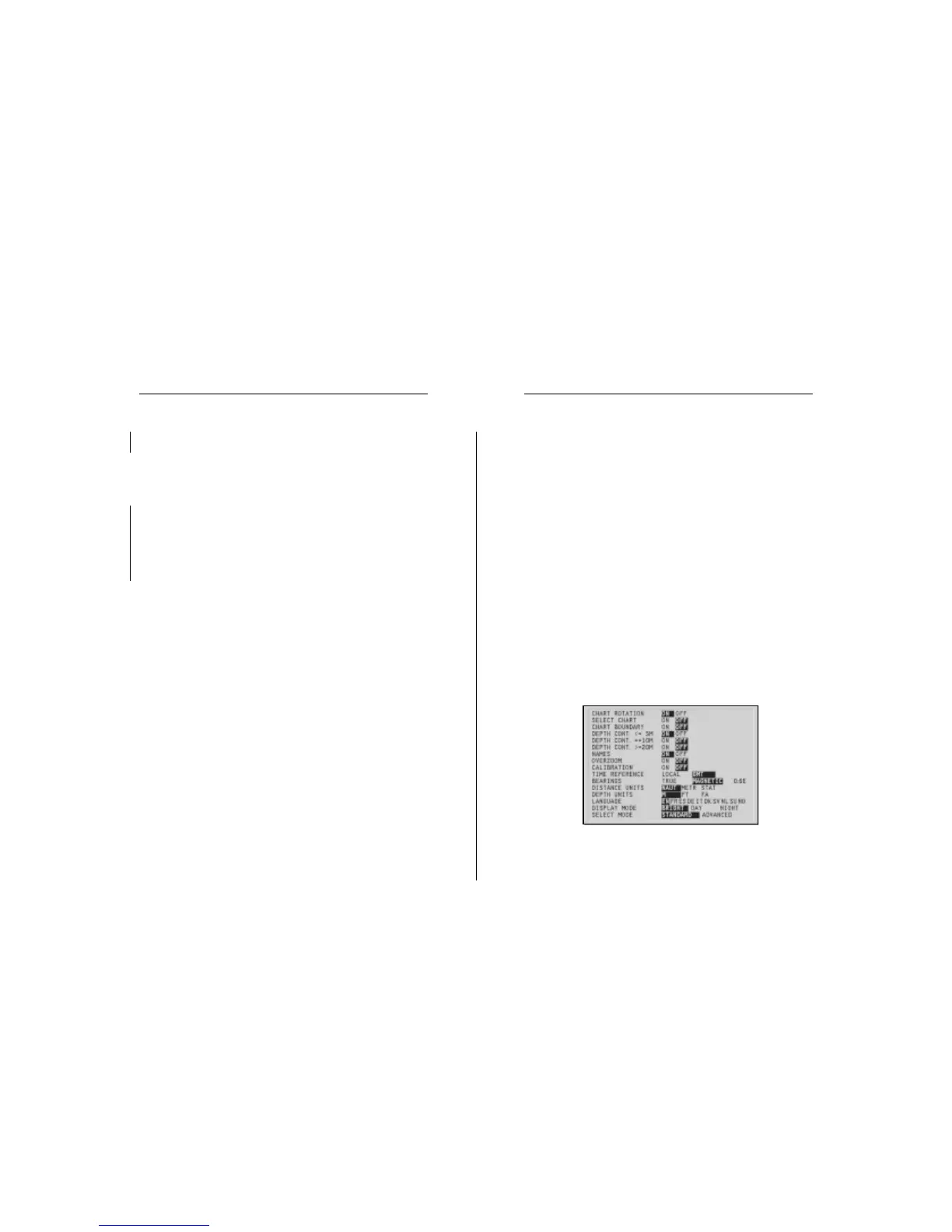
The SETUP menu allows setting the available options. De-
pending on the mode selected, the number of options will
change.
To access the SETUP menu, press PAGE repeatedly until the
main menu shows up, select the SETUP item, then use the
joystick to browse through the options and change the set-
tings.
STANDARD MODE
• Chart Rotation (ON/OFF)
Enables/disables the chart rotation.
• Select Chart (ON/OFF)
Allows selecting the chart to load from the CompactFlash™.
• Chart Boundary (ON/OFF)
Enables/disables the drawing of the boundary of the chart.
• Depth Contours (ON/OFF equal to/below 5 meters; equal
to 10 meters; equal to/above 20 meters)
Enables/disables the display of depth contours.
• Names (ON/OFF)
Enables/disables the display of geographical names.
Use the joystick to select the set desired and confirm, or press
PAGE to exit.
Deleting a set of markers
Press the PAGE key to display the menu, select MARKER, DE-
LETE and press ENTER to confirm.
The catalog that lists the sets of markers stored in the
CompactFlash™ will show the CURRENT item indicating the
set currently displayed.
Use the joystick to select the set of markers to delete and to
confirm. When selecting CURRENT, the set of markers cur-
rently displayed will be deleted.
Advanced
Advanced
Markers Setup


 To Next Page