Page 11 of 27
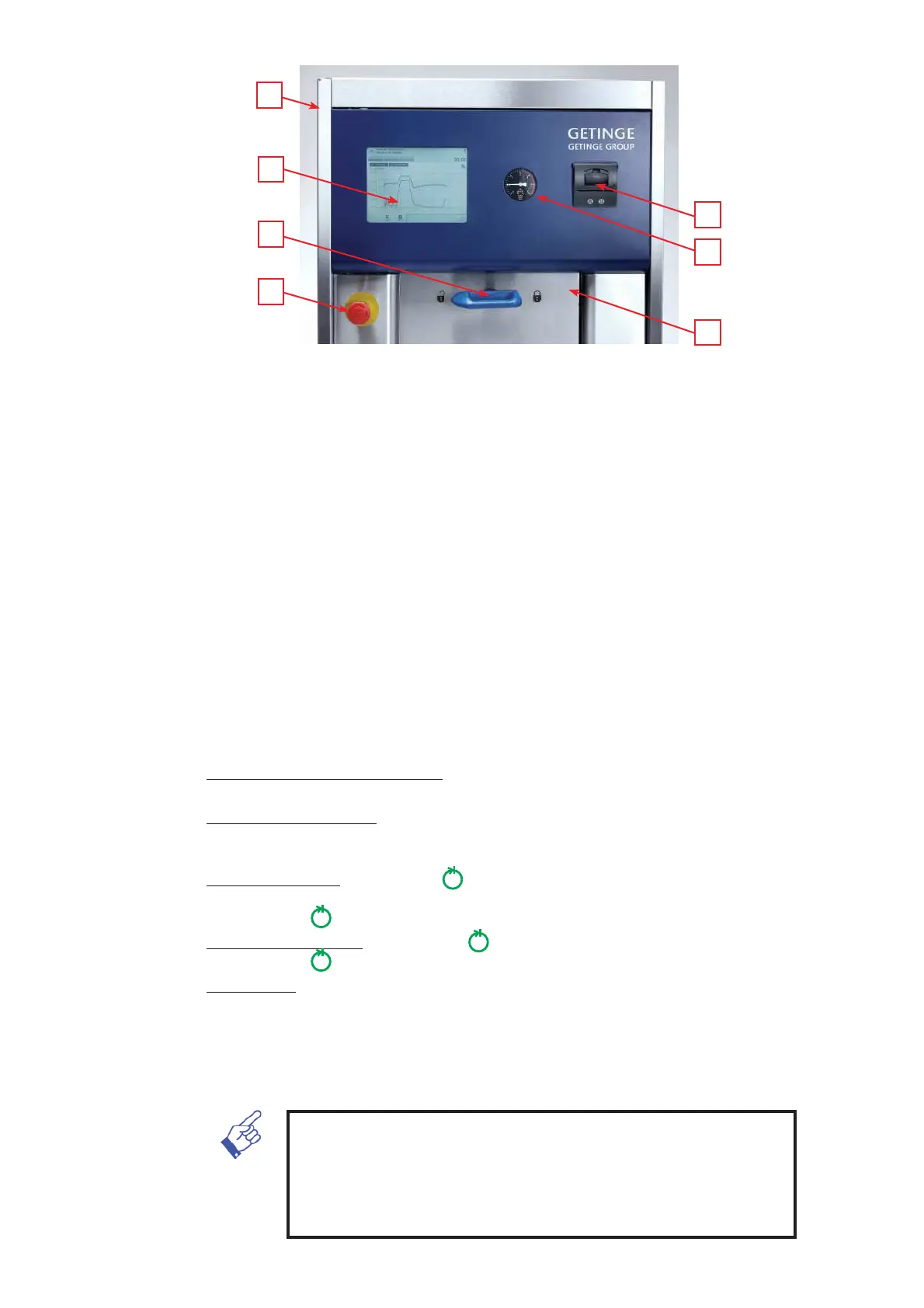
18 Display unit
The display shows the current status, program progress, number of minutes after
program start, number of completed cycles and error codes. On the double door
version also on the unloading side.
19 Handle (only on sterilizers with manual door function).
20 Emergency stop
Press in the switch if an emergency situation arises and the process needs to be
interrupted. Release by turning the switch clockwise a quarter turn.
21 Printer
Thermal printer that registers independently of the process parameters, e.g. pres-
sure, temperatures, time, process number, etc.
22 Pressure gauge
Shows the chamber pressure. On the double door version also on the unloading side.
23 RS232 computer connection (optional). Positioned on the rear side of the sterilizer
(single door) or on the left side of the sterilizer (double door).
24 Door
The chamber door is a vertical, easy running sliding door, which via an intermediate
rubber seal is pressed against the chamber when locked.
Closing and locking Manual door: The door is slided to its upper end position using
the handle. The handle is turned clockwise a half turn to lock.
Closing Automatic door: requires the sterilizer to be connected to air and electricity
supplies. Press Close door key (7). When the process starts, the door is locked. The
keys for automatic door operation are unactuated during the entire ongoing process.
Open Manual door: Avanti: press indicator (3) (in the middle of the screen) and
turn the handle anticlockwise half turn.
Classic: When indicator (3) lights, turn the handle.
Open Automatic door: Avanti: Press indicator (3). Press Door open key (6).
Classic: When indicator (3) lights, press Door open key (6). Door opens.
Double door: When a standard program has been run and the display shows
“FINISH” or “FINISH SERVICE only the unloading door can be opened and then
only once (standard requirement). The loading door can be opened and closed
unlimitedly after the unloading door has been closed. After running the leakage test
program, after a process failure or when the process for some other reason has
not been completed, only the loading door can be opened.
NOTE!
In the event of an air or power failure when the automatic door is open, the
door is automatically closed but not locked. When power or air returns,
press the door closing key (7) to close the door and then the door opening
key (6) to open the door to reset the system.
21
22
24
18
19
20
23


 To Next Page