Page 10 of 27
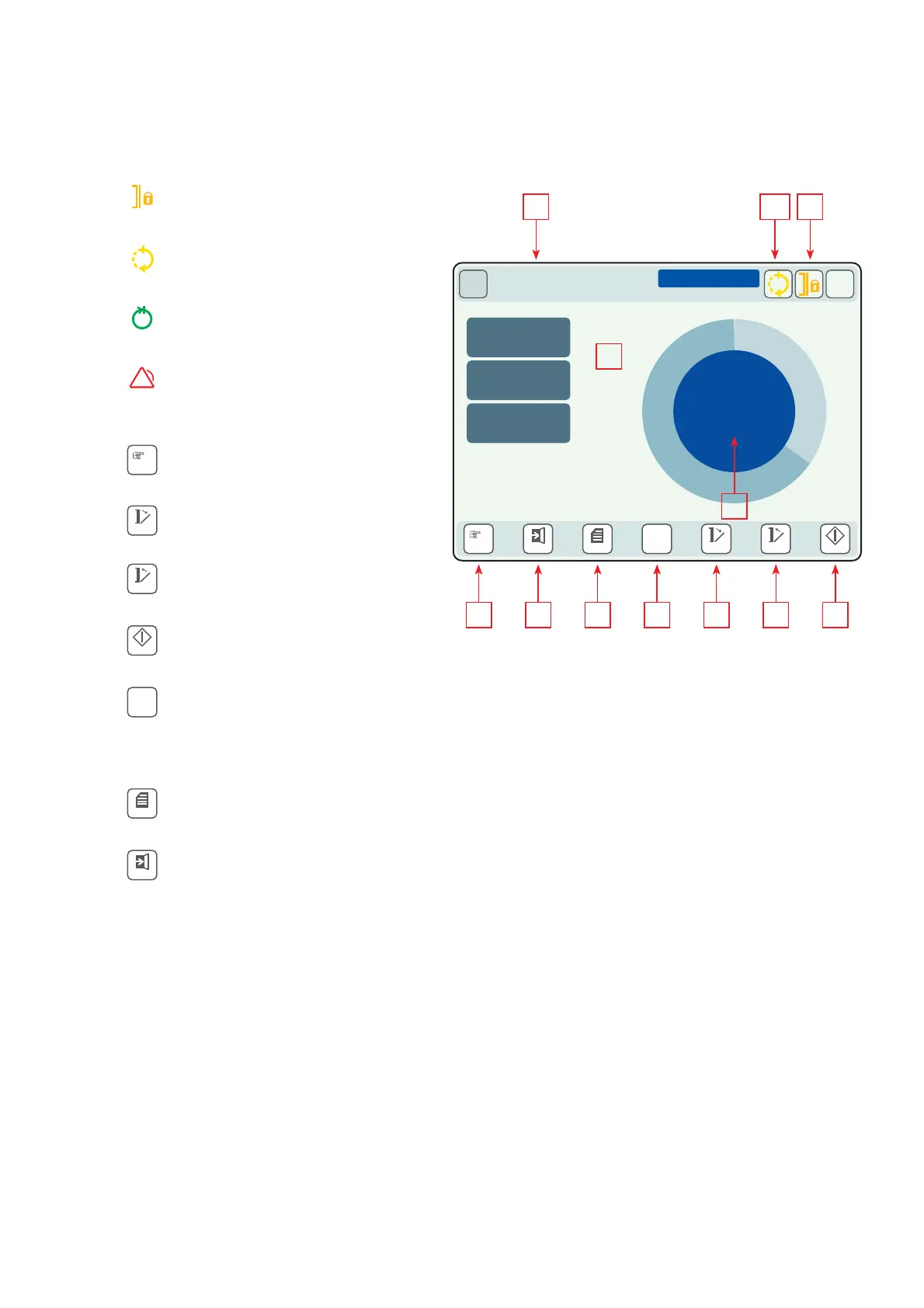
1 Indicator Door locked (only automatic door)
Door in locked positon
2 Indicator Process running
Sterilization process started and running
3 Indicator Process completed
Sterilization process is fi nished
4 Indicator Process stopped
Process interrupted or error (symbol in the
middle of the panel, panel turns red)
5 Program selection key
Press to change the program
6
Door opening key (only automatic door)
Push to open the door
7 Door closing key (only automatic door)
Push to close the door
8 Start key
Press to start a process
9 Function key (optional)
Press to activate the programmed function.
Shown only if the option is activated. An example
of an option is process and load release.
10 Menu key
Press to display the menu
13 Login-/logout key
For navigation in the menu
CONTROL PANEL LAYOUT
PASSWORD - PIN
Some programs, functions or menus are protected against accidental or
unauthorized use by a pin code. There are different pin codes for different
access levels. To enable a protected program, a function or a menu, enter
the current pin code. Pin code should be used only by authorized personnel.
The general pin code for users is 558
5 13 9 6 7 810
Start
+
More
Menu
Login OpenCycles
P1
P2
00:05:15 TEXTILES 134
00:00:15 01 STERILIZATION
STERILIZATION
P01
3.162 BAR
PRESSURE
135.5 C
STEAM-TEMP
135.4 C
CHAMBER
00:09
?
2-3 114
16
15
Close
!
Cycles
P1
P2
Login
Menu
+
More
Start
Close
Open
14 Process mode
15 Remaining process time indication
16 Temperature and pressure indication
17 Information
E.g. process phase, door open, check water quality
Display
Illuminated symbols are optional and can be activated
by means of illuminated buttons 9-12.
Dimmed icons are inactive.
CONTROL PANEL - AVANTI
DOUBLE DOOR - LOADING SIDE


 To Next Page