GFI FaxMaker Pre-installation action: Configure mail server | 19
NOTE: When RFC822 phrase handling is enabled on outbound email, the fax number
appears twice when GFI FaxMaker sends the fax. To resolve this, perform the
following from Notes Administrator:
1. Select Configuration Tab ► Messaging ► Configurations.
2. Click Edit Configuration on the server with the GFI FaxMaker mailbox.
3. Select the MIME tab ► Advanced Tab ► Advanced Outbound Message Options
tab.
4. Set RFC822 Phrase Handling to Do not add phrase.
Lotus Notes 4 and 5
Step 1: Create a dedicated database for GFI FaxMaker
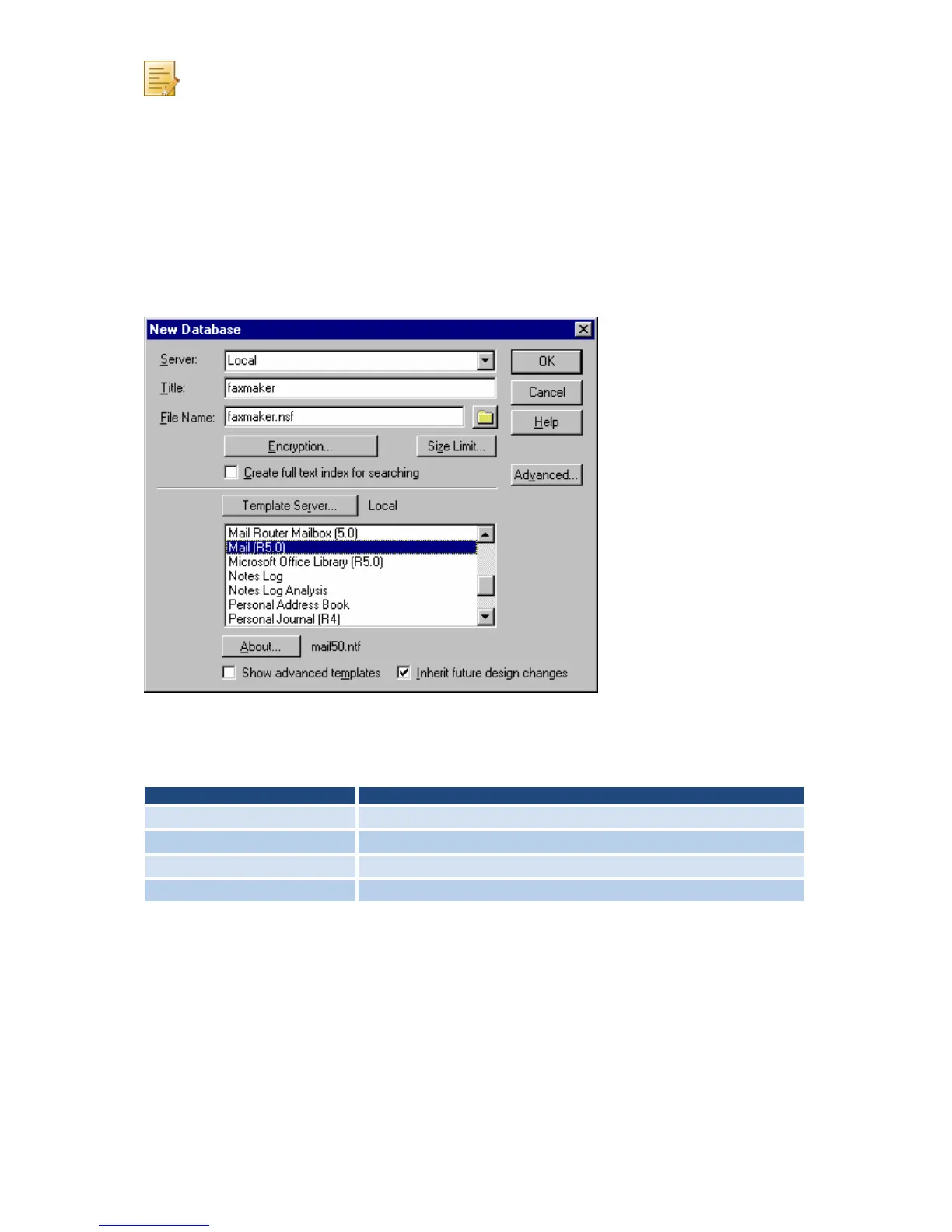
Screenshot 11 - Creating a Notes Fax database
1. In the Notes Workspace select File ► Database ► New.
2. In New Database dialog, set the following options:
Table 7 - Create database options
Click OK.
3. Right-click new database and select Access Control.
4. In Manager rights, enable Delete document option.
Step 2: Define the database as a POP Mailbox
1. From the Notes Workspace, navigate to Server and open the server Address book.
2. Click Add Person.
3. From Basics tab, enter a Name and Password for the Mailbox and set the user name
Fax.



 To Next Page