2 | Introduction GFI FaxMaker
1.4 How GFI FaxMaker works - Sending faxes
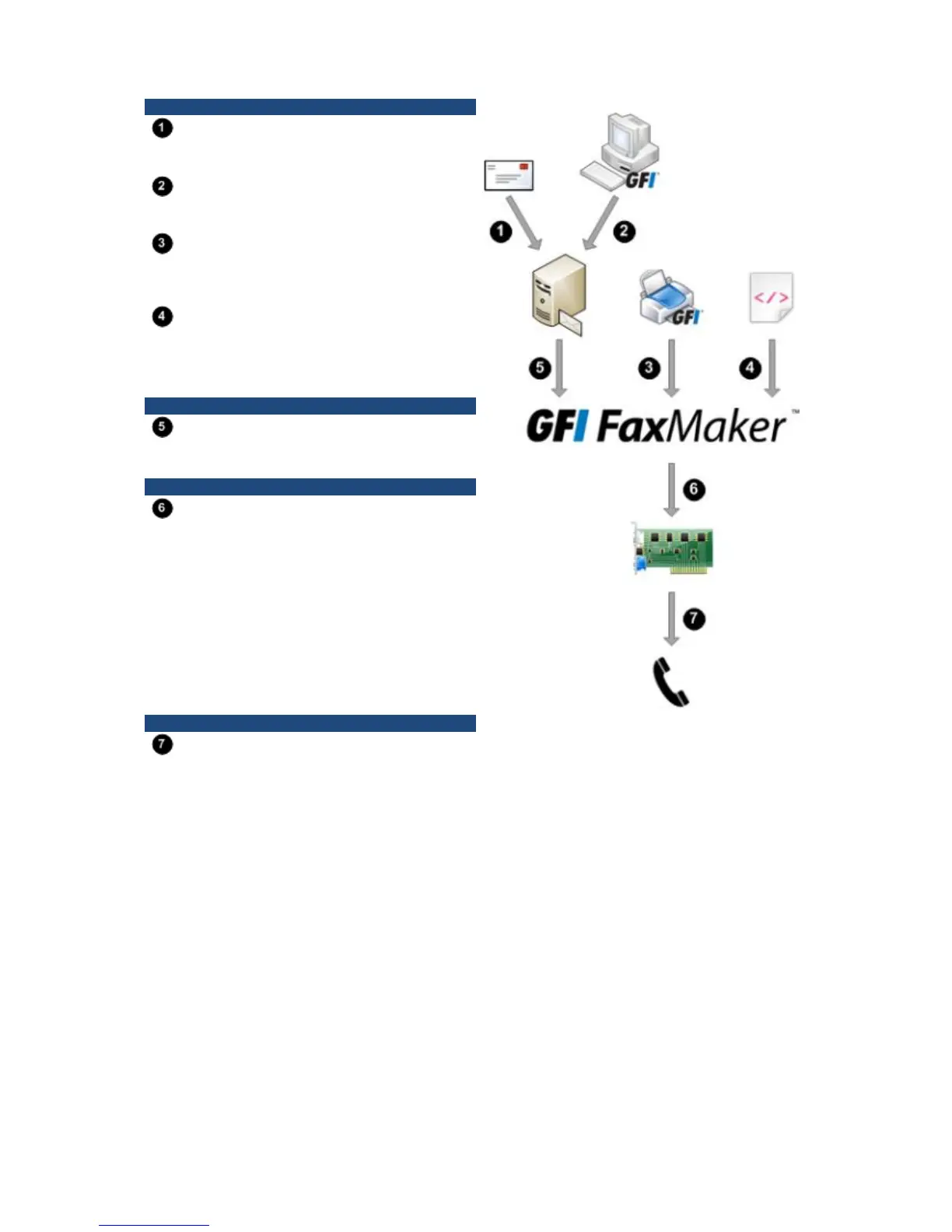
STEP 1: VARIOUS METHODS USED TO SEND A FAX
Email: User sends fax via an email addressed
to 1111@faxmaker.com (where 1111 is the fax
number of the recipient).
GFI FaxMaker Client: User uses a GFI
FaxMaker client application installed on his/her
machine to send faxes.
NetPrintQueue2Fax: Users ‘print’ content to
send by fax to the NetPrintQueue2Fax printer
driver. NetPrintQueue2Fax sends content to GFI
FaxMaker for processing.
Text & XML API: Send faxes by configuring a
text or XML file (API) and submit it to a central
folder. GFI FaxMaker automatically picks up faxes
stored within this folder.
STEP 2: MAIL SERVER ROUTES FAX TO GFI FAXMAKER
Mail server: Routes emails addressed to
*@faxmaker.com to the GFI FaxMaker server.
STEP 3: GFI FAXMAKER PROCESSES FAX CONTENT
GFI FaxMaker: Processes received content
and prepares it for transmission. Amongst others,
GFI FaxMaker:
» Resolves and formats the number to dial
» Converts content to fax format
» Adds any coverpages
» Adds any headers and footers
» Delivers content to fax device ready for
transmission
Fax Transmission: Fax device connects with
recipient and transmits fax.



 To Next Page