Gigaset IP BASE / SBG IE-UK-International en / A31008-M3037-S301-1-X119 / starting_SBG.fm / 3/12/24
Template Module, Version 2.2, 15.11.2022 / Version - 07.07.2020
7
Getting started
Package contents
• One base station, one plug-in power supply unit for the base station, one LAN cable
• One installation guide, one supplementary sheet
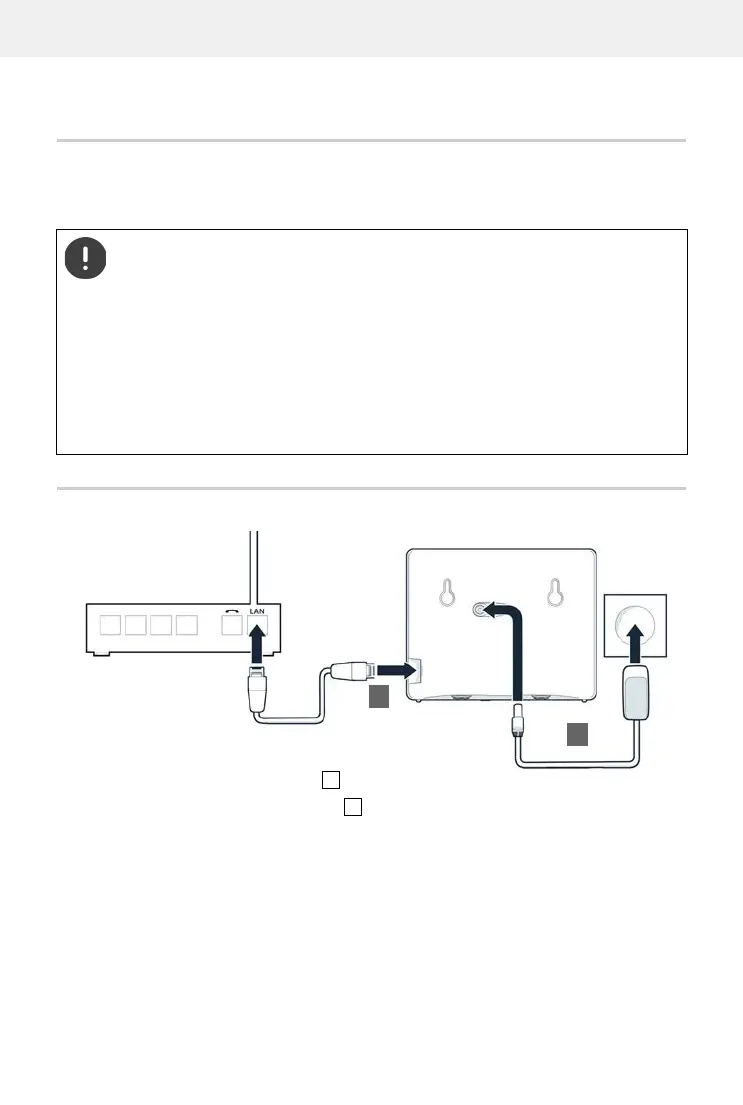
Connecting the telephone
Connect the LAN port on the device to the local network, e.g. using a router or switch.
Connect the device to the mains power .
The telephone is designed for use in closed, dry rooms within a temperature range of
+5°C to +45°C.
Position the base on a level, non-slip surface at a central point in the flat or house. The
device's feet do not usually leave any marks on installation surfaces. However, due to
the multitude of different varnishes and polishes used on furniture, contact marks on
the surfaces cannot be completely ruled out.
Never expose the telephone to heat sources, direct sunlight or other electrical
devices.
Protect your telephone from moisture, dust, corrosive liquids and vapours.
In the case of wall mounting, a height of 2 m must not be exceeded.



 To Next Page