SLX
0635-999-05---08p_2017.12.indd
0635-999/06p
Page 15 of 30
Operator manual
4 CONTROL
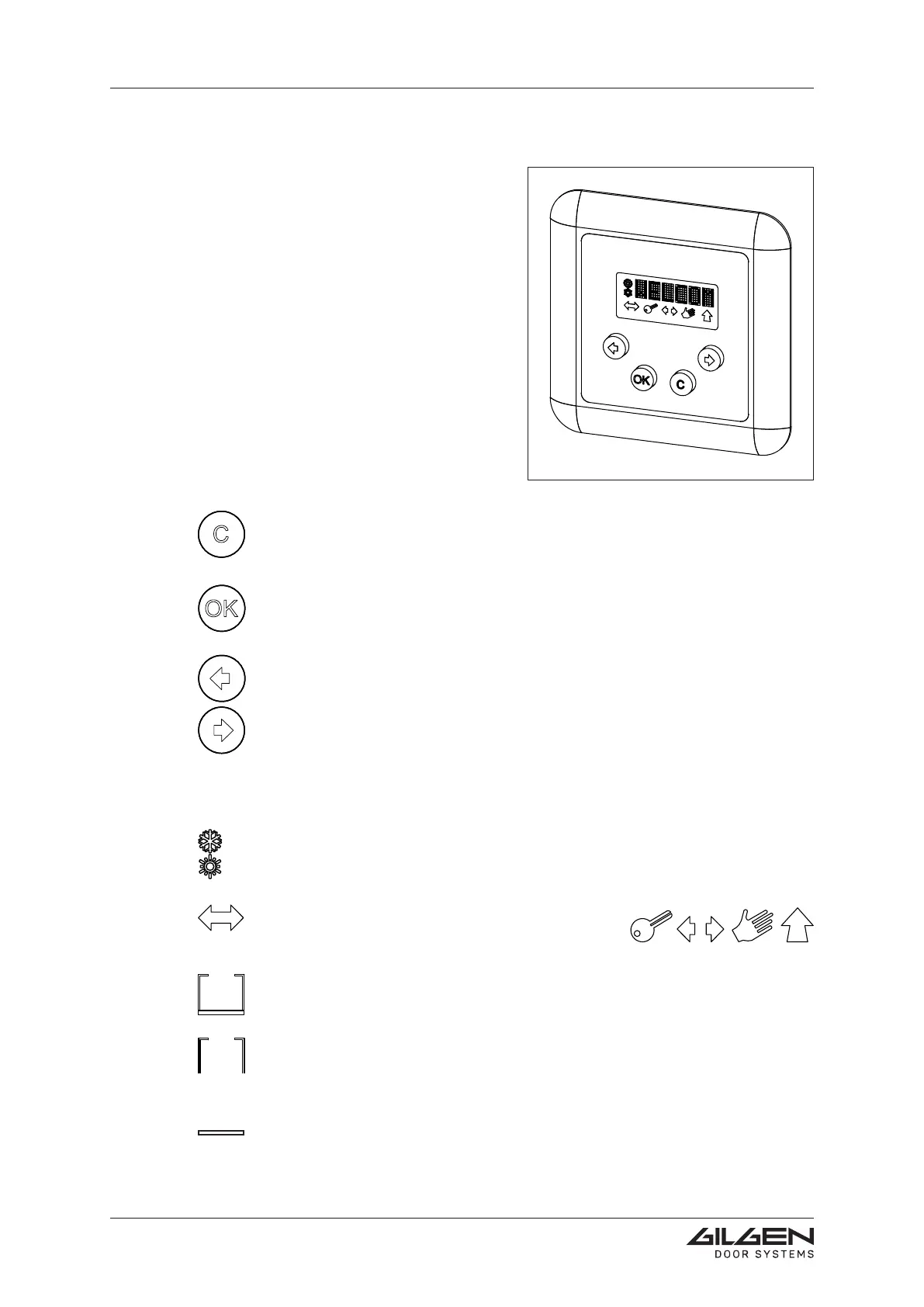
4.1 D-BEDIX (option)
The different operating modes can be
directly enabled by means of the D-BEDIX.
In addition, it provides easy programming of
the most important door settings.
The operating modes, menu settings as well
as possible errors are displayed in a clearly
arranged synopsis.
Only one D-BEDIX can be connected per
door installation.
4.1.1 Keys
C-key (Cancel)
• Exitthemenu
• Invalidate entry
OK-key
• Conrmtheselection
• Conrmtheentry
Arrow keys
• Navigate within the menus
• Short simultaneous actuation of both keys = acces to the menu level
4.1.2 Symbols
Opening width
• Winter = reduced opening width
• Summer = complete opening width
Operating mode symbols
• Show the possible operating modes
(see chapter: Operating modes)
Selection frame (active and preselected operating mode)
• Shows what has been presently selected.
Selection frame (active operating mode)
• Shows what has been presently selected but is still inhibited. A control ele-
ment with higher priority (e.g. key-operated switch) determines the operating
mode.
Bar (preselected operating mode)
• Shows the preselected operating mode.



 To Next Page