CP30 INSTRUCTION MANUAL
56
To Switch Between Alpha Name or SelCall Ident:
1. Press
CALL
LOCK
to enter the CALL Menu.
2. Rotate the Channel Selector knob or press the keys to cycle
to the SAVED option then press
MENU
F
to select.
3. While displaying a contact (it doesn’t matter which one), press
MENU
F
to
toggle between the Ident and the Alpha Name. The option you select
will determine how incoming SelCall contacts will be displayed on the
LCD.
4. When nished, press
CALL
LOCK
several times to exit the CALL menu.
5. Hold the
PRO
DUP
key.
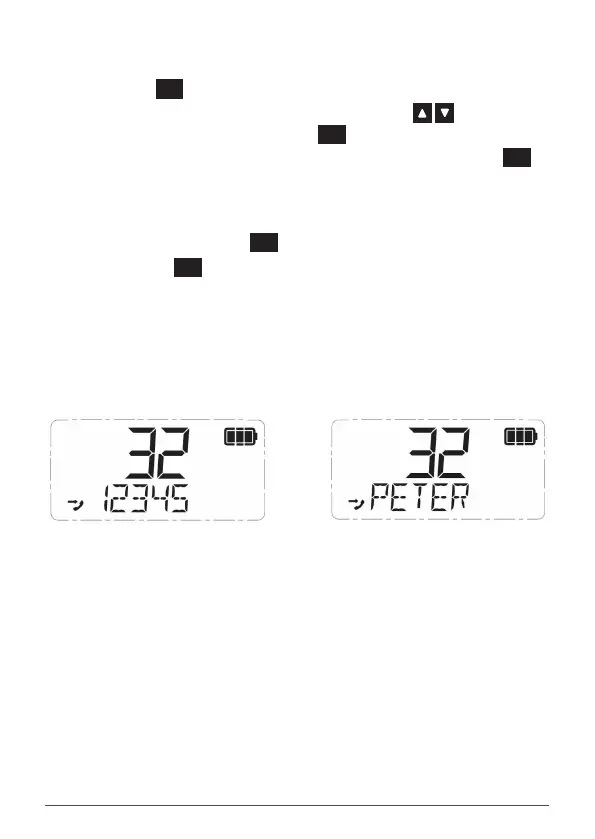
6. SCALPH ON or SCALPH OFF will be displayed briey.
• SCALPH ON (SelCall Alpha On) indicates the Alpha mode is on.
If the incoming SelCall is in your contact list, the associated
Alpha Name will be displayed.
• SCALPH OFF (SelCall Alpha O) indicates the Ident mode is on.
All incoming SelCalls will display their Ident.
NOTE: The SelCall Alpha/Ident toggle option described above is the default setting when holding
the PRO key. However the PRO key is user programmable and can be changed. If so, the HOLD
function on your PRO key may have a different operation. In this case follow the steps below to
switch between the Alpha and Ident modes.
1.
Press to enter the CALL Menu.
2.
Rotate the Channel knob or press the keys to cycle to the SAVED option then
press to select.
3.
While displaying a contact (it doesn’t matter which one), press to toggle between
the Ident and the Alpha Name. The option you select will determine how incoming SelCall
contacts will be displayed on the LCD.
4.
When finished, press several times to exit the CALL menu.
NOTE: If an Alpha Name has not been programmed for the incoming contact, ‘– – – – – ’ will be
displayed.
QUIET MODE
The QUIET mode mutes the TX6600S’s receiver to prevent any incoming signals from being heard
in the speaker until your SelCall Ident is received. This allows you to monitor a busy channel for
personal calls without being disturbed by unwanted signals.
If your SelCall Ident is received, the QUIET mode is cancelled and all incoming signals are heard in
the speaker.
Setting up the QUIET mode
To setup the QUIET mode you must first ‘tag’ the channels that you want to stay Quiet. You can
then activate the QUIET mode and only the channels you have tagged will remain Quiet to
incoming signals (unless your SelCall Ident is received). Channels that were not tagged will remain
open to all signals and will continue to operate normally.
To tag or un-tag a channel for QUIET operation
1. Rotate the Channel knob or press the keys to select the desired channel.
2. If the icon is visible to the right of the channel number, the channel is currently tagged
for quiet operation. If the icon is not visible, the channel is not tagged.
i. To tag the channel, hold the key. QT CH On will be displayed briefly and the
icon will appear to the right of the channel number.
SelCall Alpha OFF
SelCall Alpha ON
NOTE: If an Alpha Name has not been programmed for the incoming contact,
‘– – – – – ’ will be displayed.
Quiet Mode
The quiet mode mutes the CP30’s receiver to prevent any incoming signals from
being heard in the speaker until your SelCall Ident is received. This allows you to
monitor a busy channel for personal calls without being disturbed by unwanted
signals.
If your SelCall Ident is received, the quiet mode is cancelled and all incoming
signals are heard in the speaker.



 To Next Page