2.1 Menu and control keys
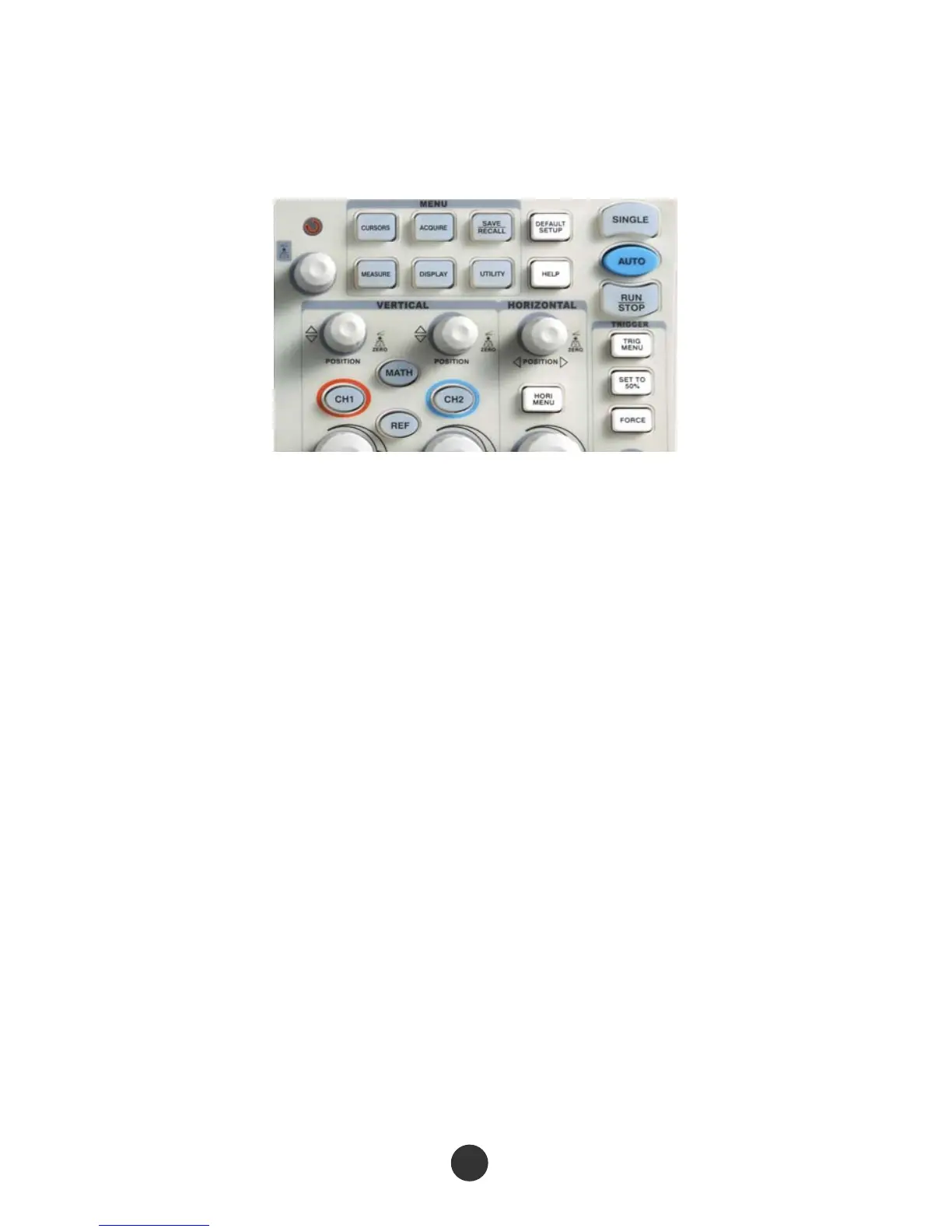
As shown in the figure below :
Figure 2-1 Control keys
All the keys are described as follows:
[CH1], [CH2]: display setup menus of channel 1 and channel 2.
[MATH]: display “ARITHMETICAL OPERATION” function menu.
[REF]: display “REFERENCE WAVEFORM” menu.
[HORI MENU]: display “HORIZONTAL” menu.
[TRIG MENU]: display “TRIGGER” control menu.
[SET TO 50%]: set the trigger electric level as midpoint of the signal amplitude.
[FORCE]: It is used for finishing acquisition of the current waveform no matter
whether the oscilloscope detects trigger, and it is mainly applied to “NORMAL”
and “SINGLE” in the trigger mode.
[SAVE/RECALL]: display the “SAVE/RECALL” menu of setups and waveform.
[ACQUIRE]: display the “ACQUIRE” menu.
[MEASURE]: display the “MEASURE” menu.
[CURSORS]: display the “CURSOR” menu. The [UNIVERSAL] knob can be used for
regulating the position of the cursor when the “CURSOR” menu is displayed and
the cursor is triggered.



 To Next Page