Baserunner V6 User Manual
Rev0
5 Phaserunner Software Suite
The Baserunner V6 is already preconfigured if it is purchased as part of a
conversion kit from Grin, no tuning of the parameters should be necessary and
this section can be skipped.
Otherwise, programming requires a computer, a TTL-USB programming cable,
and the V2.0 or later Phaserunner Software Suite. The V1.7 and earlier software
releases will give an “unrecognized device” error message.
This software is available for Linux, Windows, MacOS and Android (beta) from
our webpage:
http://www.ebikes.ca/product-info/phaserunner.html
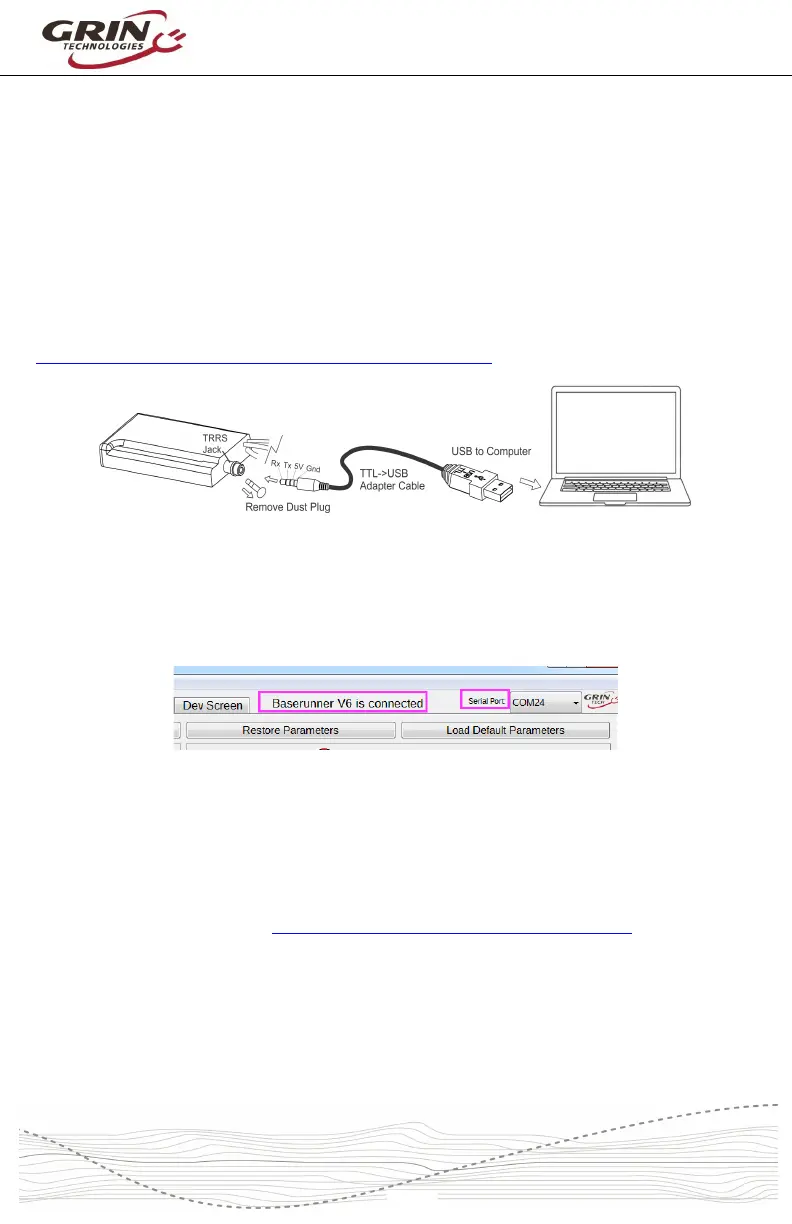
With the Baserunner V6 powered on, plug in the TTL->USB cable from your
computer to the device. There may be a dust plug on the TRRS port that must be
pulled out first. After launching the Phaserunner Suite software, select the COM
port associated with the USB cable and you should see “Baserunner V6 is
connected” on the top.
If you see “Controller is not connected,” check that the selected serial port is
correct and that the USB->TTL device shows up in your device manager as a
COM port (Windows), ttyUSB (Linux), or cu.usbserial (MacOS).
If your system does not recognize the USB serial adapter, or has frequent COM
timeouts, then you may need to download and install the latest virtual COM port
drivers directly from FTDI: http://www.ftdichip.com/Drivers/VCP.htm
During the setup process we recommend having the controller powered by a
battery pack and not a general power supply, as electrical noise from power
supplies can interfere with stable communication.



 To Next Page