Baserunner V6 User Manual
Rev0
5.1 Software Suite Interface
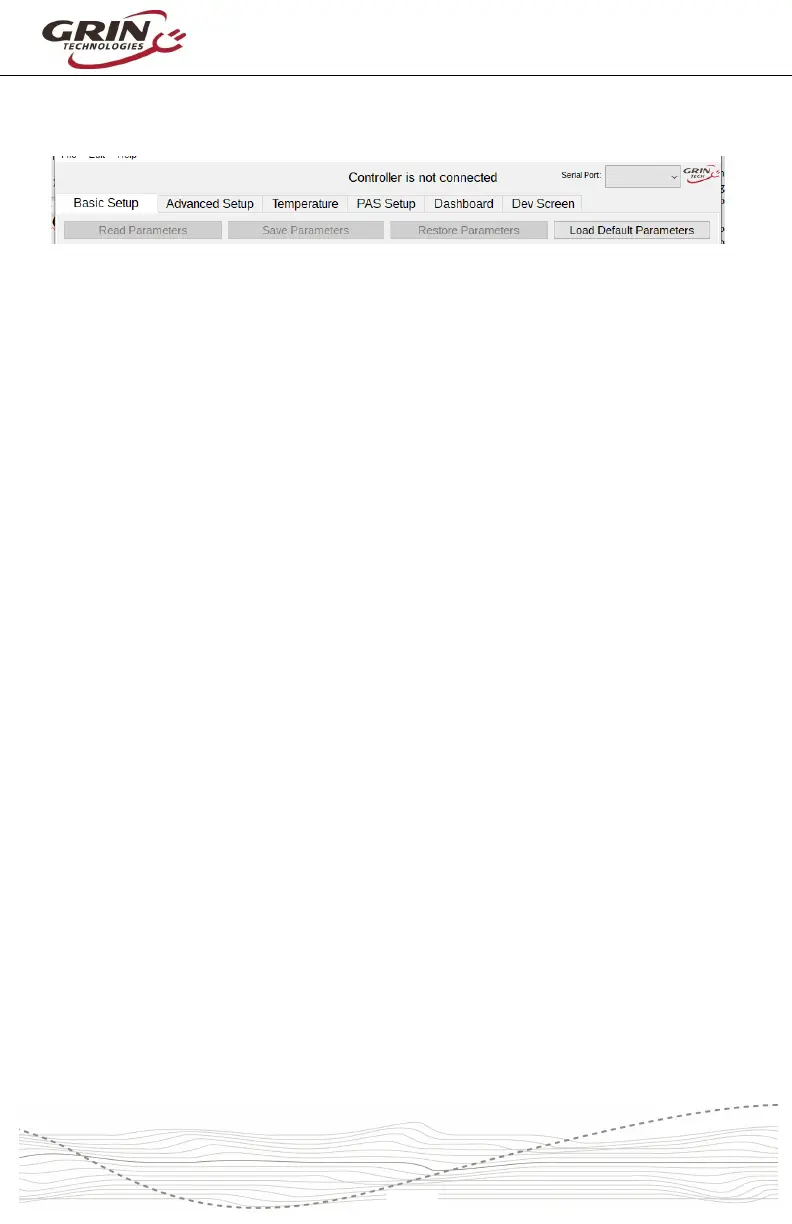
The software suite is divided into 6 separate tabs for different functions:
Basic Setup - This tab allows you to configure the motor parameters, power,
speed, and current limits, torque ramping, and other commonly adjusted
behaviors. It also shows any active controller faults or warnings.
Advanced Setup - This tab has values that require deeper system familiarity to
modify, such as throttle mapping, fault voltages, and sensorless start behavior.
Temperature - The temperature tab is for configuring thermal rollback for motors
that have an internal temperature sensor hooked up to the controller. Generally
this internal rollback is only used on systems without a Cycle Analyst.
PAS Setup - The pedal sensor tab is only present if the controller has pedal
sensing activated, ie. it does not show up in Cycle Analyst systems. This is
where Cadence or Torque sensor parameters are configured, along with the
behavior for each assist level.
Dashboard - The dashboard presents a real-time view of all the what’s going on,
including battery voltage, amps, pedal torque, vehicle speed, motor RPM, assist
level etc. The exact list of items shown will automatically change based on the
controller configuration.
Any of the values displayed can also be selected for plotting on a graph and later
saved for analysis and diagnostics purposes.
Dev Screen - The Dev Screen provides a behind the scenes look at all
communication between the software suite and the actual motor controller. It
shows a list of all currently unsaved parameters, it allows you to read or write
individual parameters by address, and also update the controller firmware.



 To Next Page