Baserunner V6 User Manual
Rev0
2.6 Communication Port
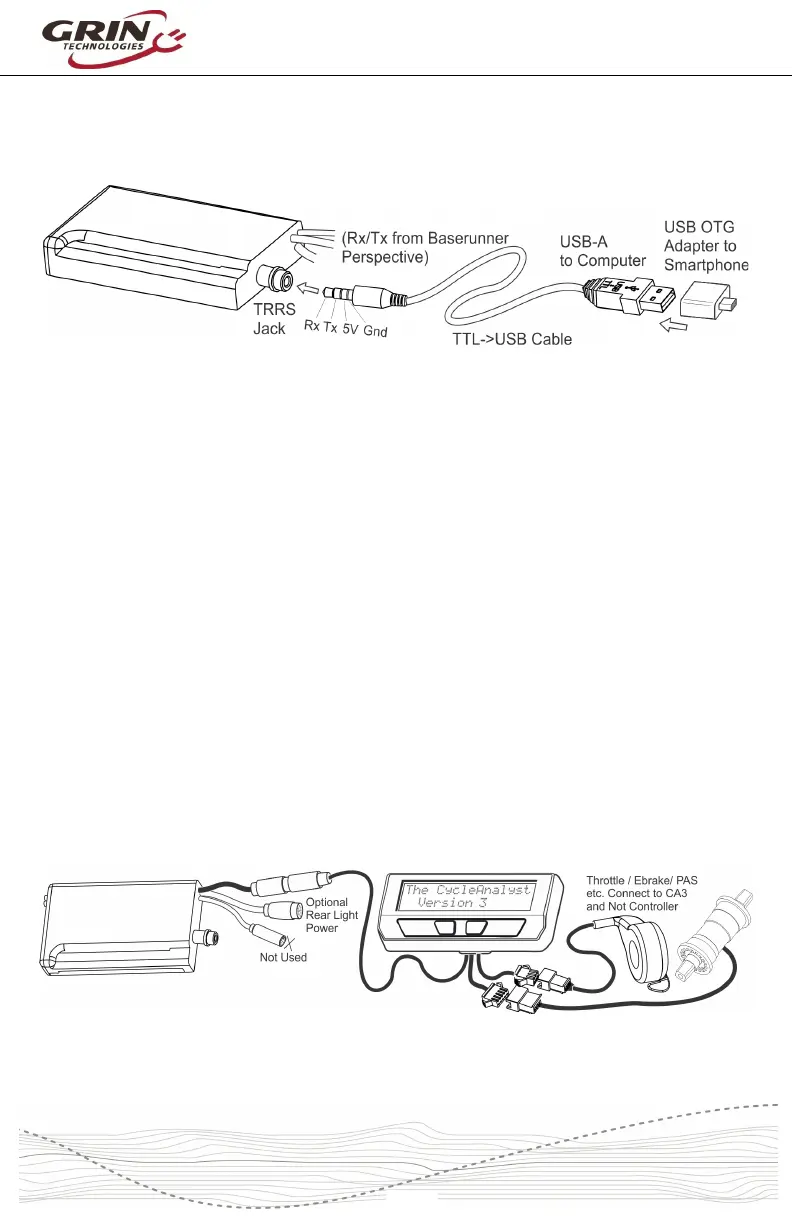
A TRRS jack embedded in the controller can be used for connecting to a
computer, Android smart phone, or potential Bluetooth dongle (future product).
The communication standard uses a 0 to 5V level serial bus. Grin produces a 3m
long TTL->USB adapter cable to connect the unit with the USB port of a standard
computer. This is the same communication cable used with the Cycle Analyst
and Satiator products. Third party USB->Serial cables, such as FTDI’s part
number TTL-232R-5V-AJ are also compatible.
An additional USB-OTG adapter is needed when connecting to an Android
smartphone via the phone's smaller Micro USB or USB-C port.
3 Wiring Strategies
The Baserunner V6 has three supported hookup modes. It can be connected
under the full control of a V3 Cycle Analyst, under the control of a 3
rd
party
display with a Superharness, or “headless” with no display at all.
3.1 Cycle Analyst Based Hookup
A setup using the latest V3 Cycle Analyst (CA3-WP) provides the most versatility
with mode presets, customizable PAS behavior, advanced regen features, and
easy performance adjustments on the road.
In this arrangement the Baserunner controller acts as a slave device. All throttle,
ebrake, and PAS or torque sensors are plugged in directly to the Cycle Analyst.



 To Next Page