Baserunner V6 User Manual
Rev0
8 Additional Details:
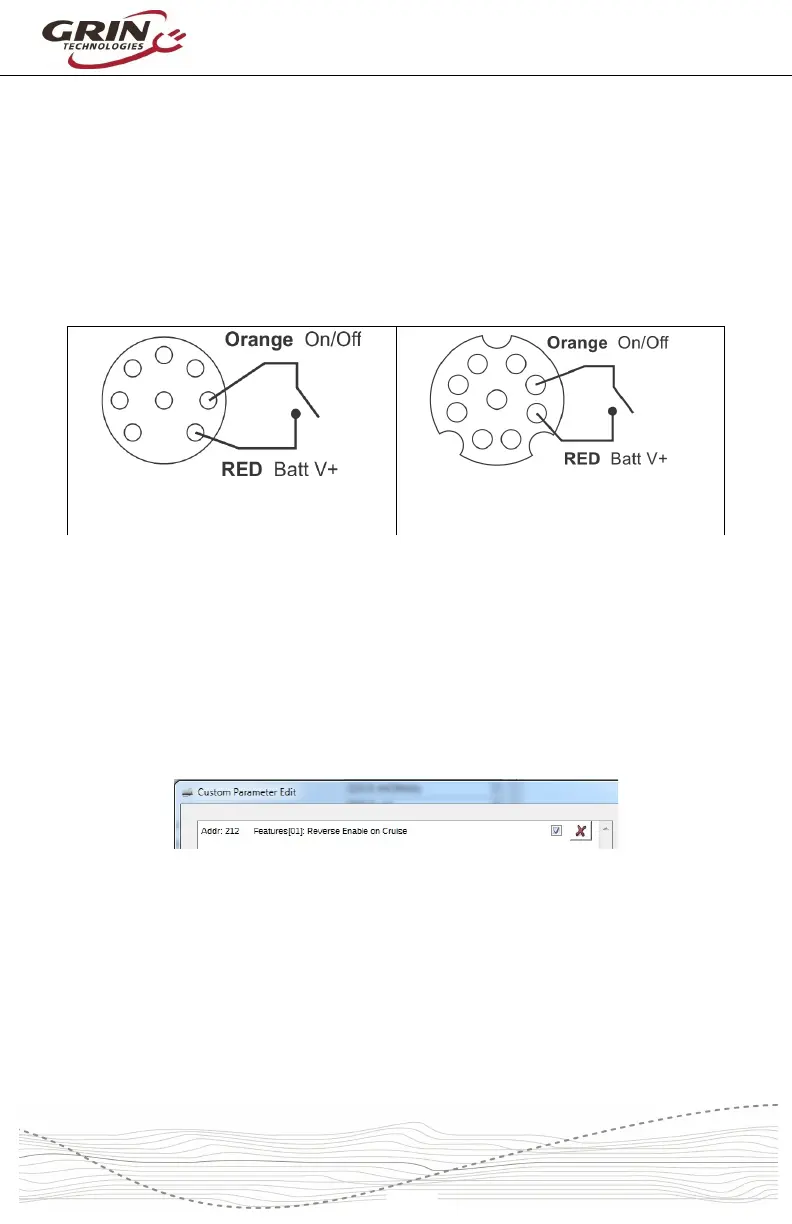
8.1 Turning the Controller On and Off
In order to power up, the Baserunner V6's on/off wire must be shorted to battery
V+, through either the WP8 plug or the Main9 plug. This is accomplished either
with a Cycle Analyst plugged into the WP8 plug, or via the display's on/off with a
Main9 harness. If battery power is applied without the on/off input connected to
V+, the controller won't be turned on and won't connect to a computer.
CA WP8 Plug On/Off Wiring
Main9 Plug On/Off Wiring
8.2 Reverse Mode
The signal PAS 2 used in the 6 pin PAS plug is electrically equivalent to the
FWD/REV pin in the Main9 plug. This input is configured as a reverse switch
input by enabling “Reverse on Cruise” for applications that require direction
reversal. It is enabled by default with Cycle Analyst systems, but is unchecked
with Superharness defaults.
Grin offers an unterminated 6 pin Higo cable that can be wired to any convenient
switch for forwards/reverse control. It is not possible to have forwards/reverse
control with a Superharness system that also has a quadrature (2 wire) cadence
sensor as they share the same digital input signal, and turning the cranks would
cause the motor to alternate forwards and reverse.
If the motor is simply spinning backwards for your application and you want to
change the direction of rotation without adding a fwd/rev switch, then follow the



 To Next Page