Baserunner V6 User Manual
Rev0
6 Setting Up Default Parameters
Basic Setup tab
If the Baserunner V6 was purchased independent of a kit or is being moved from
one ebike system to another, you will need to change it's configuration. With
hardware supplied by Grin, this can all be accomplished in a couple steps using
preloaded defaults for the Controller, the Motor, and the (optional) PAS sensor,
and then customizing the Battery Limits to your pack. .
6.1 Loading Controller Default Parameters
There are two sets of parameter defaults for the motor controller itself depending
on whether it is being run with a V3 Cycle Analyst, or with a Superharness and
3
rd
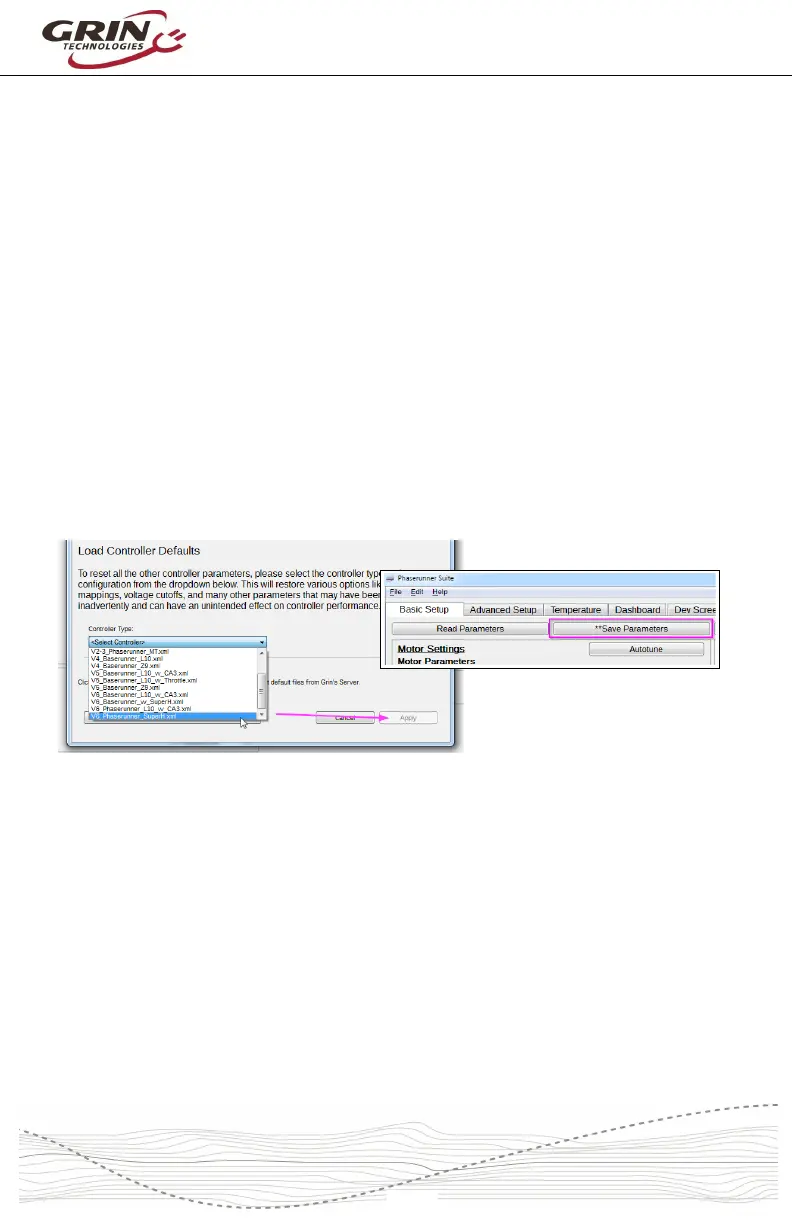
party display. To load Grin’s baseline factory controller settings, click on “Load
Default Parameters” and then open the “Controller Type” dropdown list:
• Select V6_Baserunner_w_CA3 for Cycle Analyst or Headless Systems
• Select V6_Baserunner_w_SuperH for 3
rd
party Display System
Click “Apply”, followed by “Save Parameters”. This restores all parameter
settings except those related to the motor itself to Grin’s factory default
configuration.
6.2 Loading Default Motor Parameters
Unlike a generic trapezoidal or sinewave controller, a field-oriented motor
controller needs to be tuned and configured to match the specific motor it is
driving. Incorrect motor parameters can result in, noisy operation, reduced
efficiency, or constant shutdown faults.
The Phaserunner Software Suite comes equipped with default motor settings for
all the hubs supplied by Grin plus some other common motors. With your
Baserunner V6 connected, click on “Load Default Parameters” and select the



 To Next Page