Baserunner V6 User Manual
Rev0
For motors not listed, either open the motor to count the magnets pairs (and gear
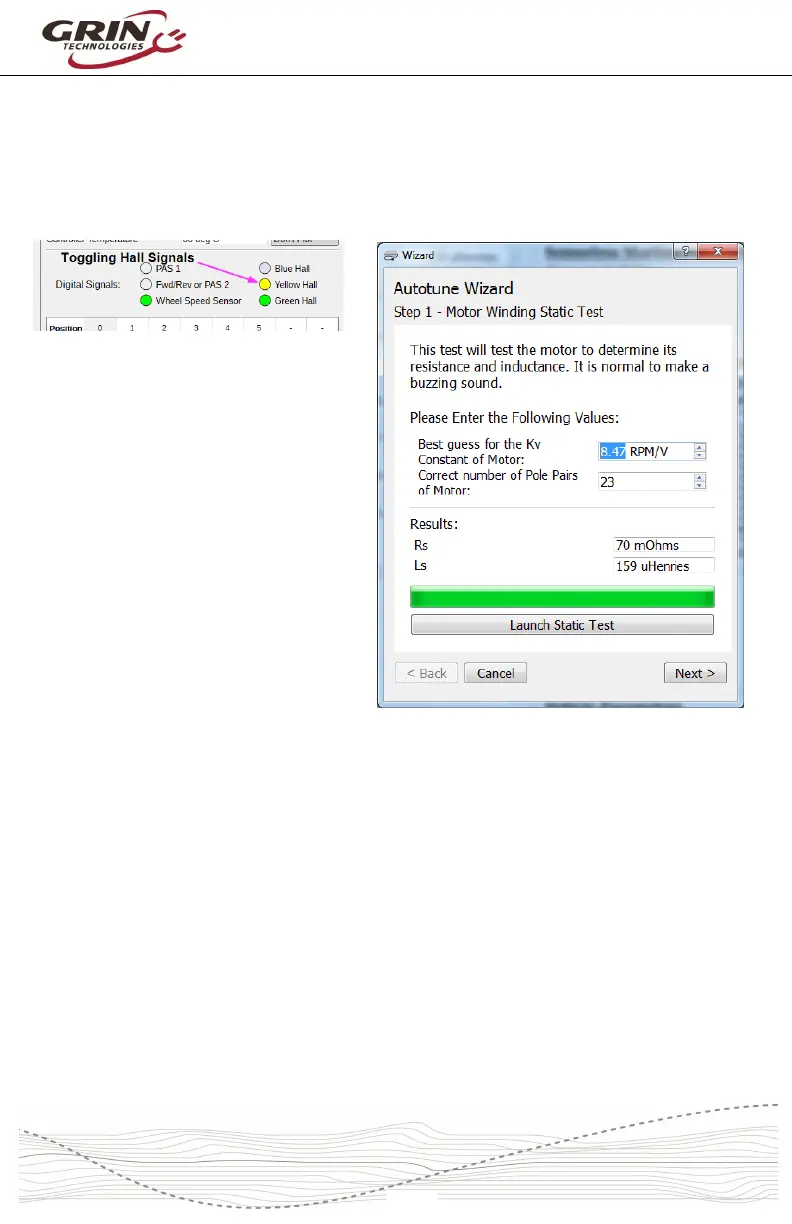
ratio), or count the number of Hall cycles that take place when you manually turn
the wheel backwards one revolution. You can monitor the number of toggling Hall
transitions via the “Dashboard” tab of the software suite.
Once the “kV” and the “Number of
Pole Pair” values are entered, launch
the “Static Test.” This test will produce
three short buzzing sounds, and
determine the inductance and
resistance of the motor windings. The
resulting values will be shown on the
screen.
Next, launch the “Spinning Motor
Test” which will cause the motor to
rotate at about half speed for 15
seconds. During this test, the
controller will determine the actual kV
winding constant for the hub, as well
as the pinout and timing advance of
the Hall sensors if they are present. If the motor spins backwards during this test,
check the box “Flip Motor Spin Direction on Next Autotuning?” and relaunch the
“Spinning Motor Test.”
During the spinning test, the Baserunner V6 will start the motor in sensorless
mode. If the motor fails to spin and just starts and stutters a few times, first
double check your starting values for effective pole pairs and KV. If they are
indeed correct, you may need to adjust the sensorless starting parameters as
described in section 7.3, “Tuning the Sensorless Self Start,” until the motor is
spinning steadily. If the spinning test detects a valid Hall sequence, the final
screen will show the hall timing offset and resulting hall table.
If the direction of rotation is backwards, select the “Flip Motor Spin Direction..”
checkbox and run the spinning motor test again.



 To Next Page