Baserunner V6 User Manual
Rev0
7.9.2 Display Assist Levels
PAS Setup tab
While the Phaserunner supports 3 assist modes, most displays are set to have
between 4,5, or even 9 assist levels, not just three. So these 3 reference points
are further interpolated to provide up to 9 unique settings.
This detail can be confusing. The KM5s display protocol does not communicate
an explicit assist level to the motor controller (ie low, middle, or high). Rather it
transmits a 0-100% PWM value, and the controller is left to interpret this. ASI
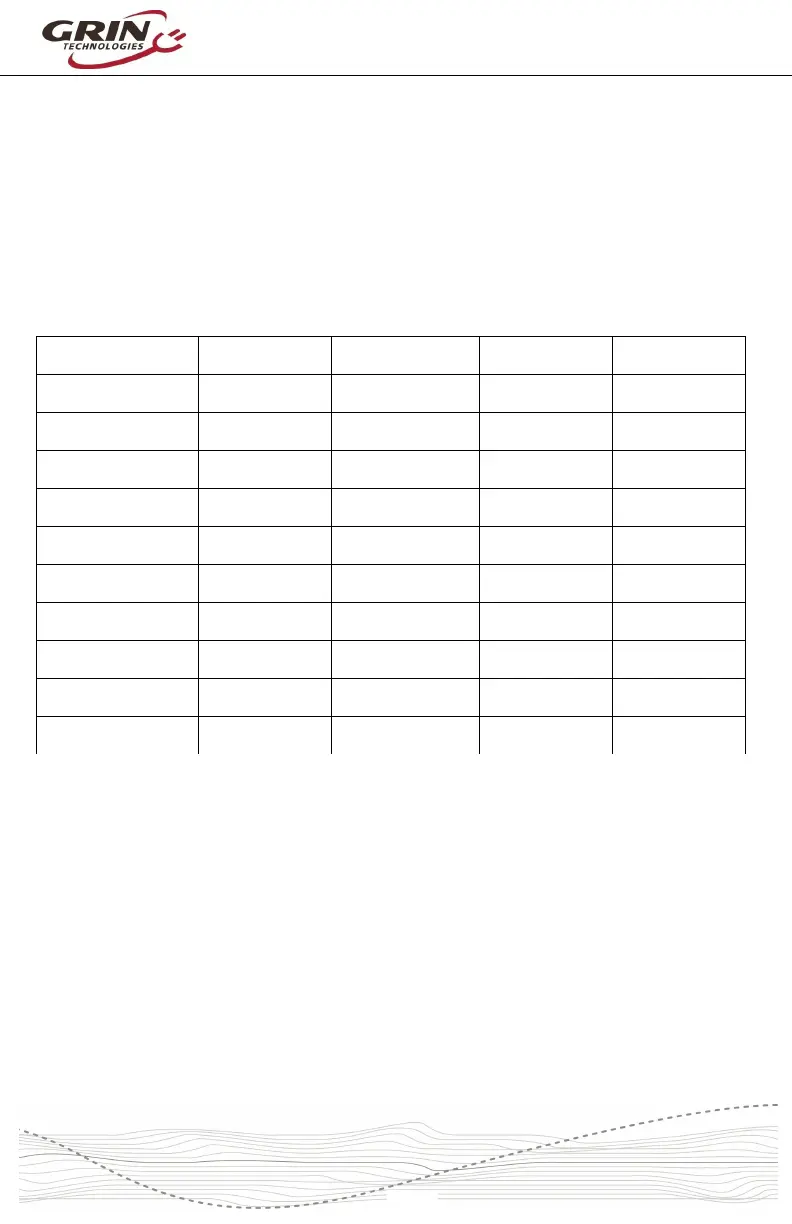
has chosen to interpret those values based on the following table:
Display Assist % Power Limit PAS Speed Lim 5 Level Disp. 9 Level Disp.
<25% Assist 0ff N/A Off Off
25-32% Low Low Level 1 Level 1
33-41% ¾ Low ¼ Mid ¾ Low ¼ Mid Level 2
42-49% ½ Low ½ Mid ½ Low ½ Mid Level 2 Level 3
50-57% ¼ Low ¾ Mid ¼ Low ¾ Mid Level 4
58-65% Med Med Level 3 Level 5
66-74% ¾ Mid ¼ High ¾ Mid ¼ High Level 6
75-82% ½ Mid ½ High ½ Mid ½ High Level 4 Level 7
83-90% ¼ Mid ¾ High ¼ Mid ¾ High Level 8
91-100% High High Level 5 Level 9
Values less than 25% are treated as no assist. The “Low” settings for power and
speed limits are used between 25-31%. The “Middle” settings are applied if the
PWM range is between 58% and 65%, while the “High” settings are used
whenever the PWM is greater than 91%. If the display sends out a PWM value
outside of these numbers, then the controller will use an in-between value based
on the table above.
Many displays have hard coded PWM values for each assist level, and in some
cases these do not align well with the interpolation table, ie two levels that both
have the same assist, or a value below 25% that results in no assist. Better
displays (including all models offered by Grin) allow custom configuration of what
PWM% is sent for each assist mode, giving some flexibility to explicitly select the
power and speed you get for each value.



 To Next Page