52 SM-GSSP BOILERLESS STEAMER
NOT TO TEMP HOLD
Pop up occurs after Hold selection and prior to preheating is complete.
Cancel - Returns to Pre-heating screen. Yes - Goes to Hold screen and starts
Hold Mode even though unit has not nished preheating. Ready light will not be
illuminated.
TIMED COOK
Timed Cook
During cook with active timer
Initial Screen
Time Setup
Timed
Brussel Sprouts
5
SHUTDOWN H:MM:SS
Set Cook Time
Timed Cook
During cook with expired timer
Timed Cook
No timer <30
Timed
Brussel Sprouts
5
Timed
INITIAL SCREEN
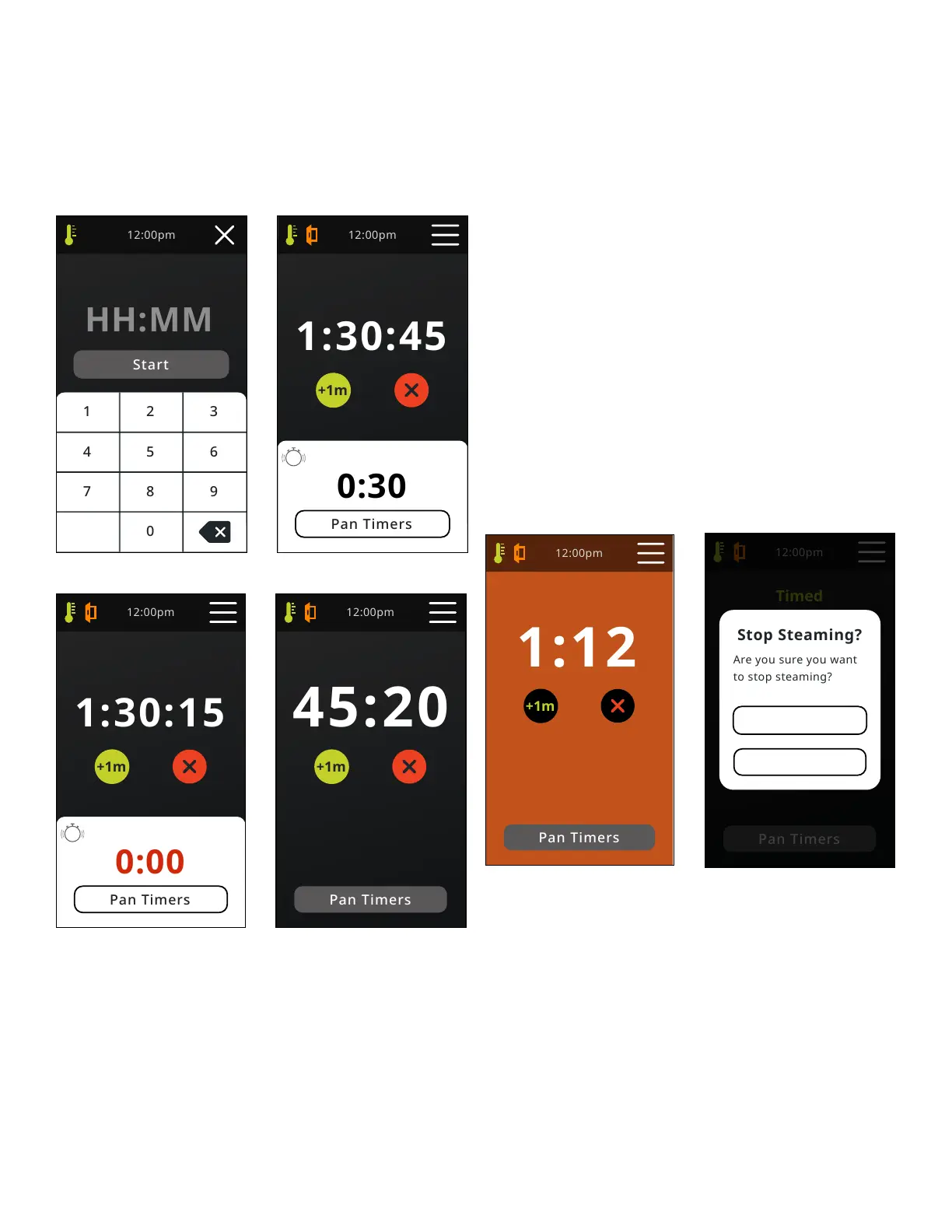
Before entering the timed cook screen, the user has to set the time for steaming.
Back button removes on character from the right. Time entry defaults to HH:MM
- This changes to zeros as soon as rst number is pressed. Limit hours to 12,
Greater than 12 hours will show error.
TIMED COOK
Count down timer displays H:MM:SS. When time is less than 1 hour, display
will show MM:SS. Text will be sized to t screen and enlarge when time is less
than 60 minutes. When door is open, seconds will stop counting down - Timer is
paused during door opening (Function depends on Compensating Timer setting
in Settings). If timed cook expires when in a menu or other screen, control will
give 3 beeps (1/2 sec on, 1/2 sec off) but will allow user to continue activity.
Control will return to Cook / Hold screen after 60 seconds of inactivity. Pan
timer section will only display one timer at a time. Timer will not display until
it is within 30 seconds of expiration. Once displayed, timer can be cleared by
pressing on the countdown time prior to expiration. This will stop the timer and
no alarm or further notications will be given. Upon expiration, the format will
change color to red and begin blinking and an alarm (Two beeps, 1/2 sec on, 1/2
sec off, repeated every 5 sec) will sound. The alarm sound will be differentiated
from the main Timed Cook alarm. The audible alarm will continue until silenced
by tapping the ashing “0.00”. Once acknowledged, the timer notication will
disappear. If a second timer reaches 30 sec prior to acknowledgment of the
previous notication, the second timer notication will be showed on top of the
previous notication and alarm sound will continue. Once the latest timer has
been acknowledged, any previous unacknowledged timers will be displayed
in order of last to expire, will show as ashing red zeros, will alarm and will
need to be acknowledged. This will be repeated for every expired timer that was
not acknowledged. All timers and cook time are paused during door openings
(Function depends on Compensating Timer setting in Settings). +1m adds 1
minute to cook time for each press. 10 presses adds 10 min.“X” takes you to the
“Stop Steaming?” pop up. “X” will not cancel any pan timers.
Timed Cook
Hold mode + No timer <30
Hold
Timed
Stop Steaming
Popup
Yes
No
TIMED COOK HOLD MODE
When Cook Time reaches zero, screen background changes to orange, 3 beeps
will sound, unit will enter Hold mode and Time will begin to count up. Count
up timer displays H:MM:SS. When time is less than 1 hour, display will show
MM:SS. Text will be sized to t screen and reduce when time is greater than 60
minutes. Count up time is limited to 10 hours. After ten hours, count up timer
will reset and begin counting up from zero. Count up timer does not pause with
door openings. +1m will remain active in Hold mode for 10 min. and then it will
disappear and the “X” button will center on the screen. In Hold mode, Ready
light is illuminated as long as temperature is above “ready” temperature. “X” -
Returns to home screen if above ready temperature. Returns to Preheating home
screen if below ready temperature. When unit is in Hold Mode, fan will be off
unless the unit is cycling on the heating algorithm.
STOP STEAMING
Yes- Returns to Home screen and unit goes into ready mode.
No - Unit returns to cook screen and continues cook operation.


 To Next Page