EasyManua.ls Logo

Hach Met One 6000 Series - User Manual

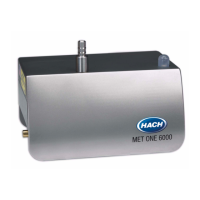
Hach Met One 6000 Series
70 pages
Print Icon
To Next Page IconTo Next Page
Loading...
701246
Met One 6000 Series Particle Counter
USER MANUAL
March 2009, Edition 2
© HACH Company, 2009. All rights reserved. Printed in the U.S.A. jk/kt

Table of Contents

Questions and Answers

  • R
    Richard KleinAug 7, 2025
    Why does my Hach Met One 6000 show a high count alarm?
    • A
      Austin JohnsonAug 7, 2025
      If the Hach Cash Counter displays a high count alarm, it could be due to high counts in the room. In this case, troubleshoot the process to determine the source of the counts. Alternatively, the probe may be placed near a source of contamination, so try repositioning the probe. It is also possible that there is a potential sensor contamination. To check it: 1. Use a portable counter to confirm the counts from the remote counter. 2. If the count is similar, the problem is with the process and not the counter. If the count is lower, use a zero count filter to clean the internal components. 3. If the count is still high, send the counter to a service center for repair.
  • A
    alexispierceAug 15, 2025
    How to troubleshoot communication failure on Hach Cash Counter?
    • M
      Megan KramerAug 15, 2025
      A communication failure in the Hach Cash Counter can occur due to several reasons. First, examine the system for loose or incorrect connections. Second, the unit may not be configured, so configure the counter using the setup utility program. Finally, if using the FXB communication protocol, an intermittent connection problem may exist, so use the CRTS (communication reliable test software) to find the problem.
  • S
    Stephen CarpenterAug 27, 2025
    What to do if Hach Met One 6000 Cash Counter shows a flow failure?
    • M
      michael52Aug 27, 2025
      If the Hach Cash Counter experiences a flow failure, several issues could be the cause. First, check if the cap placed on the inlet probe during wash down was not removed; if so, remove the cap from the probe. Second, examine both sample and vacuum tubing for bends that may restrict the air flow. Third, examine the vacuum line and fittings for leaks in the system. Finally, the vacuum pump may have failed, so repair the vacuum pump.

Summary

Section 1 Specifications

Section 2 General Information

Safety Information

Details hazard warnings, precautionary labels, and Class 1 LASER safety guidelines.

Configuration Options

Explains the various part number configurations available for the Met One 6000.

Product Overview and Status Indicators

Provides general product information and describes the system's status LED indicator.

Theory of Operation

Explains the sensor, counting, and communication electronics of the particle counter.

Wi-Fi Country Approvals & Warnings

Outlines country-specific Wi-Fi approvals and associated warnings.

Section 3 Installation

Component List and Installation Overview

Lists instrument components and provides an overview of installation tasks.

Installation Guidelines and Mechanical Setup

Covers general installation guidelines, mounting, tubing, and sample probe setup.

Wiring Safety and Electrical Installation

Details safety precautions for wiring and steps for electrical installation.

Communication Wiring and Analog Setup

Describes wiring for various communication options and analog scaling/testing.

Section 4 Operation

Configuring the Particle Counter

Instructions for configuring the particle counter using the setup utility program.

Particle Counter Communication Protocols

Details RS485, Ethernet, Pulse, Analog, and Wireless communication methods.

Wireless Configuration and Operation

Covers wireless setup, network configuration, and LED indicators.

Firmware Update Procedure

Steps for updating the instrument's firmware using the utility program.

Section 5 Maintenance

Maintenance Schedule and Cleaning

Outlines the maintenance schedule, cleaning, and zero counting procedures.

Purging, Tubing Replacement, and Calibration

Details purging, tubing replacement, and calibration return procedures.

Section 6 Troubleshooting

Troubleshooting Guide

Identifies common problems, causes, and solutions for system issues.

Section 7 Replacement Parts and Accessories

Replacement Parts and Accessories List

Catalog of available replacement parts and accessories for the instrument.

Section 8 Contact Information

Return Procedures and Technical Support

Guides for instrument returns and contact information for technical assistance.

Section 9 Limited Warranty

Appendix A Modbus Register Maps

Identity, Configuration, and Data Labels

Registers for instrument identity, configuration, and data labels.

Sample Data and Buffers

Registers for sample data, alarm status, and buffered records.

Sample Mode, Diagnostics, and Calibration

Registers for sample modes, diagnostic data, and sensor calibration.

Ethernet, Wireless, and Last Sample Data

Registers for Ethernet/Wireless configuration and last sample data.

Appendix B FXB Communication

FXB Protocol Commands and Data Syntax

Details FXB commands, syntax, and universal actions for remote counter communication.

Data Record Format and Examples

Defines data record format and provides examples for serial communication.

Hach Met One 6000 Series Specifications

General IconGeneral
BrandHach
ModelMet One 6000 Series
CategoryCash Counter
LanguageEnglish

Related product manuals