Update Scan (Antenna mode only)
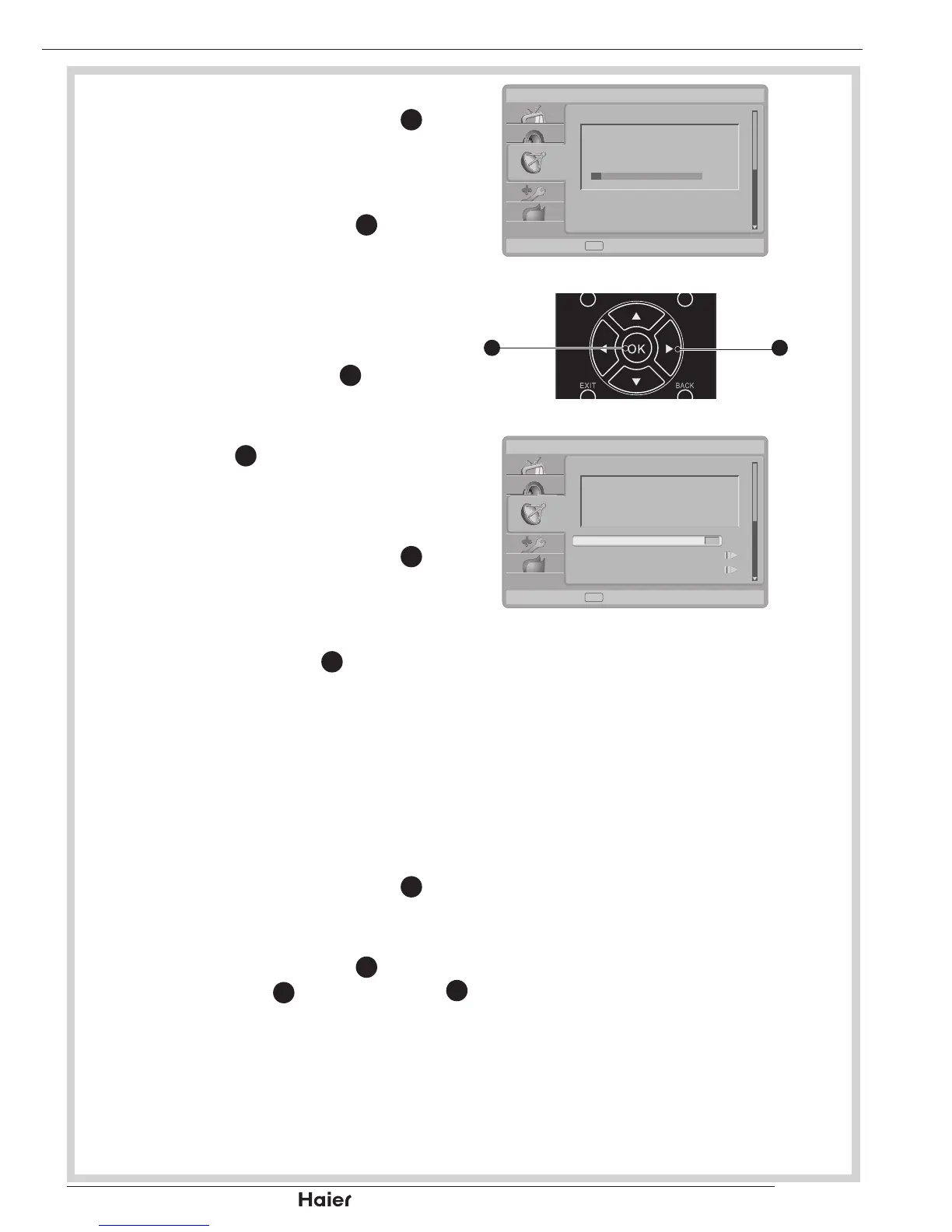
Use the Up or Down Cursor 1.
31
to
select Update Scan in the Channels
submenu.
See g. 52.
Press the Right Cursor 2.
31
to start
searching the local programme
automatically.
See g. 53.
Single RF Scan (digital only)
Use the Right Cursor 1.
31
to enter
single RF Scan in the channels
submenu.
Press OK 2.
12
to start scan digital
channel.
Analogue Manual Scan
Use the Up or Down Cursor 1.
31
to
select Analog Manual Scan in the
Channels submenu.
See g. 53.
Press Right Cursor 2.
31
to enter.
Using number buttons 0~9 to enter
the Start Frequency. Use Up or
Down to select Scan Up or Scan
Down and press Right Cursor to
start scan.
See g. 53 and 54.
Favourite Network Select
Use the Up or Down Cursor 1.
31
to
select Favourite Network Select in
the Channels submenu.
Press the Right Cursor 2.
31
to enter it
and press OK
12
or Right Cursor
31
to enter the channel list.
MENU OPERATION


 To Next Page