PVR RECORDING & VIEWING
View recorded DTV programs from USB
storage device--
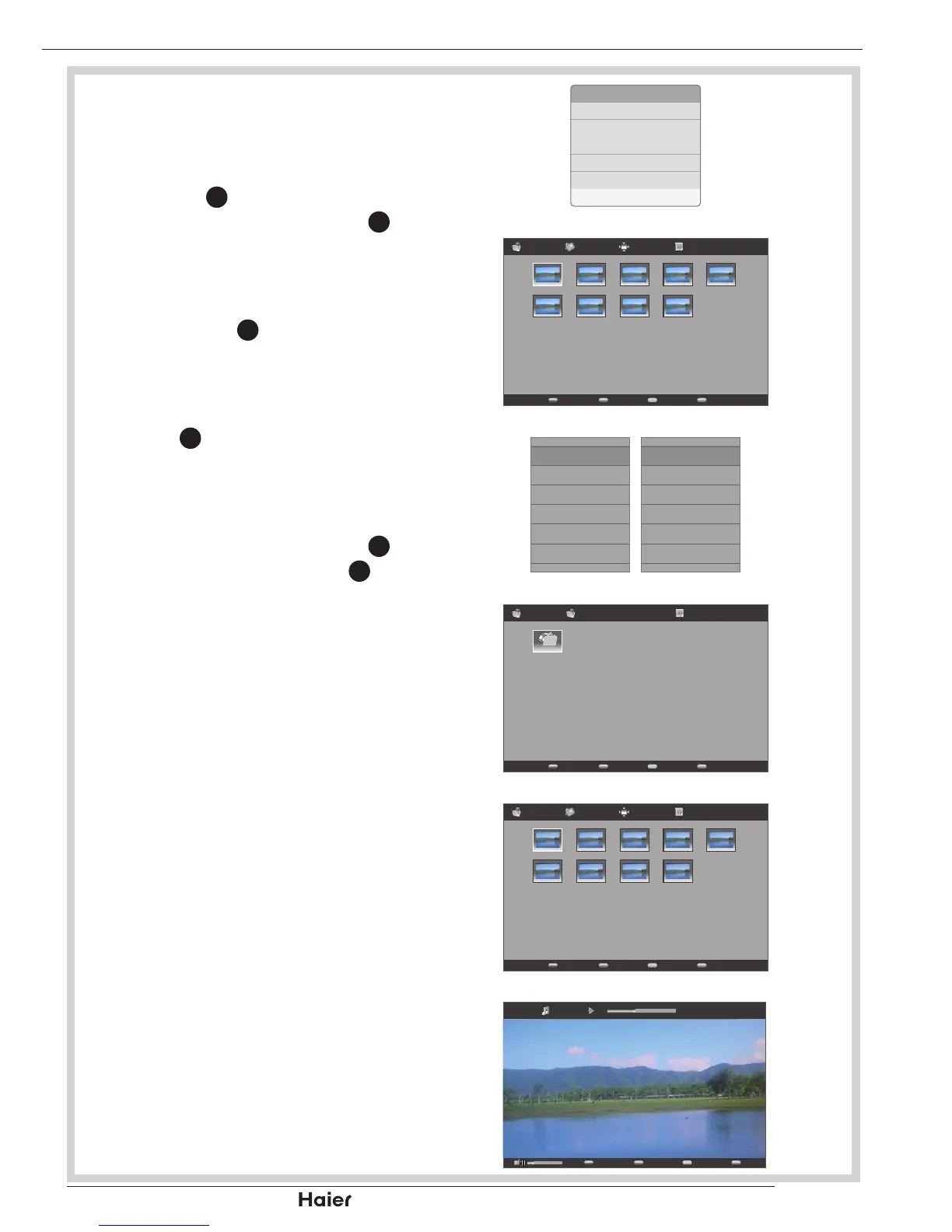
Connect USB storage device to the 1.
USB port on the side of your TV. Press
SOURCE
8
to open the Input List, and
use the Up or Down Cursor
31
to select
USB input source. The USB thumbnail
browser displayed.
See g. 74, 78, and 79.
Press MENU 2.
11
to open the submenu.
Select Video in the Media Type.
See g. 80.
Use the Up, Down, Left, or Right 3.
Cursor
31
to select PVR folder.
See g. 81.
In the PVR directory, all recorded 4.
programs will be listed. Use the Up,
Down, Left, or Right Cursor
31
to select
a video le and press OK
12
to play the
recorded program.
See g. 82 and 83.
PhotoFile name (1) SizeFile name 1 01/01
File name (6) File name (7) File name (8) File name (9)
File name (1) File name (2) File name (3) File name (4) File name (5)
VideoFile name (1) SizeCH1 01/01
File name (6) File name (7) File name (8) File name (9)
File name (1) File name (2) File name (3) File name (4) File name (5)


 To Next Page