Setting the Parameters
67
PERCUSS (PERCUSSion)
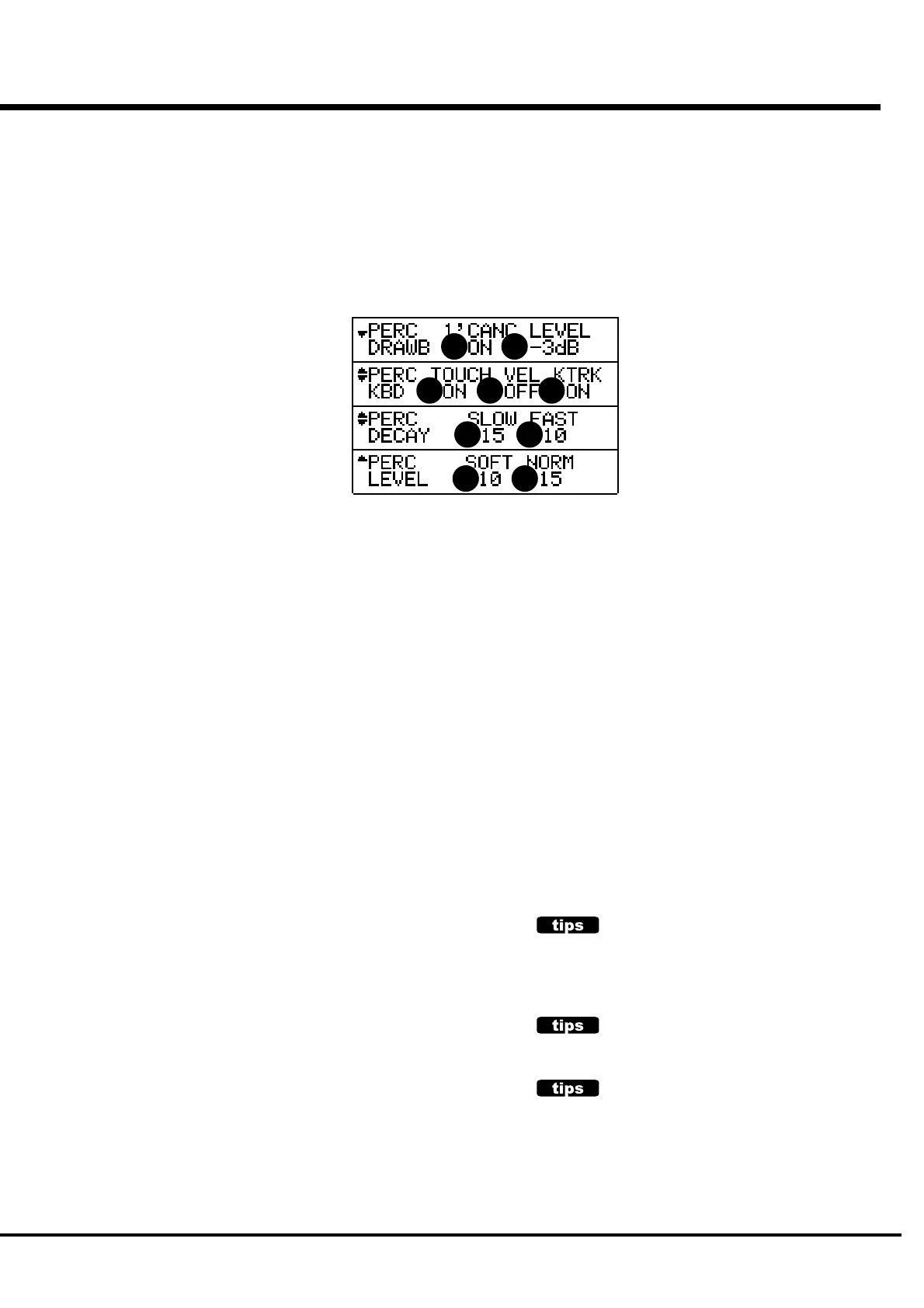
In this mode, you can set the parameter of the PERCUSSION sound.
To come to this mode:
1. Touch the [MENU/EXIT] button and display MENU, then select PAGE B by the [PAGE]
button and touch [4] PERCUSS button.
2. Or, hold down either [SECOND],[THIRD],[FAST],or [SOFT] button for a certain length of
time.
1. LEVEL - SOFT
2. LEVEL - NORMAL
These are for setting the Volume of Percussion. SOFT is the
volume when the [SOFT] button is ON, and NORMAL is the
volume when the [SOFT] button is OFF.
3. DECAY - SLOW
4. DECAY - FAST
These are for setting the Speed of the Decay of the Percussion.
SLOW is the speed when the [FAST] button is OFF, and FAST
is the speed when the [FAST] button is ON.
The setting range is 1 - 9 and C. The more the value gets, the
longer gets the Decay Time. At C, no decay (= continuous).
5. KEYBOARD - TOUCH
This is for setting the method of sound production of Percus-
sion.
ON: If you play legato, the notes including and after the
second note do not sound. (The envelope will not be
reset.)
OF: Even if you play legato, all the notes produce sound,
like the piano.
6. KEYBOARD - VELOCITY
Corresponds the Volume of Percussion with the Velocity.
ON: If you play forte, it sounds loud.
OF: It sounds at a certain volume regardless of the play.
When the Velocity is ON, it sounds at a slightly
deeper point of the key action.
7. KEYBOARD - KEY TRACK
Changes the Percussion Volume by the note.
ON: The higher notes reduce more volume.
OF: It sounds at a certain volume regardless of notes.
8. DRAWBAR - 1' CANCEL
This mutes the 1' of the UPPER PART while using PERCUS-
SION.
ON: Mute
OF: Does not mute.
9. DRAWBAR - LEVEL
Decreases the volume of UPPER DRAWBARS while using
PERCUSSION.
-3dB:Decreases the volume
0dB:Does not decrease the volume
NOTE: This parameter works only when the [SOFT] is OFF.
NOTE: The parameters in those modes are all Preset Param-
eters. They are recorded to each Combination Preset.
TOUCH
The B-3/C-3 had only one built-in Envelope Generator, and was not
recharged until all the UPPER Manuals were released. This looks
like a drawback, but it had the advantage that the sound did not get
loose when chords were roughly played.
1' CANCEL
The B-3/C-3 had no key contact exclusive for percussion but uses
the 1' contact for percussion. On this keyboard, this is simulated.
DRAWBAR LEVEL
On the B-3/C-3, the Drawbar Volume got slightly smaller, if
percussion works This is simulated on this keyboard.
1 2
3 4
5 6 7
8 9



 To Next Page